Hello all.
I'm trying to boost the RAM in my 1.25GHz G4 Mac Mini to 1GB from the 512MB stick that has been in it since I bought it second hand in 2007.
I successfully opened the case and removed the old dimm, and then replaced it with a new, second hand 1GB dimm.
However, when I press the power switch, the Mini emits a single beep (not the standard start-up chime). I read online that this beep code means that no RAM is present, so I tried again with nothing in the slot and got the same beep code. I have tried reseating the new dimm several times but with no luck. I have also tried resetting the PRAM.
In the end I gave up and reinstalled the old dimm; the Mini once again functions normally.
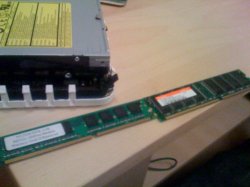
The new stick (left) is a little shorter than the old one, and the chips appear to be smaller as well, but both are PC3200, DDR and 184-pin so would appear to be OK for this Mini.
Any ideas? Or is the dimm faulty/incompatible?
I'm trying to boost the RAM in my 1.25GHz G4 Mac Mini to 1GB from the 512MB stick that has been in it since I bought it second hand in 2007.
I successfully opened the case and removed the old dimm, and then replaced it with a new, second hand 1GB dimm.
However, when I press the power switch, the Mini emits a single beep (not the standard start-up chime). I read online that this beep code means that no RAM is present, so I tried again with nothing in the slot and got the same beep code. I have tried reseating the new dimm several times but with no luck. I have also tried resetting the PRAM.
In the end I gave up and reinstalled the old dimm; the Mini once again functions normally.
The new stick (left) is a little shorter than the old one, and the chips appear to be smaller as well, but both are PC3200, DDR and 184-pin so would appear to be OK for this Mini.
Any ideas? Or is the dimm faulty/incompatible?