Become a MacRumors Supporter for $50/year with no ads, ability to filter front page stories, and private forums.

tony359

macrumors regular
Original poster
Quick question: is there a way to set a higher MINIMUM fan speed on a Mac Mini M4? Macs fan control allows to set a minimum and maximum temperature but I don't see a way to change the minimum speed.

My mini would really just need something like 1300rpm to keep cool at all times but Apple chose 1000rpm which will eventually (with LOTS of apps running) take it to 90+C and the fan only speeds up over 100C.

Thanks!
 
Quick question: is there a way to set a higher MINIMUM fan speed on a Mac Mini M4? Macs fan control allows to set a minimum and maximum temperature but I don't see a way to change the minimum speed.

My mini would really just need something like 1300rpm to keep cool at all times but Apple chose 1000rpm which will eventually (with LOTS of apps running) take it to 90+C and the fan only speeds up over 100C.

Thanks!
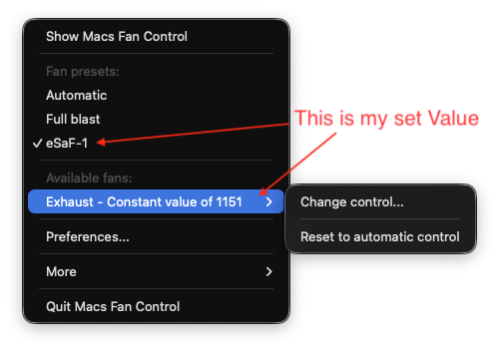
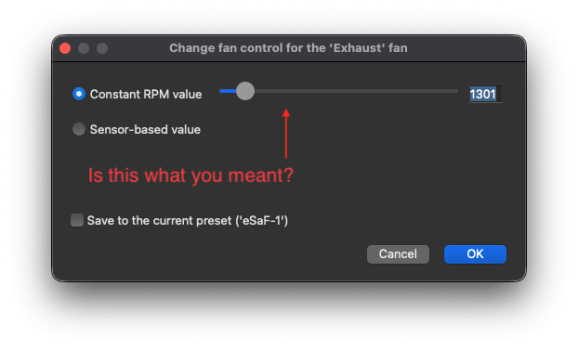
Hi, sorry if I misunderstood your post but I have the 'Mac Fan Control' app installed and have it constantly running the fans at 1500 rpm as shown but I can also increase the speed if necessary to what you queried.

It is also set to ramp up the speed if under constant load, I must say I have never heard the fans unless I manually increase the speed to maximum which the app allows you to.
 

Attachments

  • Screenshot 2026-02-18 at 17.53.12.png
    Screenshot 2026-02-18 at 17.53.12.png
    56.5 KB · Views: 99
  • Screenshot 2026-02-18 at 17.50.37.png
    Screenshot 2026-02-18 at 17.50.37.png
    68.2 KB · Views: 87
Hi - I’d rather not have a fixed speed as my understanding is that in the unlikely case that the system overheats, the fan speed won’t increase automatically. You can verify that yourself, if you set the fan to 1000 and run some stress test, the CPU will get to silly temperature and the fan won’t even try to speed up.

What I’m looking for is a ‘don’t run the fan below 1500 but do speed it up if necessary’.

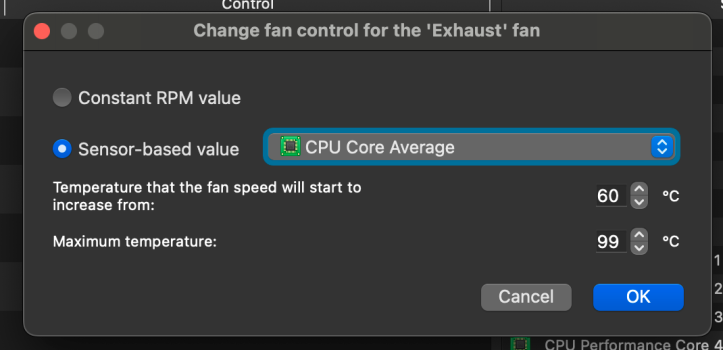
I’ve currently set something like 64C as ‘temperature over which the fan will start increasing the rpm’ and it kind of works but I was wondering if there was just a way to set a higher minimum speed, without having to set a constant value.

Thanks!
 
Hi - I’d rather not have a fixed speed as my understanding is that in the unlikely case that the system overheats, the fan speed won’t increase automatically. You can verify that yourself, if you set the fan to 1000 and run some stress test, the CPU will get to silly temperature and the fan won’t even try to speed up.

What I’m looking for is a ‘don’t run the fan below 1500 but do speed it up if necessary’.

I’ve currently set something like 64C as ‘temperature over which the fan will start increasing the rpm’ and it kind of works but I was wondering if there was just a way to set a higher minimum speed, without having to set a constant value.

Thanks!
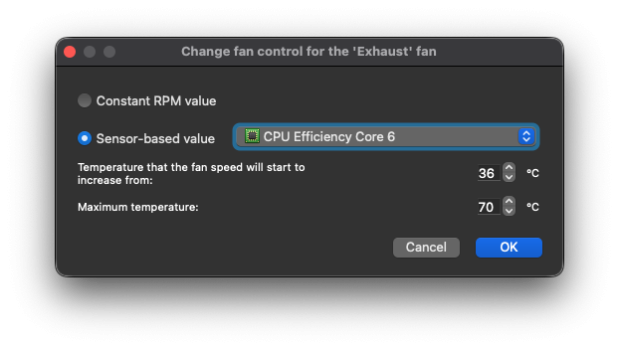
Wouldn't a setting (such as the attached) in the app be suffice where a higher fan speed will automatically kick in according to the load??!!
 

Attachments

  • Screenshot 2026-02-18 at 19.36.06.png
    Screenshot 2026-02-18 at 19.36.06.png
    66.1 KB · Views: 82
Yes this is what I already have and works-ish. But I was hoping to be able to set the minimum speed too.
 

Attachments

  • SCR-20260218-rjgk.png
    SCR-20260218-rjgk.png
    94.3 KB · Views: 58
  • Like
Reactions: eSaF-Eddie
The minimum and maximum fan speeds are reported by the SMC and not the MFC.
These represent the hardware-defined safe operating range for each fan.
 
Yes this is what I already have and works-ish. But I was hoping to be able to set the minimum speed too.
Ah ok. I don't know of an app or setting that would cater for what you want.
If you do come across one that has the ability to offer just that, please share.
 
Ah ok. I don't know of an app or setting that would cater for what you want.
If you do come across one that has the ability to offer just that, please share.
TG Pro seems to fit the bill? https://www.tunabellysoftware.com/tgpro/

"This all-in-one solution provides comprehensive fan control and extensive temperature monitoring across a wide range of Mac models and processors. Monitor key components such as CPU, GPU, WiFi, drives, and battery (for laptop models), plus many others. Take control of cooling with both manual and automatic fan speed adjustments. TG Pro is fully compatible with macOS 26 Tahoe through macOS 10.13 High Sierra and natively supports both Intel and Apple Silicon (M1, M2, M3, M4 & M5 series) Macs."
 
Thanks - that does what I'm looking for.
If anything, it doesn't seem to be able to create a "curve", that is, if you set 15% at 40C and 100% at 100C, it will stay at 15% fan speed until the relevant sensor gets to 100C, THEN it jumps to 100% fan speed. But one can add as many points as needed.

And yes, you can say 15% "always" which becomes your new minimum!

Cheers#
 
Quick question: is there a way to set a higher MINIMUM fan speed on a Mac Mini M4? Macs fan control allows to set a minimum and maximum temperature but I don't see a way to change the minimum speed.

My mini would really just need something like 1300rpm to keep cool at all times but Apple chose 1000rpm which will eventually (with LOTS of apps running) take it to 90+C and the fan only speeds up over 100C.

Thanks!
I use Macs Fan Control on my MBP to ramp the fans up earlier (average CPU core temp of 43ºC) and max them out by the time it reaches 90ºC. If you set the temp at which it'll start to ramp fans below the normal idle temp, they'll probably spin a bit faster at all times.
 
  • Like
Reactions: eSaF-Eddie
Yes the App seems to tick all the boxes to control the fan on the Mac mini but I have hit a snag.
Call me brave or foolhardy (I prefer brave) I tend to throw caution to the wind and install the latest macOS Betas on my machine.

This habit stems from running a Hack for many years and has now spilled over to my actual Mac machine.
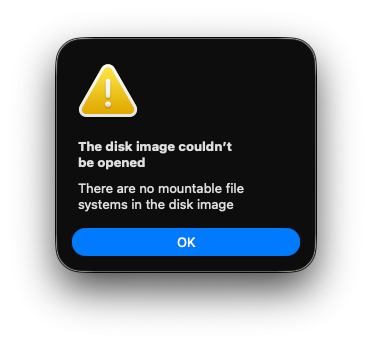
After paying for and downloading the app, the dmg will not open for the installation so I think it is because I am running Tahoe 2.64 Beta.😪
 

Attachments

  • Screenshot 2026-02-18 at 21.30.08.png
    Screenshot 2026-02-18 at 21.30.08.png
    51.1 KB · Views: 57
After paying for and downloading the app, the dmg will not open for the installation so I think it is because I am running Tahoe 2.64 Beta.😪
Known issue with this beta release. You need to mount it manually using diskutil in terminal.
 
I had the same question, as I don’t understand why Apple let’s the system get so hot. I don’t use it to boil water 🙂

I have found this app smc_fan_util https://github.com/charlie0129/smc_fan_util It’s not designed for Apple silicon, it returns some SMCWriteKey error, but it can set the speed to about 1300.
Code:
sudo ~/smc_fan_util/build/smc_fan_util -m 10
It only lasts until restart, as “SMC resets automatically on Mac with Apple silicon.”
https://support.apple.com/en-us/102605

In conclusion, probably Macs Fan Control remains the best option by setting the starting temperature to 35 degrees Celsius.
 
Register on MacRumors! This sidebar will go away, and you'll see fewer ads.