
Become a MacRumors Supporter for $50/year with no ads, ability to filter front page stories, and private forums.

Muppetshow

macrumors newbie
Original poster
So, running 10.7.5 and suddenly realized that the sound is missing.

Volume grayed out, in sound settings input/output says "no output device found" and "no input device found".

Have repaired permissions, have reseted pRams and all the lot, have tried the toothpick trick etc...

There is a startup chime when booting up, there is no light in the jack, sounds work normally under bootcamp.

Anyone have pointers where to start?


The weird thing that I made clean drive, installed 10.9.2 in it and got it to work. But even under 10.9.2 I have no sound...🙁
 
Anyone?? Heeeelp...!

Like, what folders should I check for corrupted / missing files?
Been surffing the crap out of in the interwebs about this topic and
no dice. Does anyone have a file list what should be in the some audio folder for successful living?

Should I try on different forum in macrumors, any suggestions?


Edit : The 10.9.2 install was made on top of a clone (with CCC) of 10.7.5...so some crap has
apparently been carried on.
 
So, running 10.7.5 and suddenly realized that the sound is missing.

Volume grayed out, in sound settings input/output says "no output device found" and "no input device found".

Have repaired permissions, have reseted pRams and all the lot, have tried the toothpick trick etc...

There is a startup chime when booting up, there is no light in the jack, sounds work normally under bootcamp.

Anyone have pointers where to start?


The weird thing that I made clean drive, installed 10.9.2 in it and got it to work. But even under 10.9.2 I have no sound...🙁
This might sound stupid, but did you go to the Sound Preference panel and check, what is selected there?

If not:
Do you see a hardware Audio device under the Audio section of the System Information. If Realtek or Intel High Definition Audio is there (I have a Mac Pro 5,1 here, so I am not sure, what is on the 1,1), then it is a driver problem. Reinstalling the OS should fix it. If there is nothing but other audio like AirPlay, USB Display Audio etc., then there is a hardware issue.

Since you stated that there is chime on start and there is audio in BootCamp, if the Sound Preferences are selected correctly and there is no sound, I would reinstall. It should not remove any of your settings and apps.
 
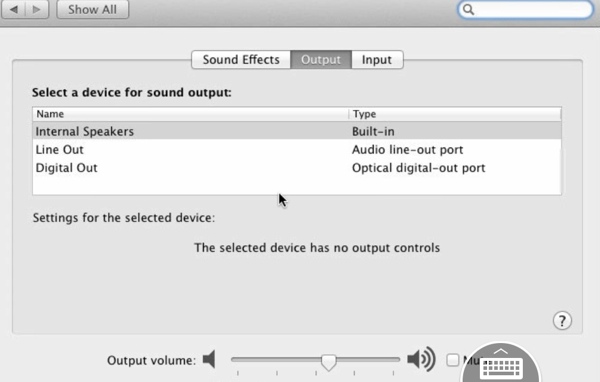
DO you see any of this under Preferences > Sound?

audio_panel.jpg
 
Under System Information I see this.

Intel HighDef Audio

Audio : 892


Intel High Def Audio

Audio : 892

Headphone in..etc.


So I see the audio Twice.O
ne with only the Audio : 892 notion and one with the full list of outputs.


Under Preferences > System I see only :

- No output devices found
- No input devices found
 
So, running 10.7.5 and suddenly realized that the sound is missing.

Volume grayed out, in sound settings input/output says "no output device found" and "no input device found".

Have repaired permissions, have reseted pRams and all the lot, have tried the toothpick trick etc...

There is a startup chime when booting up, there is no light in the jack, sounds work normally under bootcamp.

Anyone have pointers where to start?


The weird thing that I made clean drive, installed 10.9.2 in it and got it to work. But even under 10.9.2 I have no sound...🙁

Have you tried an SMC reset?
 
Register on MacRumors! This sidebar will go away, and you'll see fewer ads.