
Become a MacRumors Supporter for $50/year with no ads, ability to filter front page stories, and private forums.

ZXRyuu

macrumors member
Original poster
Hello Everyone,

I wanted to do a sanity check from a bigger simple of machines. From what I've been able to determine from about a month of testing is that Windows 11 24H2 does not support a 12-core processor tray with X5650 processors. I can get 24H2 to work with a single 4-core W3530 and I've gotten reports that single 6-core processors also work. I've used OpenCore and Rufus and I'm always getting stopped by both the 24H2 installer and the 24H2 system by either a KMODE or KERNEL_SECURITY_CHECK_FAILURE Blue Screen Of Death.

If other users have Mac Pros from 2010-2012 with 12-core processors I would really like to know if you are seeing the same issues, or that you've been able to get 24H2 to work with no issues using a 12-core processor tray.

Thanks,
ZXRyuu
 
I have also tried to install Windows 11 24H2 and got the KMODE error. The system is Mac Pro 4,1 (upgraded to 5,1) using a 8-core (2x Intel Xeon X5550) processor tray. After that I tried to install Windows 11 23H2 which worked fine.
 
  • Like
Reactions: ZXRyuu
I have been doing more testing and I'm not getting a KMODE BSOD now. I'm getting Kernel Security Check Failure, but only when any of RAM slots 5-8 are being used; 1-4 seem to be fine. Is this related to backplane issues and if so, how do I isolate that or is it related to a Boot Camp driver issue?

Still trying to find a solution to this super weird issue. Thanks!
 
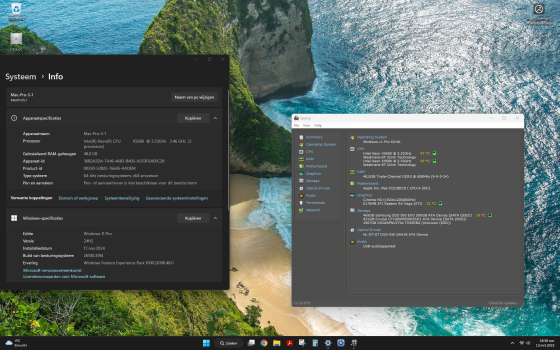
My Mac Pro 5,1 (upgraded 4,1) with 12 core (2 x X5680) runs windows 11 24H2 fine without any issues.
It is the legacy version (not UEFI).
In addition, you need the "pro" version of Windows, since the "home" version only supports 1 CPU.
 
Screenshot:
 

Attachments

  • Schermafbeelding 2025-03-13 183833.png
    Schermafbeelding 2025-03-13 183833.png
    3.1 MB · Views: 222
EDIT: Writing back so that everyone is aware of my findings! I finally got my Mac Pro 2010 to run Windows 11 24H2 without any issues. After changing (no joke) every component on the machine, it turned out to be the RAM that was causing issues. I switched to using ELPIDA 16GB 2Rx4 PC3L-10600R-9-10-E2 EBJ17RG4EAFA-DJ-F modules and that fixed it!

My theory is 24H2 modified a bunch of stuff related to power requirements, functions, etc, and I think that by using low power memory now, I'm back under some threshold that Windows has set.

Big thanks to everyone who commented and added suggestions to help me track down this absurd issue!
 
Hello Everyone,

I wanted to do a sanity check from a bigger simple of machines. From what I've been able to determine from about a month of testing is that Windows 11 24H2 does not support a 12-core processor tray with X5650 processors. I can get 24H2 to work with a single 4-core W3530 and I've gotten reports that single 6-core processors also work. I've used OpenCore and Rufus and I'm always getting stopped by both the 24H2 installer and the 24H2 system by either a KMODE or KERNEL_SECURITY_CHECK_FAILURE Blue Screen Of Death.

If other users have Mac Pros from 2010-2012 with 12-core processors I would really like to know if you are seeing the same issues, or that you've been able to get 24H2 to work with no issues using a 12-core processor tray.

Thanks,
ZXRyuu
Hey, just wanted to say you aren't crazy. I've been having the exact same issues with the same setup. Thanks for the thread!
 
My Mac Pro 5,1 (upgraded 4,1) with 12 core (2 x X5680) runs windows 11 24H2 fine without any issues.
It is the legacy version (not UEFI).
In addition, you need the "pro" version of Windows, since the "home" version only supports 1 CPU.
I ran Windows 11 pro 23h2 at one point but kept having an annoying issue. Anytime i would game using a controller, either via bluetooth or usb, any game i played would start stuttering and locking up. Perfectly fine using a keyboard and mouse though
 
Hey, just wanted to say you aren't crazy. I've been having the exact same issues with the same setup. Thanks for the thread!
Definitely not crazy. A HUGE thank you. I was driven crazy with the 24H2 update. I have the 12-core with 128GB and kept getting the BSOD with any build after 24H2. I tried various insider ones to no avail. 23H2 builds worked fine.

Then I read the post and removed one of the DIMMs. Magically all went away and installed as normal.

Still don’t know why 128GB such an issue. 96GB and below works fine. If there is anyone with any ideas on voltages etc and on DIMMs that could work please share. Could not find anything in Win 11 documentation.
 
  • Like
Reactions: ZXRyuu
Is this issue still happening with some Mac Pros?
Should be. Now there are some issues with upgrading from one developer build to the other (not the compatibility check - that can be worked around). After the update build downloads, it fails to even start installing - all you get is an Installation Error in Windows Updtae. Might be unrelated with the issue here though.
 
EDIT: Writing back so that everyone is aware of my findings! I finally got my Mac Pro 2010 to run Windows 11 24H2 without any issues. After changing (no joke) every component on the machine, it turned out to be the RAM that was causing issues. I switched to using ELPIDA 16GB 2Rx4 PC3L-10600R-9-10-E2 EBJ17RG4EAFA-DJ-F modules and that fixed it!

My theory is 24H2 modified a bunch of stuff related to power requirements, functions, etc, and I think that by using low power memory now, I'm back under some threshold that Windows has set.

Big thanks to everyone who commented and added suggestions to help me track down this absurd issue!
I am discovering this issue after upgrading to dual x5690s, what a shame


Are you saying you are able to use slots 5-8 with those specific dimms? How many dimms do you use?
 
I am discovering this issue after upgrading to dual x5690s, what a shame


Are you saying you are able to use slots 5-8 with those specific dimms? How many dimms do you use?
I was able to use all 8 slots with those specific DIMMs, but I wanted triple channel so I just used slots 1-3 and 5-7 totalling 96GB. Using the Elpida sticks is still working just fine on Windows 11 25H2 as well.
 
I have also tried to install Windows 11 24H2 and got the KMODE error. The system is Mac Pro 4,1 (upgraded to 5,1) using a 8-core (2x Intel Xeon X5550) processor tray. After that I tried to install Windows 11 23H2 which worked fine.

This is a known issue even with MP 2019. I spent countless hours figuring it out, so here's a little bit of time you can save.

The secret sauce is to install Windows 10 (latest ISO) → Install latest Bootcamp drivers → Create a Win11 25H2 USB booter using Rufus and remove TPM2.0, then "upgrade" in place on top of Windows 10 by running Setup.exe from the USB stick. Let it upgrade and then it should all work. If "Windows Update" gets stuck at 49% in Win10 for a long time (give it like 30 mins), just run services.msc and then Stop "Windows Update" service and then "Start" again and let it continue the setup.

One additional thing to keep in mind is that Microsoft changed the way the Win11 Kernel works and Apple hasn't updated their EFI to keep up with it, and never will now that Bootcamp is officially discontinued. So here is the process to actually boot into Windows properly on an Intel Mac:

After you have Windows 11 properly installed:

If you are under macOS, go to Startup settings → Select Windows → Enter password → DO NOT CLICK RESTART → Shut down your Mac fully with Apple → ShutDown → Start up Mac and it will boot into Windows.

If you want to go back to macOS, just right click in Bootcamp icon in Windows → Restart to macOS.

The reason you have to shut down and can't restart directly from macOS → Windows after selecting Windows partition is because the way Windows writes into the EFI is newer than what your Mac supports. Also the Option Boot select will give you kernel errors as well with Win11 25H2, so you have to do the above procedure to make it work.

On another note, if you need TPM2.0 support (some games like Valorant or Call of Duty require TPM2.0) you can use this tool, its pretty affordable and I use it all the time. Runs silently in the background and TPM2.0 is detected in Win11 25H2.
 
Last edited:
Got my new ram today and indeed it has resolved the issue.

the specific dimms I got are: Samsung 16gb 2rx4 pc3l-10600R-09-11-e2-03

I would love to know what exactly the issue was, the memory I used before was a mix of unregistered dimms so it is hard to say.
 
Register on MacRumors! This sidebar will go away, and you'll see fewer ads.