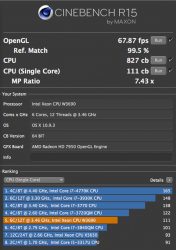
Installed the 2x 2.93 GHz X5670 processors today
All done except for the processor upgrade... Encountered no hitches at all.
System being upgraded: 2009 MP4,1 dual 2.26 GHz 8core.
1) Firmware upgraded from 4,1 to 5,1 without issues. MP is now a MP5,1. This allows for the new processors and running the new 64GB RAM at 1333MHz.
2) Sapphire Radeon HD 7950 installed easily.
3) OWC's 6G 960GB PCIe SSD installed easily and offered up close to 1 GByte/sec read/writes at times (...an aberration maybe as typically it's seen to run at 600 to 700 MB/s). This was configured to hold Mac OS X 10.9.2 + Applications and User data.
4) OWC's 3G 2x 240GB setup as RAID-0 offered up 534 MBytes/sec reads and 496 Mbytes/sec writes. Setup a scratch space for AE and FCPX.
5) 2x 3G 2TB Seagates setup as RAID-0 offered up 244 MBytes/sec reads and 192 MBytes/sec writes. Used for AE & FCPX project data.
6) 1TB 3G Seagate for OS 10.9.2 backup
7) 1TB 3G WD for Time Machine backups (a bit small but so far the 960GB boot OS is using only 401 GB.
8) OWC's 64GB RAM 1333Mhz (8x 8GB) replaced the 32 GB RAM (8x 4GB). RAM running at 1066MHz until the new dual 6-core 2.93 GHz X5670 processors are installed later next week.
Geekbench score did not change much and after all the reconfigs and upgrades it gave in 64-bit mode 1856 single core and 14226 for multi-core. When the new processors are installed I expect this to climb up to 25000 to 27000 for multi-core. By comparison our MP6,1 12core 2.7 GHz, with 64GB RAM, 1TB SSD and dual D700s comes in at for 64-bit, 2974 single core and 32286 for multi-core.
Boot time from startup bong to login panel was a steady 21.11 seconds. This compares to my MBP,8,3 (2.5GHz, 17-inch, late 2011, with OWC's 480GB SSD and 16GB RAM) that takes just over 25 seconds to boot.
Used AE and FCPX on the upgraded MP5,1 after I finished everything and it ran better and was more responsive than our souped up 27" iMac with 1TB Fusion drive and 20GB RAM... it was a huge improvement overall and very very responsive to all actions... I loved it. I will love it even more when later next week I install the new dual X5670s to give us 12cores at 2.93 GHz. I am very happy with his new MP5,1. ... I received instant gratification... 😀
BTW... The Sapphire Radeon HD 7950 can drive our big 60" Sony Bravia TV easily via the 7950s HDMI and audio no longer stutters and is in complete sync vs. what we had at times with the previous Blackmagic card... which drove us berserk at times when showing stuff to clients.
The MP5,1 is driving a 30" Apple ACD, a 27" display and a 60" Sony Bravia TV without any issues.
OK... now waiting for my 2mm thick thermal padding and then will install the new X5670s to really make the MP5,1 move along.
I'm pleased with everything so far. 😉 ..and can't wait to see what this system can do with the X5670s installed.
Today I received my long awaited 2mm thick thermal padding so I installed the 2x Xeon X5670 2.93 GHz 6-core processors in the already upgraded MP4,1. It's now a MP5,1 with 12-cores at 2.93 GHz, 64 GB 1333 MHz RAM, Sapphire Radeon HD 7950 graphics card, OWC's 960 GB PCIe SSD card and OWC's 2x 240 GB 3G SSDs setup as 480 GB RAID-0.
The processor installation upgrade took me 4 hours today. CPU A was the learning curve and took maybe 2 hours. CPU B installed a lot quicker in about 1 hour based on my experience installing CPU A. I then spent 1 hour performing benchmarks on office Macs -- a MP6,1 12core, 64GB RAM, 1TB SSD and dual D700s, a 2013 27" iMac13,2 with 3.4 GHz 4-core processor, 20 GB RAM and 1TB Fusion drive and of course the upgraded already 2009 MP4,1.
Apart from me jabbing my index finger with a razor blade when trimming off some plastic tags to allow the fan and temp sensor connectors to seat down properly. I bled like a pig as I scurried about the office looking for a first aid kit.... ended up wrapping my finger with a small piece of paper towel from the bathroom and then holding that together with some 3M sticky tape. Someone will find a bloody paper towel in his waste can... so hopefully they will not be too alarmed... and can assume I bled for a cause.
Here are the benchmarks
The MP6,1 is named Titan
The upgraded MP4,1 is named Mercury
The iMac13,2 is named Saturn
In short...
Titan/Mercury/Saturn multi-core Geekbench 3 64-bit scores were
Titan 33191
Mercury 27658 (was 14146 originally as a MP4,1)
Saturn 13907
Titan/Mercury/Saturn single-core Geekbench 3 64-bit scores were
Saturn 3542
Titan 3137
Mercury 2573 (was 1853 originally as a MP4,1)
The Cinebench R15 CPU rendering scores were
Titan 1515
Mercury 1396 (was 743 originally as a MP4,1)
Saturn 666
Cinebench R15 for the OpenGL Car Chase showed Frames Per Sec (FPS)
Titan 70.86
Saturn 68.17
Mercury 60.86 (was 41.13 originally as a MP4,1)
Saturn with its 3.4 GHz processor scored best in Geekbench 3's single core benchmarks... which was to be expected.
Saturn also has a good performing NVIDIA GeForce GTX 680MX graphics unit as it's FPS is very close to what Titan scored.
In terms of raw performance with Titan as a baseline of 1.0, Mercury is 0.83 and Saturn is 0.42. I think the upgrade for Mercury at this point has been well worth it as it gives 83% of Titans raw multi-core performance and 2x what Saturn provides with its 4 cores.
Total cost for upgrading Mercury came in at $2,100.
I left the office with Mercury running a CPU stress test for 10 hours. It's 5 fans were barely noticeable.
I must give credit to the Pindelski's web site at
http://pindelski.org/Photography/technical/mac-pro/ that provided excellent instructions making this MP4,1 upgrade possible for me.
BTW... I had to reset the NVRAM after installing and running the new processors in order for the system to recognize the 1333 MHz RAM.