Hi everybody.
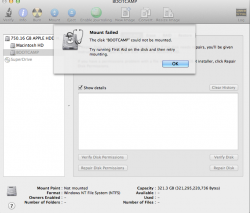
After Updating the new 2.9EFI update for the 2012 MacBook Pro, I restarted the computer which was set to boot into windows. The windows booted and show the BSOD for a brief moment then closing. After I booted into Windows again to see "BOOT FAILED!" I switched into Mac OSX to see that the the BOOTCAMP partition was also gone in finder so I opened Disk Utility to see that the drive was unmountable so I did disk repair and said everything was fine. I booted windows again and now it says a different message, something on the lines of NO OS. I don't know whats happening and everything was working fine until this EFI 2.9 UPDATE and I want to keep my OS and don't want to get rid of windows. I also wan't to keep my documents on Windows. BOOTCAMP still says I have windows installed. Nothing else recognises windows is there exept DISK UTILITY. I did not tamper with windows. I also can't delete partition... MAC OS is working fine as usual.
After Updating the new 2.9EFI update for the 2012 MacBook Pro, I restarted the computer which was set to boot into windows. The windows booted and show the BSOD for a brief moment then closing. After I booted into Windows again to see "BOOT FAILED!" I switched into Mac OSX to see that the the BOOTCAMP partition was also gone in finder so I opened Disk Utility to see that the drive was unmountable so I did disk repair and said everything was fine. I booted windows again and now it says a different message, something on the lines of NO OS. I don't know whats happening and everything was working fine until this EFI 2.9 UPDATE and I want to keep my OS and don't want to get rid of windows. I also wan't to keep my documents on Windows. BOOTCAMP still says I have windows installed. Nothing else recognises windows is there exept DISK UTILITY. I did not tamper with windows. I also can't delete partition... MAC OS is working fine as usual.