Become a MacRumors Supporter for $50/year with no ads, ability to filter front page stories, and private forums.

jellek929

macrumors newbie
Original poster
Sep 26, 2010
4
0
Hello fellow forum members,

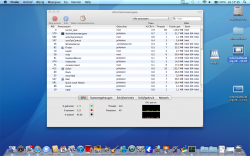
Ik recently bought a brand new macbook. It's the 2.4 Ghz version with 2gigs of ram. 320m videocard.. Now i got a problem, since 2 days my fan is freaking out. It constantly is running on 6200 rpm instead of 2000 rpm. Even when there are no apps running it still got a high rpm. Can someone help me with this problem it's getting really annoying. Here's a screenshot, in the upper right corner you can see the temperature and the fan speed in rounds per minute.

Hope to see some solutions soon! Much gratitude..

Jelle Klein
 

Attachments

  • Schermafbeelding 2010-09-26 om 11.17.34.png
    Schermafbeelding 2010-09-26 om 11.17.34.png
    1.1 MB · Views: 226
Can you post a screenshot of Activity Monitor sorted by all processes, and arranged by CPU usage.

Edit* Like this...

Screen%20shot%202010-09-26%20at%2010.51.11.png
 
Click on the SMC fan control icon and change the RPM of the fan speed? 😕

the problem with SMC fan control is that you can only change the minimum fan speed, i have to find an option so i can change the maximum fan speed. Here's a screenshot of my task manager:
 

Attachments

  • Schermafbeelding 2010-09-26 om 17.35.22.png
    Schermafbeelding 2010-09-26 om 17.35.22.png
    759.1 KB · Views: 170
I would shut down and do an SMC and a PRAM reset and see how it does. I figured you probably didn't leave smc fan control at full blast setting but just thought I'd throw that out as trouble shooting step number 1. 😛
 
I would shut down and do an SMC and a PRAM reset and see how it does. I figured you probably didn't leave smc fan control at full blast setting but just thought I'd throw that out as trouble shooting step number 1. 😛

Already did both resets. Does anyone know an app that can maximize the fan speed?
 
Hello fellow forum members,

Ik recently bought a brand new macbook. It's the 2.4 Ghz version with 2gigs of ram. 320m videocard.. Now i got a problem, since 2 days my fan is freaking out. It constantly is running on 6200 rpm instead of 2000 rpm. Even when there are no apps running it still got a high rpm. Can someone help me with this problem it's getting really annoying. Here's a screenshot, in the upper right corner you can see the temperature and the fan speed in rounds per minute.

Don't know if it occurred to you... If you have a brand new Mac, and the fan runs at full speed when the CPU is doing nothing, then you don't have a problem, Apple has a problem. It could be something like a broken temperature sensor, so your Mac might think it is too hot all the time, or your Mac might _know_ that the temperature sensor doesn't work, and in that case it _must_ run the fan at full speed, because that is the only safe option. Talk to Apple to let them fix it.
 
the problem with SMC fan control is that you can only change the minimum fan speed, i have to find an option so i can change the maximum fan speed. Here's a screenshot of my task manager:

??? Not sure you are working smcfancontrol correctly there par'dner.

Click preferences in SMCfancontrol, then click the + sign and add additional speeds. I have the default setting set to 2000rpms, mid-rpm at 4000 and high at 6200rpm. Adjust as needed.

Sounds to me like your default setting is set to 6200rpm's, which means the fan will always run at full, all the time.
 
Remove SMC fan control and let us know how it is. If it's still pegged at 6200 RPM go strait to the genius bar and get that thing fixed, it shouldn't be doing that.
 
Ok guys thanks for your replies and your time. I can't fix it so I wil send it back to Apple! Much gratitude,

Jelle
 
Probably a broken temperature sensor
Insert your install DVD and find Hardware Test on it
Run Hardware Test, I expect it will show a faulty sensor
.... or just get in touch with Apple! Not something you can fix easily.
 
Register on MacRumors! This sidebar will go away, and you'll see fewer ads.