Become a MacRumors Supporter for $50/year with no ads, ability to filter front page stories, and private forums.

MacRumors

macrumors bot
Original poster
Apr 12, 2001
70,379
41,988


112121-100_0452_300.jpg


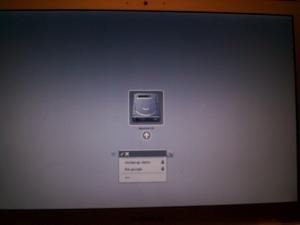
MacQuebec (via HardMac) provides a screenshot of the boot menu for the MacBook Air. The Boot Menu is invoked by pressing the "Alt" key during boot and now gives you the option for Wifi networks to boot wirelessly.


Article Link

 
Wirelessly posted (Mozilla/5.0 (iPod; U; CPU like Mac OS X; en) AppleWebKit/420.1 (KHTML, like Gecko) Version/3.0 Mobile/4A93 Safari/419.3)

What is this "Alt" key they speak of. I know of an "Option" key ;)
 
Wirelessly posted (Mozilla/5.0 (iPod; U; CPU like Mac OS X; en) AppleWebKit/420.1 (KHTML, like Gecko) Version/3.0 Mobile/4A93 Safari/419.3)

What is this "Alt" key they speak of. I know of an "Option" key ;)

Mine says "alt" in tiny letters at the top. it exists!
 
I'm not quite clear: surely all this fancy boot-over-wifi and mount-over-wifi must be a simple software function in the MBA? What's to prevent the other Macs from theoretically having access to these useful features (along with the enhanced multi touch)?

Apart from artificially hyping the capabilities of the otherwise reduced functionality of the MBA of course...
 
Mine says "alt" in tiny letters at the top. it exists!

I said it because there was a post earlier in the day complaining about the "Alt" - "Option" issue. Mine says both for the record, but on a mac it is traditionally called the "Option" key, so I don't see why it's hard to say that, especially on a mac-related website (not MR's fault).

I'm not quite clear: surely all this fancy boot-over-wifi and mount-over-wifi must be a simple software function in the MBA? What's to prevent the other Macs from theoretically having access to these useful features (along with the enhanced multi touch)?

Apart from artificially hyping the capabilities of the otherwise reduced functionality of the MBA of course...

It's in the EFI as the software hasn't loaded when you first start your mac... therefore you'd need an EFI update to enable this on other macs, and it'd really only be useful if you were wired or had 802.11n.
 
UK Mac keyboards (at least on my first generation MacBook Pro) do not have a key marked "option". Instead, there is a funky switch symbol ⌥ (the same one as in the keyboard shortcuts listed in application menus) and the world "alt" on the top. So, it's not surprising people would call the option key the alt key, and leave new Mac users baffled as to what the "option" key is when asked to press it.
 
It will come to other Macs

I think at least the newer laptops and desktops from Apple will soon have this same functionality. More preferably, to all older Macs as well.
 
I'm not quite clear: surely all this fancy boot-over-wifi and mount-over-wifi must be a simple software function in the MBA?.

I've never written any software to load an OS, but having read about it, I think it is save to assume it is anything but simple. I think this is a big achievement actually.
 
And what would this functionality be used for, other than if your optical drive broke?

None really, Though you could have a server with tiger, leopard, 10.5.1, 10.5.2, etc on different partitions and boot to those wirelessly to test software from the couch :-D
 
i don't get what the wireless boot is all about

Picture this... The MBA has no optical drive. Your OSX installation is hosed and won't boot. You don't own an ethernet dongle or external superdrive. How do you reinstall your OS? I would assume you put your restore discs in another computer and choose the wireless boot option on your MBA, allowing you to access the CD and reinstall your OS over the network, wirelessly.

That's all assumption though.
 
Picture this... The MBA has no optical drive. Your OSX installation is hosed and won't boot. You don't own an ethernet dongle or external superdrive. How do you reinstall your OS? I would assume you put your restore discs in another computer and choose the wireless boot option on your MBA, allowing you to access the CD and reinstall your OS over the network, wirelessly.

That's all assumption though.

that's exactly how it'll be working. i've seen it written on t'interwebs! it must be the law!

but seriously, you're spot on. ;)
 
Picture this... The MBA has no optical drive. Your OSX installation is hosed and won't boot. You don't own an ethernet dongle or external superdrive. How do you reinstall your OS? I would assume you put your restore discs in another computer and choose the wireless boot option on your MBA, allowing you to access the CD and reinstall your OS over the network, wirelessly.

I can see MacBook Air owners buying software at an Apple Store asking the sales person "could you just stick the DVD into on of your Macs so I can install it?" :D
 
I can see MacBook Air owners buying software at an Apple Store asking the sales person "could you just stick the DVD into on of your Macs so I can install it?" :D

yeah, because there will be legions of people having the macbook air as their sole computer... right.
 
Register on MacRumors! This sidebar will go away, and you'll see fewer ads.
