Become a MacRumors Supporter for $50/year with no ads, ability to filter front page stories, and private forums.

joseinoa

macrumors newbie
Original poster
i just bought a 100gb hitachi hdd for my 1.83 macbook. i noticed something, when i removed the stock hdd it was different form the new one in that it contains these 4 extra pins next to the power connector and the new one did not. now i went and installed the new drive but my computer wont recognize it. im wondering will these extra 4 pins have anything to do with that. can anyone please give me some advice cause i really dont wanna deal with returning this new drive cause i bought it on ebay and dont wanna go through the hassle of shipping it back out. thanks.btw the new drive is 7200rpm.

 
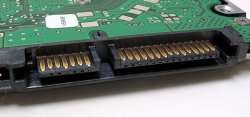
Sounds like the legacy PATA power connector. Some models still include them, but many don't. For your machine, as long as you connect both the SATA cables (power and data), you should be fine. Are you sure you firmly connected the cables?
 
yes its a sata hdd and i am connecting them both firmly now i have even another problem when i boot up the mac with the osx cd in it and hold down the letter c nothing happens, all that comes up is a folder in the middle of the screen with a question mark in the middle. i have done it numerous times and i get the same thing.
 
After installing a brand new hard drive you will need to format it. Insert dvd1 and restart your machine holding down the C key. It should boot up for you and then from there you format the drive. Once you have formatted you install the software.

Good luck.
 
yes i have tried holding down c but nothing happens only the folder with the question mark on it appers. i have thought that maybe my keyboard does not work because when i hit caps while the question mark flashes thet light does not come on. can this be a possibility since i am putting in a new hd.
 
Could you maybe post the model of the hitachi hard drive per chance so we get a better idea what drive you are installing? we know it's 100 gb, 7200 rpm drive, but we don't know model #.
 
Actually better yet does your new drive look like this?
 

Attachments

  • plugs.jpg
    plugs.jpg
    36.7 KB · Views: 89
Register on MacRumors! This sidebar will go away, and you'll see fewer ads.