Become a MacRumors Supporter for $50/year with no ads, ability to filter front page stories, and private forums.

veskop

macrumors member
Original poster
My Mac with M1 Pro is death after trying to update…. It hang on black screen Long time after start updating. No logo, no progress bar! I tried to restart it with long pressing on power button, but nothing. It doesn’t respond, I can’t start it again even in recovery mode. Amy ideas. Thanks
 
No, I tryed allso with ext. display. Battery was at least 80% full, because I use it @ home, connected to charger.
 
a million times .... nothing... black screen only
+1, same happened to my Macbook Pro 16 M2 earlier today: it fetched the update of 26.4, I left it running with the update in progress and when I came back, the laptop was off. Charger cable showing the charger and blinking once after 10 sec hold.

I'm currently attempting revive using this guide https://support.apple.com/en-us/108900 but first 2 attempts didn't succeed, so I gonna try this https://www.bkurtz.io/posts/macvdmtool/ with different versions
 
  • Like
Reactions: veskop
@veskop in my case revive didn't work so I had to fully reset the Mac which had some data on it gone 🙁

cfgutil revive -I ~/Downloads/UniversalMac_26.3.1_25D2128_Restore.ipsw

Restore will wipe the users data!

cfgutil restore -I ~/Downloads/UniversalMac_26.3.1_25D2128_Restore.ipsw
 
I had the same problem. What worked for me:

Boot the problematic Mac into DFU. Start Apple Configurator 2 on a seperate Mac, which is connected to the other one using the DFU guide on the Apple website.

Into Apple Configurator 2, load the IPSW file of 26.3.1. Press revive in the dialog.

After a couple of minutes I saw the Apple logo again on the problematic mac, and could use the system again back on 26.3.1. I did not lose any data.

A couple of notes:
- Reviving using 26.4 does not work! This will be tried by default by the recovery software. You'll need to be using a custom IPSW file. (https://updates.cdn-apple.com/2026W...1973/UniversalMac_26.3.1_25D2128_Restore.ipsw)
- It's hard to get the mac into DFU mode. I had to try this 10-20 times to get this done.
 
Last edited:
I had the same problem. What worked for me:

Boot the problematic Mac into DFU. Start Apple Configurator 2 on a seperate Mac, which is connected to the other one using the DFU guide on the Apple website.

Into Apple Configurator 2, load the IPSW file of 26.3.1. Press revive in the dialog.

After a couple of minutes I saw the Apple logo again on the problematic mac, and could use the system again back on 26.3.1. I did not lose any data.

A couple of notes:
- Reviving using 26.4 does not work! This will be tried by default by the recovery software. You'll need to be using a custom IPSW file. (https://updates.cdn-apple.com/2026W...1973/UniversalMac_26.3.1_25D2128_Restore.ipsw)
- It's hard to get the mac into DFU mode. I had to try this 10-20 times to get this done.
I found easier way of getting to DFU, but made a mistake with revive vs restore command from the command line 🤦‍♂️🤦‍♂️🤦‍♂️

So, from this guide https://www.bkurtz.io/posts/macvdmtool/ the command below puts mac into DFU mode

Code:
sudo macvdmtool dfu
 
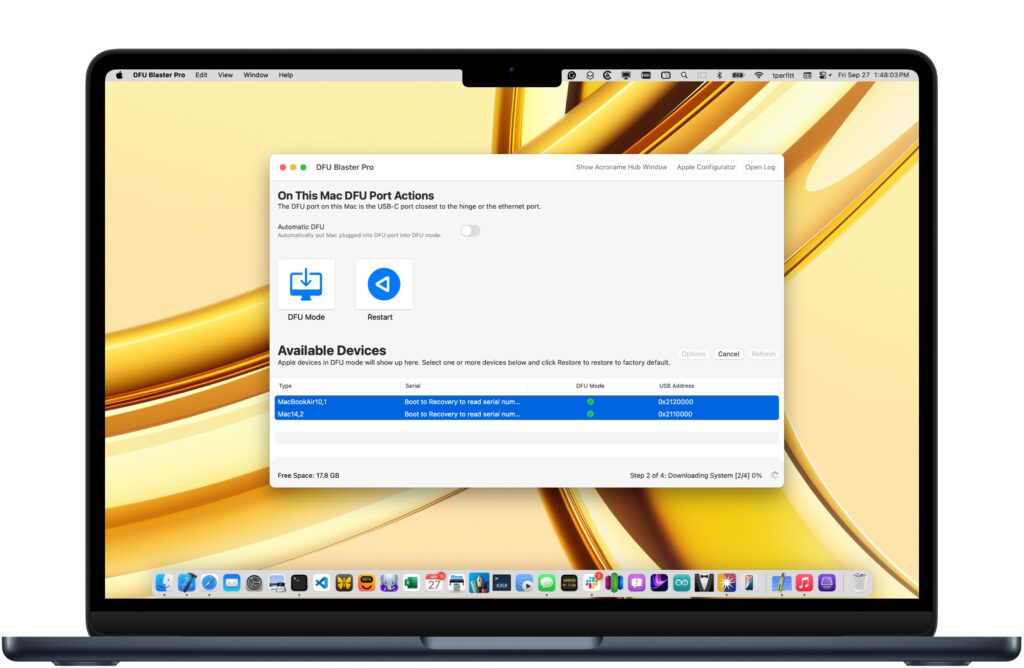
There's another easy way to get a problem Mac into DFU mode.

It's called "DFU Blaster Pro":

It's "pay for" software and costs $50...
BUT...
It will also operate in "free mode".

Free mode will let you establish a DFU connection using a graphical interface.
HOWEVER...
If you want to use any other features of DFU Blaster, you have to register.

If you just want to get a Mac into DFU mode, and you're having trouble "getting there", I strongly suggest you download DFU Blaster and give it a try in free mode...
 
Making an account just to say I also had this on my 2023 M2 Pro Macbook Pro 14 inch. I set the update downloading and when I came back, my machine was completely dead with no signs of life other than Magsafe showing orange and then green once fully charged.

Used A Mac Mini at work with apple config to revive - just some notes though i'd like to add for more detail for anyone who might need it, I was going off 3 different sets of notes to get enough detail for me.

1) get the IPSW file for 26.3.1 from here https://updates.cdn-apple.com/2026W...1973/UniversalMac_26.3.1_25D2128_Restore.ipsw

2) For DFU mode - I found a comment on reddit that had different instructions from Apple but apparently were more reliable. I got into DFU mode on my first try. Make sure the mac is not connected to anything first.

2.1 Press and hold the power button (Touch ID). (Make sure your mac is fully charged if it is a Macbook)

2.2 Immediately hold down these keys as well for 10 seconds:
Left Control, Left Option, Right Shift.
2.3 After 10 seconds, release the keys but continue to hold the power button (Touch ID) for another 8 seconds.
2.4 Plug in USB C cable into DFU port and connect it to your Mac with Apple configurator.
2.5 Drag the IPSW directly onto the Mac in the list on apple config, and click revive.
2.6 Wait. It took about 3-5 minutes, My mac then booted into recovery, I entered my password and it rebooted. The first reboot failed so I manually clicked Macintosh HD, entered my password again and then it worked.

Credit to u/Darthsilicrypt on Reddit for these instructions.

 
Making an account just to say I also had this on my 2023 M2 Pro Macbook Pro 14 inch. I set the update downloading and when I came back, my machine was completely dead with no signs of life other than Magsafe showing orange and then green once fully charged.

Used A Mac Mini at work with apple config to revive - just some notes though i'd like to add for more detail for anyone who might need it, I was going off 3 different sets of notes to get enough detail for me.

1) get the IPSW file for 26.3.1 from here https://updates.cdn-apple.com/2026W...1973/UniversalMac_26.3.1_25D2128_Restore.ipsw

2) For DFU mode - I found a comment on reddit that had different instructions from Apple but apparently were more reliable. I got into DFU mode on my first try. Make sure the mac is not connected to anything first.

2.1 Press and hold the power button (Touch ID). (Make sure your mac is fully charged if it is a Macbook)

2.2 Immediately hold down these keys as well for 10 seconds:
Left Control, Left Option, Right Shift.
2.3 After 10 seconds, release the keys but continue to hold the power button (Touch ID) for another 8 seconds.
2.4 Plug in USB C cable into DFU port and connect it to your Mac with Apple configurator.
2.5 Drag the IPSW directly onto the Mac in the list on apple config, and click revive.
2.6 Wait. It took about 3-5 minutes, My mac then booted into recovery, I entered my password and it rebooted. The first reboot failed so I manually clicked Macintosh HD, entered my password again and then it worked.

Credit to u/Darthsilicrypt on Reddit for these instructions.
I also made an account just to thank you. My MacBook Pro crashed last night during a restart and I was also up late.

Regular revive kept crashing on me and I thought I was going to lose all my data and take it to a shop. Reviving with that ipsw link/file finally did it. My computer is back😭🙏
 
I also made an account just to thank you. My MacBook Pro crashed last night during a restart and I was also up late.

Regular revive kept crashing on me and I thought I was going to lose all my data and take it to a shop. Reviving with that ipsw link/file finally did it. My computer is back😭🙏
Glad to hear it! I can't take credit for it really, all I did was put it all together and noted some things I didn't think were clear from other instructions. I thought my machine was toast - I have apple care on it so wouldn't have been a huge issue but the inconvenience more than anything. Glad you got going!
 
Cool. For the benefit of people who will see this thread in the future searching for a solution, what fixed the problem?
 
@veskop

Congratulations!
And on a humorous note, as much as one may judge from user pictures of course;

Can you adopt me? Am very flexible, minimal needs really. You wouldn't know i was there.
 
  • Haha
Reactions: Alameda
what fixed the problem?
Nothing special, Apple Configurator 2, DFU ( I was lucky, I did it from 3th try ) and "Revive"! That's It. The hardest part was, that I have to buy new Mac ( MBA M4 ) to use it, because idiots in "official" Apple repair store said , that my Logic Board is dead ( cost 700 euro!!!), just because they cannot put it in DFU mode! I pay 40 euro for that "diagnostic"! So I am little bit angry!
 
OP wrote:
"because idiots in "official" Apple repair store said , that my Logic Board is dead"

I take it that the place you went wasn't an actual "Apple Store" (owned and operated by Apple), but a 3rd-party repair shop.

I'm going to speculate that if you had taken it to a REAL Apple Store, they could have revived it on the spot. For free.

But... finding such a store is probably difficult if one isn't in the USA...
 
OP wrote:
"because idiots in "official" Apple repair store said , that my Logic Board is dead"

I take it that the place you went wasn't an actual "Apple Store" (owned and operated by Apple), but a 3rd-party repair shop.

I'm going to speculate that if you had taken it to a REAL Apple Store, they could have revived it on the spot. For free.

But... finding such a store is probably difficult if one isn't in the USA...
In Bulgaria we don't have an official Apple Store.
 
I just want to thank @Pataar and @WilsonADW for their instructions here. That was a life saver.

I had the same issue as the OP, but on a MacBook Air M2 (2023). After (during?) the update to macOS 26.4, the machine wouldn't boot, no apple logo, no sound, no keyboard lights. It seemed completely dead, no matter what I tried. I've never seen such a hard crash during a "simple" update. I really thought it was a hardware failure. Especially since I tried all the usual "black screen of death" recovery methods, *and* the Apple Configurator + cable + DFU method with revive/restore failed as well (on step 4 of the process, every time). In an Apple repair shop, the proposed "solution" was to replace the motherboard (so, hundreds of € since the warranty just expired, of course). But when using the macOS 26.3.1 image instead of 26.4, the DFU method worked! Thanks again!
 
  • Like
Reactions: edubfromktown
Hi,
My MacBook with an M2 chip shut down during the 26.4 (or related version) update and will not turn on. Following online instructions, I managed to enter DFU mode by connecting it to another MacBook. However, when I select 'Revive', the 'Restore' (factory reset) option appears after just a few seconds. I do not want to restore the device because it contains very important data that I cannot afford to lose.
Could the reason for the failed 'Revive' process be that the host MacBook is running an older version, such as macOS 15.6? Do I need to update the second MacBook to the latest version (e.g., macOS Sequoia 26.3)? Additionally, is it mandatory to install the Apple Configurator app from the App Store to complete this process successfully?
I would be very grateful for any suggestions on how to fix this without losing my data.
 
  • Like
Reactions: MKaram
No, you dont have to use newest version on host macbook, but you have to use version 26.3.1, not 26.4 for revive.
 
Register on MacRumors! This sidebar will go away, and you'll see fewer ads.