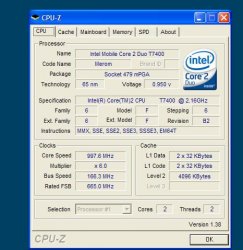
capoditutti macrumors 6502 Original poster Feb 6, 2007 #1 What tool (if any) can you use to see how fast your processor is running in windows under bootcamp?
bmcgrath macrumors 65816 Feb 7, 2007 #2 CPU-Z, Thats what I use. Dunno the download link but if you google it you'l find it. 🙂
D djellison macrumors 68020 Feb 7, 2007 #3 If you right click on my computer and then click properties - it should show it on that first tab. Doug
If you right click on my computer and then click properties - it should show it on that first tab. Doug
capoditutti macrumors 6502 Original poster Feb 7, 2007 #4 i used CPU-Z and it's reporting that only 1GHZ is in use - doesnt xp under bootcamp use both cores? Attachments untitled.JPG 46.2 KB · Views: 195
twoodcc macrumors P6 Feb 7, 2007 #5 capoditutti said: i used CPU-Z and it's reporting that only 1GHZ is in use - doesnt xp under bootcamp use both cores? Click to expand... it says 2 cores. i think it runs at full speed when it needs to, and doesn't when it doesn't need to
capoditutti said: i used CPU-Z and it's reporting that only 1GHZ is in use - doesnt xp under bootcamp use both cores? Click to expand... it says 2 cores. i think it runs at full speed when it needs to, and doesn't when it doesn't need to
jeremy.king macrumors 603 Feb 7, 2007 #6 http://www.cpuid.com/cpuz.php Q: CPU-Z reports my CPU speed below its stock frequency. A: This is the effect of C1E (Enhanced Halt State) and/or EIST (Enhanced Intel SpeedStep Technology). Load your system and you will see the frequency increase to its nominal value. Click to expand...
http://www.cpuid.com/cpuz.php Q: CPU-Z reports my CPU speed below its stock frequency. A: This is the effect of C1E (Enhanced Halt State) and/or EIST (Enhanced Intel SpeedStep Technology). Load your system and you will see the frequency increase to its nominal value. Click to expand...
capoditutti macrumors 6502 Original poster Feb 7, 2007 #7 excellent - that'll learn me to read the jibberish next time hehehe thanks kingjr3