Become a MacRumors Supporter for $50/year with no ads, ability to filter front page stories, and private forums.

IKBest

macrumors member
Original poster
My MacBook Pro is running extremely slow and glitchy, I'm tempted to re install mac os x but I dont want the hassel of reinstalling all of my pro apps, CS5 FCS... etc. Any suggestions to an alternative?
 
Performance Tips For Mac OS X

______________________________________________________
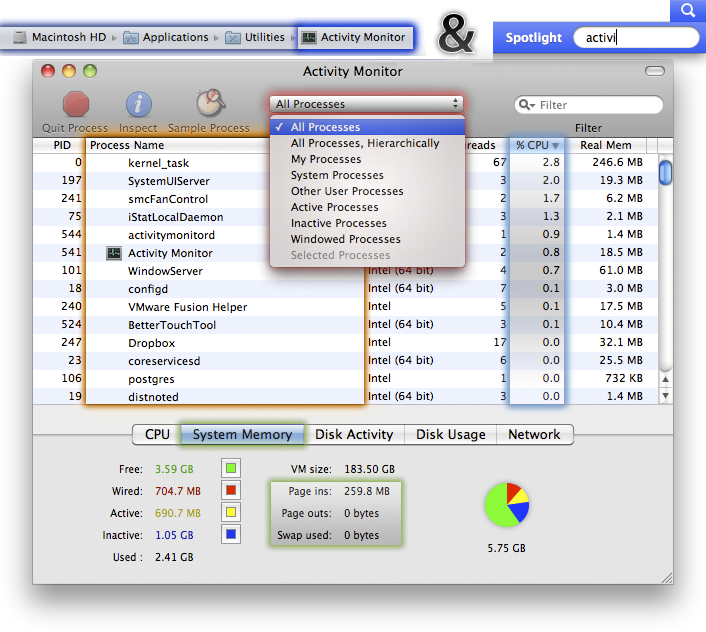
Have a look at Activity Monitor (Applications / Utilities /) and select All Processes and sort by CPU to see what the culprit may be.
Also check the "System Memory" tab to see what your "Page ins:", "Page outs:" and "Swap used:" are.

image below uses sorting by CPU as an example
Acitivty_Monitor.png

Further reading:
______________________________________________________​

 
Performance Tips For Mac OS X

______________________________________________________
Have a look at Activity Monitor (Applications / Utilities /) and select All Processes and sort by CPU to see what the culprit may be.
Also check the "System Memory" tab to see what your "Page ins:", "Page outs:" and "Swap used:" are.

image below uses sorting by CPU as an example
Image
Further reading:
______________________________________________________​


Just a question, how did you make those glowing outlines? I could do that in Photoshop, was just wondering if you're using some quick and easy method. Never thought of displaying things that way, I've always just used arrows.
 
Just a question, how did you make those glowing outlines? I could do that in Photoshop, was just wondering if you're using some quick and easy method. Never thought of displaying things that way, I've always just used arrows.

I use PS for that, using the Blending Options and such.
As I often have used this "Activity Monitor" template, I decided one day, to just make a visual representation, though it is still too loud, if you catch my drift. Maybe one day I find a way to make it simpler.
 
I use PS for that, using the Blending Options and such.
As I often have used this "Activity Monitor" template, I decided one day, to just make a visual representation, though it is still too loud, if you catch my drift. Maybe one day I find a way to make it simpler.

Ahh... cool. It looked like an "outer glow" esque effect to me. I may try that. The end result is pretty sweet.
 
Performance Tips For Mac OS X

______________________________________________________
Have a look at Activity Monitor (Applications / Utilities /) and select All Processes and sort by CPU to see what the culprit may be.
Also check the "System Memory" tab to see what your "Page ins:", "Page outs:" and "Swap used:" are.

image below uses sorting by CPU as an example
Image
Further reading:
______________________________________________________​


THANKS! that really helped 😀
 
Register on MacRumors! This sidebar will go away, and you'll see fewer ads.