
Become a MacRumors Supporter for $50/year with no ads, ability to filter front page stories, and private forums.

Jholder112233

macrumors newbie
Original poster
Hi everyone,

Just looking for some advice. I installed a 256GB Samsung Evo 840 SSD in my 2010 MacBook Pro yesterday and did a clean install of OS X Mavericks.

I've just done a read/write test using the Blackmagic disk utility and I've realised my speeds are much slower than expected.

Read tops out at around 260MB/s and write at around 255MB/S.

Any tips on what I can try to up them? I've enabled trim.
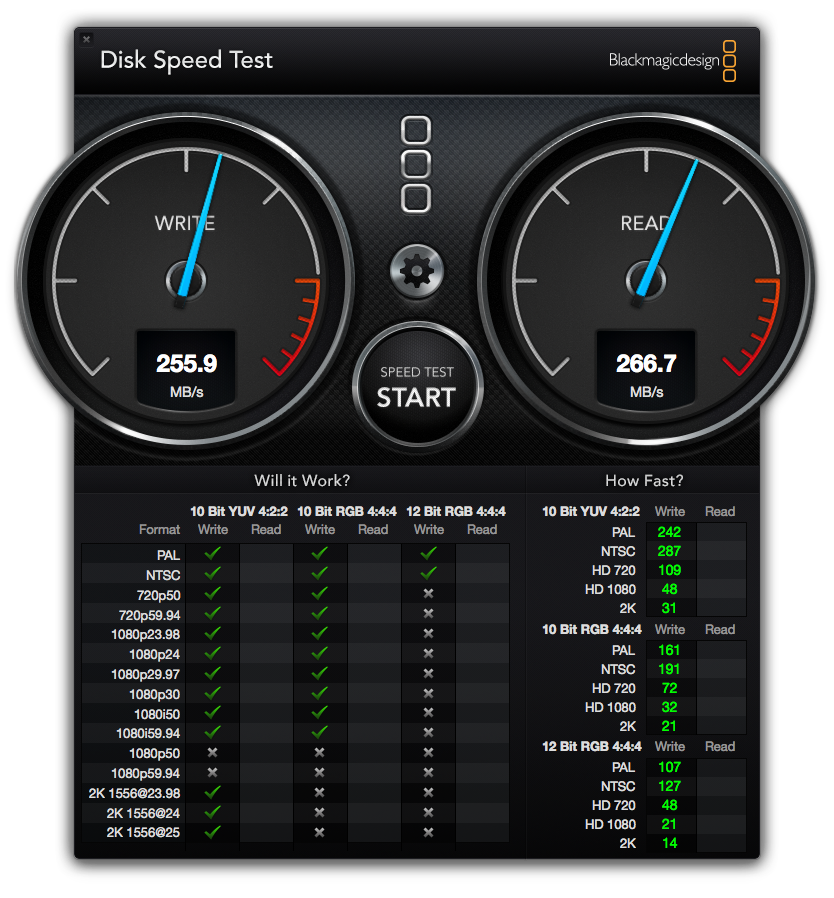
Screen_Shot_2014_05_10_at_17_23_22.png
 
Nope the SSD speed on your device is correct. Since you are using SATA 3 Gbps connection there is a speed off.

If you would have SATA 6 Gbps bus then you would have full speed that the SSD offers.
 
Hi everyone,

Just looking for some advice. I installed a 256GB Samsung Evo 840 SSD in my 2010 MacBook Pro yesterday and did a clean install of OS X Mavericks.

I've just done a read/write test using the Blackmagic disk utility and I've realised my speeds are much slower than expected.

Read tops out at around 260MB/s and write at around 255MB/S.

Any tips on what I can try to up them? I've enabled trim.

Image

No you can't. Your MBP has a SATA2 3Gb/s connection, so you can only get around 250-300MB/s.
 
You have effectively made an older, slower, computer 'faster' I should hope, but not nearly at speeds the new component could be used at.. :apple:
 
That's SATA II speeds BUT you have increased your data transfer speeds
by at least 3 X what a normal HDD can do !!

Still was a great move so be happy 🙂

M.
 
Never used an Evo but I had a single 840 Pro 512 in my Mac Mini and would average about 400 MB/s.

I recently got a second drive and put them in a RAID 0 (after some serious resistance from Mavericks).

Now this is what I'm getting......

attachment.php
 

Attachments

  • DiskSpeedTest.png
    DiskSpeedTest.png
    734.3 KB · Views: 2,851
Register on MacRumors! This sidebar will go away, and you'll see fewer ads.