Become a MacRumors Supporter for $50/year with no ads, ability to filter front page stories, and private forums.

cows

macrumors newbie
Original poster
Ok, so yesterday I come home from school and see that my macbok's charger's light is a dim green. I didn't think much of it. I drained that battery down to about 50% before plugging it back in. Upon plugging it in, up in the menu bar where it tells you what your battery life is it says "Not Charging". I found this to be a little strange so I unplugged it from my macbook and plugged it back in. Still nothing. I heard some where that if you lick the end of the charger it would get an electoral current going, or something like that. That still didn't work. I finally looked at the magsafe port on my macbook and noticed that of the gold/bronze things in there was a little black in the middle. My charger on the other hand looked fine. This is the second charger I've had to buy and it's worked fine up to this point. Also the magsafe port on my macbook is kinda dirty. The macbook I have is the aluminum unibody from 2008 I think? Sorry if this story was unnecessary or this question has already been ask.

 
Ok, so yesterday I come home from school and see that my macbok's charger's light is a dim green. I didn't think much of it. I drained that battery down to about 50% before plugging it back in. Upon plugging it in, up in the menu bar where it tells you what your battery life is it says "Not Charging". I found this to be a little strange so I unplugged it from my macbook and plugged it back in. Still nothing. I heard some where that if you lick the end of the charger it would get an electoral current going, or something like that. That still didn't work. I finally looked at the magsafe port on my macbook and noticed that of the gold/bronze things in there was a little black in the middle. My charger on the other hand looked fine. This is the second charger I've had to buy and it's worked fine up to this point. Also the magsafe port on my macbook is kinda dirty. The macbook I have is the aluminum unibody from 2008 I think? Sorry if this story was unnecessary or this question has already been ask.

if it says not charging it means that it's using the power adaptor as power source, try using your charger with other macs/charing your mac with other adapter to find the problem. It could also be the connecting wire not the adapter it self that is damaged.

I recommend getting Apple care, my MBP (just like yours) power adapter broke like month and i got free one.
 
if it says not charging it means that it's using the power adaptor as power source, try using your charger with other macs/charing your mac with other adapter to find the problem. It could also be the connecting wire not the adapter it self that is damaged.

I recommend getting Apple care, my MBP (just like yours) power adapter broke like month and i got free one.
I am unsure what you mean by using the power adaptor as power source?
 
Here's what you need to do.

You need to first try and connect your power charger to another Mac. If it charges the other Mac, then you know there's something wrong with your computer and not the charger. If it doesn't charge the Mac you connect it to, then you know the charger is dead and will need to be replaced.

Are you sure you don't have AppleCare? It's a three year warranty that covers replacement chargers, among other things — meaning that you wouldn't have to buy a new one.
 
Here's what you need to do.

You need to first try and connect your power charger to another Mac. If it charges the other Mac, then you know there's something wrong with your computer and not the charger. If it doesn't charge the Mac you connect it to, then you know the charger is dead and will need to be replaced.

Are you sure you don't have AppleCare? It's a three year warranty that covers replacement chargers, among other things — meaning that you wouldn't have to buy a new one.
I'm pretty sure I don't have AppleCare but I believe my Warranty for my macbook is still good. Also I do not have another macbook to test this on at the time.
 
Update: My macbook seems to be charging but the light is still dim. I'm not sure if I should be worried.
 
I'm pretty sure I don't have AppleCare but I believe my Warranty for my macbook is still good. Also I do not have another macbook to test this on at the time.

You might want to check to see if you do — it could save you a lot of money. After all, you said this is the second charger you had to buy?! If your charger breaks, Apple will replace it for you for free under warranty! Chargers are what... like $71 dollars each? That comes out to be almost $150 for the two chargers you bought! Apple would have given them to you for free!

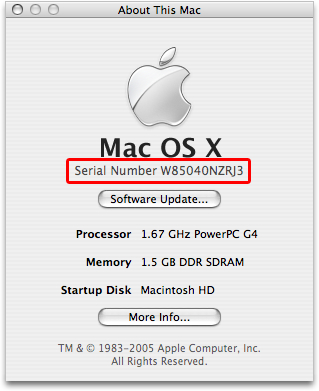
For the record, all Macs come with a one-year warranty, and if you got AppleCare, it extends it an additional two years to give you three years total. If there's ever anything on your computer that stops working, Apple will fix it for free, as long as it's a problem covered under the warranty. To check to see if you got AppleCare, go to Apple's Support website and type in your serial number.

HT1529_1.jpg


You can find your serial number by clicking the Apple menu in the upper-left corner of your screen and selecting "About this Mac." Then, double click where it says Version 10.5.8 (or whatever it says there). It'll show your serial number. Just type that into Apple's website and it'll tell you the status of your warranty on the computer.

Update: My macbook seems to be charging but the light is still dim. I'm not sure if I should be worried.

I would just keep using it and cross your fingers that it continues to work. But I'd still check your warranty (using the steps I mentioned above), because otherwise you're just throwing your money away each time you buy a new charger.
 
Thank you for your help. Sadly I do not have applecare and would love to get it if only I weren't paying for mobileme. Also does applecare cover more then one computer?
 
Thank you for your help. Sadly I do not have applecare and would love to get it if only I weren't paying for mobileme. Also does applecare cover more then one computer?

Unfortunately, AppleCare only covers one machine. But if that machine breaks, having it is almost always worth it. For example, I had a MacBook a few years older than yours, but the logic board in it went out. The cost of the repair was $1,200! The cost with AppleCare = $0. So believe me, it was definitely worth it.

Keep in mind though, that you can only purchase AppleCare within the first year that you own the computer. So if your one year warranty has already come and passed, you're not eligible to buy AppleCare anyway.

Either way, I hope the charger issue works itself out.
 
I'm pretty sure my charger just died. I have no idea how this could have happened. I've never dropped it, I usually take the charger out of the computer the right way. It's cords have never been strained for more then couple of minutes. Why does this happen to me.
 
Register on MacRumors! This sidebar will go away, and you'll see fewer ads.