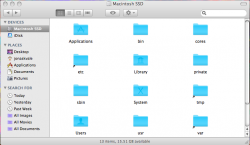
jrsx macrumors 65816 Original poster Aug 3, 2014 #1 Can anyone explain why my Macintosh HD folder looks like this? I've tried to run the chflags hidden command in terminal to hide these folders but it just repeats "Permission denied". Why is this? Attachments Picture 1.png 77.4 KB · Views: 163
Can anyone explain why my Macintosh HD folder looks like this? I've tried to run the chflags hidden command in terminal to hide these folders but it just repeats "Permission denied". Why is this?
Intell macrumors P6 Aug 3, 2014 #2 Have you run the chflags command via sudo? Sometimes an improperly cloned installation will show those folders.
Have you run the chflags command via sudo? Sometimes an improperly cloned installation will show those folders.
B Bruno09 macrumors 68020 Aug 3, 2014 #3 Try this : Code: defaults write com.apple.finder AppleShowAllFiles false ;killall Finder
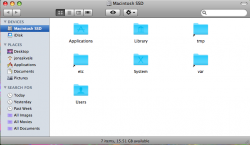
jrsx macrumors 65816 Original poster Aug 3, 2014 #4 Intell said: Have you run the chflags command via sudo? Sometimes an improperly cloned installation will show those folders. Click to expand... Hmm, I tried the command and it did work for all the folders accept the alias folders.. any idea how to get rid of them? Attachments Picture 1.png 66.7 KB · Views: 104
Intell said: Have you run the chflags command via sudo? Sometimes an improperly cloned installation will show those folders. Click to expand... Hmm, I tried the command and it did work for all the folders accept the alias folders.. any idea how to get rid of them?