Become a MacRumors Supporter for $50/year with no ads, ability to filter front page stories, and private forums.

antho2305

macrumors newbie
Original poster
Hello everyone,

I’m Anthony, an independent developer from France.

I’ve been working on a macOS app called MacOptimizers — it started as a personal toolbox and gradually evolved into something more complete. Before anything: I know “optimizer/cleaner” tools have a bad reputation, especially on macOS. I’m not trying to replace macOS system management, and I don’t use scare tactics, fake alerts or background processes. The app is fully local, no tracking, no ads, and no subscription.
Capture d’écran 2026-04-01 à 17.43.29.png

What MacOptimizers does :

Rather than “boosting performance”, the idea is to give users tools and visibility over their system and files:
  • Remove user-level clutter (logs, caches, leftover files — nothing critical)
  • Advanced uninstall (including Homebrew leftovers)
  • Duplicate file detection
  • File organization tools
  • A collection of shell commands with explanations (for users who don’t want to dig through docs)
  • Basic file utilities (compression, conversion, etc.)
  • Simple diagnostic tools for common issues
What it is NOT
  • No “your Mac is infected” popups
  • No fake optimization claims
  • No system-level hacks
  • No background daemons running permanently
The app is freemium with one-time purchase licence (no ads, no track, no subscription) for premium features. Available on Mac Apple Silicon and Intel and for Ventura, Sonoma, Sequoia and Tahoe.

Here are some screenshots :
Capture d’écran 2026-04-01 à 17.43.41.png

Capture d’écran 2026-04-01 à 17.43.57.png

I’d genuinely appreciate feedback from more experienced macOS users here:
  • What tools do you actually find useful on macOS?
  • What do you think is unnecessary or misleading in apps like this?
  • Would you prefer a more focused tool instead of a toolbox?
Download / More info :
EN : https://macoptimizers.informatiqueconnect.fr/en/
FR : https://macoptimizers.informatiqueconnect.fr/

Thanks in advance for your time and feedback!
 
Last edited:
  • Like
Reactions: cbsvitzer
Automatic cleanup of junk files, caches, logs and temporary files and so much more to clean you mac deeply.
That's not necessary.
Optimization of RAM, CPU and storage usage
How does one "optimize" these things?
Media Optimisation : a lot of tools to compress, convert files, pictures, videos, pdf, merge pdf, download video from internet, add subtitle to a video, translate subtitle, get text to speech from a video.
Sounds like you're feature-stuffing your program.
200 shells command you can run through the app with explanation for each command for expert with searching for hours the good command.
What?
Encrypt and Decrypt your files easily with the documents protection like that no one can open a file without password.
Why would anyone encrypt their files using some random proprietary app?
Antimalware adware include, you can also analyse a file (app,pgk,dmg) to see if there's any malicious files.
Does your program detect itself?
Auto-diagnostic function, your mac run weirdly an issue with sound ? you can troubleshoot automatically an issue (like windows with the troubleshoot assistant) which can also repair errors.
What?
What optimization or cleanup features do you miss the most on macOS?
None?
Are there any pain points with existing tools (CleanMyMac, etc.) that you’d like improved?
My problem with them is that they exist and make users believe that this software will somehow help them when in reality it either does nothing or makes their Mac worse.
 
That's not necessary.

How does one "optimize" these things?

Sounds like you're feature-stuffing your program.

What?

Why would anyone encrypt their files using some random proprietary app?

Does your program detect itself?

What?

None?

My problem with them is that they exist and make users believe that this software will somehow help them when in reality it either does nothing or makes their Mac worse.

Thanks for the feedback, I actually expected this kind of reaction 🙂

Just to clarify a few points:
  • I’m not trying to “replace macOS optimization” or claim that macOS is poorly designed. I agree that macOS already handles memory, CPU and system processes very well.
  • The “cleanup” part is optional and mostly targets user-level clutter (logs, large unused files, dev leftovers, etc.), not critical system files.
  • The “optimization” wording is probably not the best — it’s more about giving visibility and control rather than magically boosting performance.
  • The app is 100% local, no background daemons, no aggressive automation, and no fake alerts or scare tactics (which I personally hate too).
  • I’m still experimenting with what users actually find useful.
The goal is more of a toolbox for advanced users (or curious ones), not a miracle cleaner.

I appreciate the criticism though, it helps me refine both the app and how I present it so I changed the way I presented the app to be more align with what is it exactly.
 
Some issues/suggestions:
- the app didn’t request Full Disk Permission. I have SIP disabled, so it might be just an error due to my configuration. I went into System Settings and toggled the permission on.

- as it’s a Premium feature, I don’t know exactly what it has identified as 49.2 GB large files, but I can guess they are LLMs files. If that’s the case, you could consider excluding known ones or mention what they are needed for.

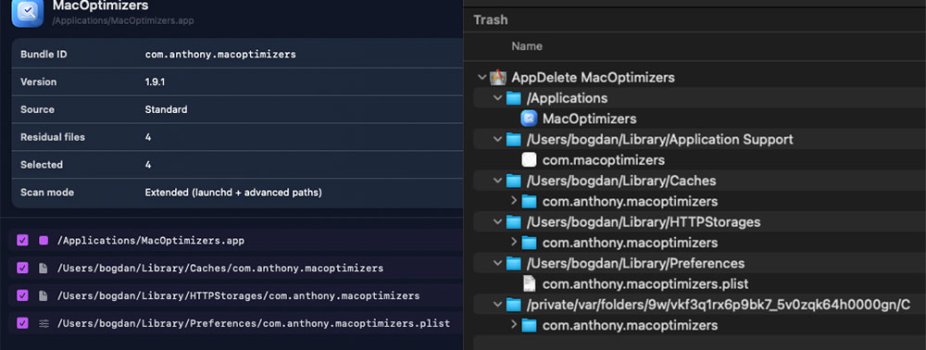
- since the developer sadly passed away in 2017, I’ve been looking for a replacement for AppDelete https://web.archive.org/web/20170315174356/http://www.reggieashworth.com/appdelete
In my opinion, here is why AppDelete is still better than MacOptimizers: more files/folders found and placed in Trash in a dedicated folder with the full path from where they have been deleted. MacOptimizers uses rm to delete them?

MacOptimizers-vs-AppDelete.jpg

- it would be easier to convince people to purchase the premium version if they could actually test it

- the app says 4,99 € per license, the website says 7,99 €/License
 
Some issues/suggestions:
- the app didn’t request Full Disk Permission. I have SIP disabled, so it might be just an error due to my configuration. I went into System Settings and toggled the permission on.

- as it’s a Premium feature, I don’t know exactly what it has identified as 49.2 GB large files, but I can guess they are LLMs files. If that’s the case, you could consider excluding known ones or mention what they are needed for.

- since the developer sadly passed away in 2017, I’ve been looking for a replacement for AppDelete https://web.archive.org/web/20170315174356/http://www.reggieashworth.com/appdelete
In my opinion, here is why AppDelete is still better than MacOptimizers: more files/folders found and placed in Trash in a dedicated folder with the full path from where they have been deleted. MacOptimizers uses rm to delete them?

View attachment 2619110

- it would be easier to convince people to purchase the premium version if they could actually test it

- the app says 4,99 € per license, the website says 7,99 €/License
Thanks a lot for taking the time to test and write such detailed feedback — this is really helpful 🙏

A few points:

- Full Disk Access:
Good catch. The app should normally prompt for it, but your SIP-disabled setup might have affected that behavior. I’ll double-check and make the request flow more explicit to avoid confusion.

- Large files detection (49.2 GB):
You’re probably right about LLM or similar large data files. I recently improved the scan to also include hidden user files (like those in “.” directories), so these should now be detected more reliably.
That said, I agree that adding clearer labeling or smart exclusions would make this much more transparent — I’ll improve that.

- Uninstall comparison with AppDelete:
This is very valuable feedback. Right now, MacOptimizers focuses on common leftover locations, but it’s clearly not as exhaustive as AppDelete yet.
Also, yes — files are currently removed directly (using system commands), mainly because many users don’t empty the Trash, which leads to confusion about whether apps are really uninstalled.
UPDATE : Corrected in MacOptimizers 1.9.2 should be as efficient as AppDelete or AppCleaner

That said, your approach makes a lot of sense:
having a dedicated Trash folder with full paths would improve both transparency and safety. I’ll definitely look into implementing something similar.
UPDATE : Corrected in MacOptimizers 1.9.2 now move to the trash if possible then rm

- Premium trial:
Totally fair point. Allowing users to test premium features before purchasing is something I’m considering — it would make the decision much easier.

- Pricing inconsistency:
Thanks for pointing it out — this was an old hardcoded value that I forgot to update. It’s now fixed. The price is the one indicated in the website, however were you connected to the internet during the test because the price is shown dynamically if there's promotion but it needs the internet to update and show the price from the website.
UPDATE : Corrected in MacOptimizers 1.9.2 add a fallback for this case.

Really appreciate this kind of feedback — it helps me prioritize what actually matters 👍
 
Last edited:
  • Like
Reactions: bogdanw
Thank you for the detailed reply and for making the app available for several macOS versions, not just the latest.

I’ve just tested version 1.9.2 in a Tahoe 26.4 virtual machine with SIP enabled and the Full Disk Access request is displayed correctly. It doesn’t appear at all if SIP is disabled. That’s not an issue, as few people have SIP disabled and those who have it know what should have Full Disk Access. 🙂

Although I enabled the extended scan, it doesn’t seem to be showing anything from /Private/var/folders. For qBittorrent it shows ~/.config/qBittorrent.

One more question from the perspective of a regular user. Is it safe to remove language files from apps? Like /Applications/VMware Fusion.app/Contents/Resources/Japanese.lproj or /Applications/Microsoft Word.app/Contents/Resources/fr.lproj
Doesn’t it break the app’s signature?
 
  • Like
Reactions: antho2305
Thank you for the detailed reply and for making the app available for several macOS versions, not just the latest.

I’ve just tested version 1.9.2 in a Tahoe 26.4 virtual machine with SIP enabled and the Full Disk Access request is displayed correctly. It doesn’t appear at all if SIP is disabled. That’s not an issue, as few people have SIP disabled and those who have it know what should have Full Disk Access. 🙂

Although I enabled the extended scan, it doesn’t seem to be showing anything from /Private/var/folders. For qBittorrent it shows ~/.config/qBittorrent.

One more question from the perspective of a regular user. Is it safe to remove language files from apps? Like /Applications/VMware Fusion.app/Contents/Resources/Japanese.lproj or /Applications/Microsoft Word.app/Contents/Resources/fr.lproj
Doesn’t it break the app’s signature?
Thanks again for the detailed testing.

Regarding the language files: technically, deleting "*.lproj" inside an app bundle modifies "/Applications/AppName.app/Contents/...", so the original code signature is no longer strictly intact.

In practice, many apps still run fine after that, and language resources are often restored during app updates. In my app, this cleanup is optional and not selected by default, but I’ll probably add a clearer message to explain it. It was a feature requested by many users, and so far I haven’t encountered issues after removing those files, but you’re right — it’s something that should be clearly explained.

Regarding the uninstall scan: extended mode does include "/private/var/folders", but matching there is intentionally conservative to avoid false positives. If you can share a concrete qBittorrent path found by AppDelete in "/private/var/folders", I can refine detection for that pattern. That said, "/private/var/folders" is a sensitive location — it stores cache files but also other data — so I try to be cautious when removing files from there.
 
Register on MacRumors! This sidebar will go away, and you'll see fewer ads.