
Got a tip for us?
Let us know
Become a MacRumors Supporter for $50/year with no ads, ability to filter front page stories, and private forums.
macOS Sequoia 15.2 Beta 1 - Bug fixes, changes and more
- Thread starter WilliApple
- WikiPost WikiPost
- Start date
- Sort by reaction score
You are using an out of date browser. It may not display this or other websites correctly.
You should upgrade or use an alternative browser.
You should upgrade or use an alternative browser.
- Status
- The first post of this thread is a WikiPost and can be edited by anyone with the appropiate permissions. Your edits will be public.

DoctorFedora
macrumors regular
dunno if this has been affecting anyone else, but my M1 iMac has been getting multiple kernel panics per day on 15.2 beta 1 — maybe it wasn't a great idea to install the first developer beta after all ; )

nnwrrr
macrumors newbie
Anyone else getting this when attempting to log in to ChatGPT?
My partner logged in just fine with his 13" Air M2, and I'm stuck with my 14" M3 Pro.
View attachment 2441362
And when using even a free version, it just doesn't work anywhere, neither in Writing Tools, nor in Siri:
View attachment 2441366
View attachment 2441367
UPD: this morning I signed in just fine. Maybe there really was a huge load of requests on ChatGPT side. And now it works with Siri and Writing Tools as intended.

LutzRFrank
macrumors 65816
Not a Single one on my Mini M1dunno if this has been affecting anyone else, but my M1 iMac has been getting multiple kernel panics per day on 15.2 beta 1 — maybe it wasn't a great idea to install the first developer beta after all ; )


Anyone else getting this when attempting to log in to ChatGPT?
My partner logged in just fine with his 13" Air M2, and I'm stuck with my 14" M3 Pro.
View attachment 2441362
And when using even a free version, it just doesn't work anywhere, neither in Writing Tools, nor in Siri:
View attachment 2441366
View attachment 2441367
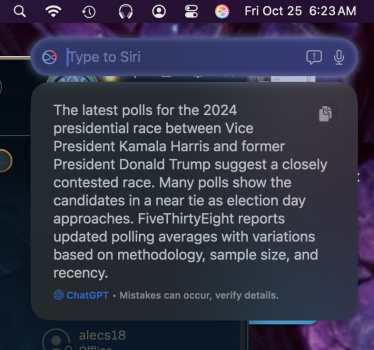
I was able to sign in, and I just tried a query, and it worked fine. I did disable the setting that makes it ask every time it has to ask ChatGPT. I just asked it something I figured Siri wouldn't be able to answer. So I asked what the latest polls were for the presidential race. Here's how it looks. It even tells me it's from ChatGPT.
Attachments
LutzRFrank
macrumors 65816
its currently only for the M-chip (intelligence enabled)I read somewhere the 15.2 beta is only for M1 and above. Can anyone with Intel confirm?

JUMA55
macrumors 6502
15.1 RC2 runs fine on my 2019 Intel iMac.I read somewhere the 15.2 beta is only for M1 and above. Can anyone with Intel confirm?
LutzRFrank
macrumors 65816
15.1, yes - 15.2 (beta 1) no15.1 RC2 runs fine on my 2019 Intel iMac.
Last edited:

flowrider
macrumors 604
^^^^
I still haven't been able to get it.
Lou
Not available for me on my NcMP 7,1 - Intel❓ Tried turning off and tried all available options.
I still haven't been able to get it.
Lou
LutzRFrank
macrumors 65816
Apple Intelligence is free to use and will initially be available in U.S. English. Coming in beta this fall.*^^^^
I still haven't been able to get it.
Lou
- MacBook Air M1 and later
- MacBook Pro M1 and later
- iMac M1 and later
- Mac mini M1 and later
- Mac Studio M1 Max and later
- Mac Pro M2 Ultra

haralds
macrumors 68040
I decided to run 15.1 RC2 on another volume. The Studio was simply unusable with all those panics.It is VERY unstable on my Mac Studio M1 Ultra, which had no issue with the previous betas. I hope they have a quick update on this. I am having a panic multiple times a day!


ocrane
macrumors regular
dunno if this has been affecting anyone else, but my M1 iMac has been getting multiple kernel panics per day on 15.2 beta 1 — maybe it wasn't a great idea to install the first developer beta after all ; )
Actually running into due same on mine, these panics are new after running betas since June. Curious if either of you have looked at the logs? Mine seems to be tied to running a time machine backup "[kalloc.type0.48]: element modified after free"I decided to run 15.1 RC2 on another volume. The Studio was simply unusable with all those panics.
Line_Noise
macrumors member
Most panicky beta I've used for a long, long while. Doesn't like something about the input accessories. Seems ok with just the MacBook running by itself but crashes hourly with USB devices attached.


ocrane
macrumors regular
I've had to rollback to 15.1RC due to how many panics my M1 MacBook Air was having, thank god for TimeMachine. I would say its been the most unstable beta Apple has put out in a very long time.
Mine was having the panic's FROM the time machine, confirmed via report. Submitted the bug to apple.Most panicky beta I've used for a long, long while. Doesn't like something about the input accessories. Seems ok with just the MacBook running by itself but crashes hourly with USB devices attached.
Anyone with M3/Pro/Max MacBook Pro can check if you're able to manually control fans with any app (iStat, TG Pro or Mac fans control)?
Apple has blocked it since MacOS 14.7 and now it's impossible to turn on fans when they're off. They also raised the threshold for when the fans activate. The fans only turn on when CPU reaches around 80C degrees.
Apple has blocked it since MacOS 14.7 and now it's impossible to turn on fans when they're off. They also raised the threshold for when the fans activate. The fans only turn on when CPU reaches around 80C degrees.

wslloyd
macrumors newbie
Same. I'm running 15.2 on a 2023 MacBook Pro with an M2 Pro. Getting kernel panics about once an hour. Is the only remedy to wait for an update?I decided to run 15.1 RC2 on another volume. The Studio was simply unusable with all those panics.

dmccombs
macrumors 65816
I think it involved either a Time Machine, or just waiting. 😉someone somewhere talked about a work-around to get Image Playground working early, and now I can't find it
Anyone here know?
Line_Noise
macrumors member
I think you might be right, but in my case it seems to be the USB drive that's tripping the actual panic. I've turned off TM's automatic backups, curious whether that solves it, but it hadn't successfully finished a backup since the 23rd.Mine was having the panic's FROM the time machine, confirmed via report. Submitted the bug to apple.