

Become a MacRumors Supporter for $50/year with no ads, ability to filter front page stories, and private forums.

MacRumors

macrumors bot
Original poster


Sometimes when you share a webpage link with someone, you just want to bring their attention to a specific passage or sentence to make your point, rather than have them read through the entire article.

safari-icon-blue-banner.jpeg

In 2020, Google added a function to its Chrome browser called Scroll to Text Fragment (STTF) that helps you achieve this. It allows URLs to link directly to any visible text on a page. You may have seen it work in Google Search, where clicking on a link in your returned results takes you to a highlighted passage of text further down the page.

Google later added the feature to the Chromium codebase, so most other popular Chromium browsers like Edge, Opera, Brave, and Vivaldi also support it. Here's how it works.

Copy Link With Highlight in Safari

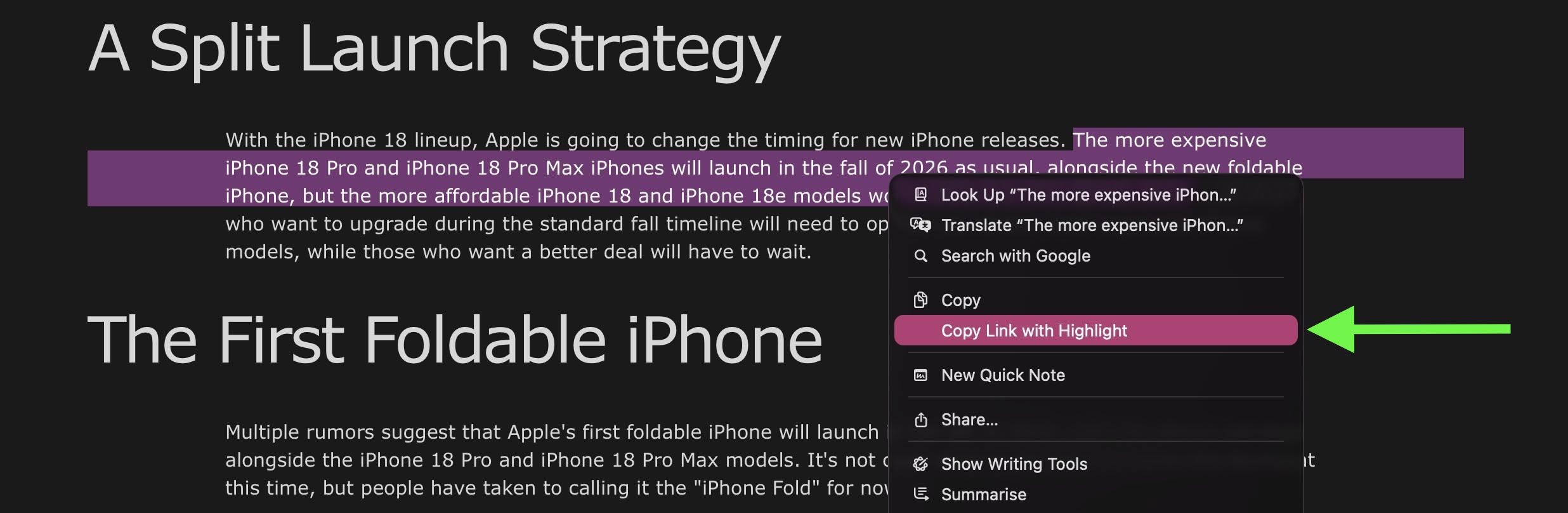
Apple added full support for text fragment links in Safari 18, and the feature is available in Safari on macOS Sequoia and later. To use the feature, visit a web page and simply highlight the text you want to create a link to, then right-click (Ctrl-click) and choose Copy Link with Highlight from the dropdown menu.
share-with-highlighted-text.jpg
The "Copy Link to Highlight" option

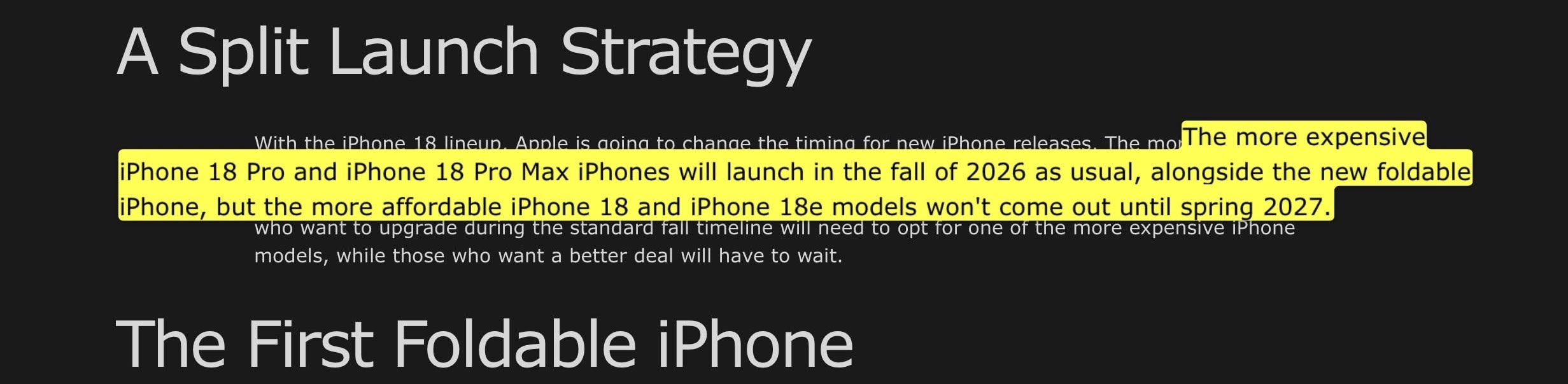
This will generate a special URL that includes a hash (#) symbol and "text" element, followed by a few words that bookend the selected text. All you need to do is share the link with someone, and when they click it they will be sent directly to that part of the webpage with the specific passage highlighted, as shown below.
highlighted-text-shared-safari.jpg
The shared link as the recipient sees it


That's all there is to it. The Copy Link to Highlight option is also available in Safari on iPhone and iPad, though we have found it to be buggy and inconsistent in iOS 26.3. Hopefully Apple can fix it soon. At least on Mac, it makes it easier for you to direct the recipient of the link to the content you actually want them to focus on.

Bear in mind that the look of highlighted text can differ depending on whether the page author has styled it to look a certain way. Also, text fragment linking does not work in PDFs. Since July 2025, Copy Link to Highlight has also been introduced in Firefox.

Article Link: macOS: Share a Link That Jumps to a Specific Line on a Webpage
 
I’m annoyed by this as often as I’m helped by it. Half the links from Google that I copy have this text when I don’t want it, and Apple always thinks the last part of the link is a word to check the spelling on, so it takes 5-10 taps just to remove the part of the link I don’t want.
 
This was available on Microsoft IE since about when the internet was invented.
Glad to know though that we're only 6 years behind Google.
I can't find any reference to this in old IE docs, and I don't remember ever seeing it (other than by using standard HTML anchor links, which didn't highlight anything, and which all browsers did and do support). But I'll take your word for it.

Until it's a W3C standard it's a bit of a risk adding it at all, and I'm kind of surprised they have. I guess they figured it's been in the CSS4 draft spec for long enough at this point.
 
I will mentally add this to my 'useful things that I won't be able to remember how to do when I eventually want to do them' list
I learned how to do it manually before non-Chrome browsers implemented the copying function.
 
This was available on Microsoft IE since about when the internet was invented.
Glad to know though that we're only 6 years behind Google.
Not the way it’s implemented here. It was possible to #link specific sections of an html document as long as the page was created with that in mind. This, however, allows one to link to a specific line even if the page was not written with this in mind.
 
I don’t trust Google one bit. Sadly I’m stuck using its email services & haven’t found an alternative solution yet. Most of my Doctors/Hospitals use my Google email. Everything else I stay away from as far as possible. 🤷
 
Confused. This has been available in Safari since Sequoia. This feature was first introduced in macOS 15.2 and iOS 18 from this link with video proof: https://macmost.com/using-links-with-highlights-on-mac-and-iphone.html

Previous versions of Safari will also work with the actual link with highlighting just fine as well. It won't work in Mojave but will in Monterey's Safari.

This used to be on MacRumors here as a how-to: https://www.macrumors.com/how-to/send-web-links-jump-to-exact-text/ but has been pulled. No idea why. The Wayback Machine isn't working for me right now but the page was there in 2025.

Brave won't enable it since there are privacy issues with Google's implementation or something like that regarding their STTF code (going from memory here). That was also mentioned in the how-to guide. All Chrome based browsers have it with Safari next and now finally, Firefox natively. There was a plug-in before for Firefox.

I ran into this when a friend of mine was using it and didn't know that it was a new feature that wouldn't work for older browser users via a web site link.

It is a great feature when needed.
 
I don’t trust Google one bit. Sadly I’m stuck using its email services & haven’t found an alternative solution yet. Most of my Doctors/Hospitals use my Google email. Everything else I stay away from as far as possible. 🤷
I agree with you 100%!

Even though I have a couple addresses with them, I don't use them for anything personal, just for Google services I have to use. Everything now goes through Proton for work and my own server for personal which will also be moving to Proton as well.

Giving data away to Google just isn't worth it anymore. Never mind all the "others" seeing emails I've dealt with in the past. So done with Google.
 
Good article and it is a really useful feature. Nice to see these tips. Hope the bugs are ironed out soon.
 
  • Like
Reactions: mganu
This was available on Microsoft IE since about when the internet was invented.
Glad to know though that we're only 6 years behind Google.
Are you not thinking of set bookmarks, which had to be pre-defined by the page creator within the actual web page HTML?
 
This is vastly more complicated to implement than an element ID built into a web page, but given how the internet was supposed to work when it was designed I’m suddenly surprised this functionality wasn’t part of the HTML spec 20 years ago.

I can't find any reference to this in old IE docs, and I don't remember ever seeing it (other than by using standard HTML anchor links, which didn't highlight anything, and which all browsers did and do support). But I'll take your word for it.
I’m not taking someone’s word for it without some documentation—I used to hand-code web pages in the late 90s through mid 2000s, which in those days of miserable standards support involved getting quite familiar with every browser on every platform, and I have never heard of such a feature on IE nor is it even clear how it would have been implemented back then. An internet search just now came up with absolutely nothing, either.

IE could, like any browser, link directly to an ID on a page, and there were some 3rd party extensions for various browsers that would do this as well as hacks involving JavaScript and frame wrappers, but I’d like to see some documentation that IE could do it before I believe it.

I still have access to working IE installs, so I’d like to see how it accomplishes this if it is actually a feature.
 
Last edited:
Until it's a W3C standard it's a bit of a risk adding it at all, and I'm kind of surprised they have. I guess they figured it's been in the CSS4 draft spec for long enough at this point.

MS was notorious for adding their own HTML tags that only worked on IE. It's how they tried to corner the browser market, and also draw the ire of governments with threats of breaking up Microsoft.
 
Register on MacRumors! This sidebar will go away, and you'll see fewer ads.