Become a MacRumors Supporter for $50/year with no ads, ability to filter front page stories, and private forums.
Status
The first post of this thread is a WikiPost and can be edited by anyone with the appropiate permissions. Your edits will be public.
My TV library file corrupted on my external drive. My fault I suppose for having it plugged in but assumed it would be ok as the TV library could be on the internal drive. Music library file was unaffected on the same drive. Both libraries were fine before clicking the update.

Just a heads up to remove the external drive as a precaution. Other than that, no issues.
 
Interesting. Not that I'm some serious user (I'm using any Office-alike suite mostly for opening files I receive), but I had it shipped with a new Mac. Pages and iMovie are regularly updated, but after trying to update Keynote and Numbers I get this


Screenshot 2026-02-12 at 22.17.57.png
 
Interesting. Not that I'm some serious user (I'm using any Office-alike suite mostly for opening files I receive), but I had it shipped with a new Mac. Pages and iMovie are regularly updated, but after trying to update Keynote and Numbers I get this


View attachment 2604278
We all got something like that. Seems the name of the app changed slightly so you have to go to the app store and download the new version (currently 15.1). After a while, I got something closer what what is below with a link to App Store.

1770931983207.png
 
Interesting. Not that I'm some serious user (I'm using any Office-alike suite mostly for opening files I receive), but I had it shipped with a new Mac. Pages and iMovie are regularly updated, but after trying to update Keynote and Numbers I get this
View attachment 2604278
Version 15 of Numbers / Pages / Keynote are separate apps on the App Store now. You have to go out of your way to download them and then delete the "old" versions. (This happened last week when they did the creator studio thing.) Can you install those? Numbers is called something like "Numbers: Make Spreadsheets" instead of "Numbers 14.5". https://apps.apple.com/us/app/numbers-make-spreadsheets/id361304891
 
  • Like
Reactions: polyphenol
Version 15 of Numbers / Pages / Keynote are separate apps on the App Store now. You have to go out of your way to download them and then delete the "old" versions. (This happened last week when they did the creator studio thing.) Can you install those? Numbers is called something like "Numbers: Make Spreadsheets" instead of "Numbers 14.5". https://apps.apple.com/us/app/numbers-make-spreadsheets/id361304891

The thing is, I've managed to update Pages and iMovie regularly via App Store update. But for some reason, trying to update Numbers and Keynote the same way gave me that message.
 
Numbers is called something like "Numbers: Make Spreadsheets"
Called that in the App Store. But there are 3 different names for the same thing:

App Store: "Numbers: Make Spreadsheets"
Terminal: "Numbers Creator Studio.app"
Finder: "Numbers"
Spotlight: "Numbers"

Confusing?
 
  • Like
Reactions: roncron
Another feature 26.3 has added
- spinning wheel in Finder / not responding.

Also memory is always in yellow now (16GB M1 Pro).

I wanted an M5 Mini / Studio, but think I’ll order an M4 Studio and downgrade both to Sequoia.
 
Another feature 26.3 has added
- spinning wheel in Finder / not responding.

Also memory is always in yellow now (16GB M1 Pro).

I wanted an M5 Mini / Studio, but think I’ll order an M4 Studio and downgrade both to Sequoia.
Just bought a M4 Mini and it still comes with Sequoia!
 
  • Like
Reactions: G3Blue
Another feature 26.3 has added
- spinning wheel in Finder / not responding.

Also memory is always in yellow now (16GB M1 Pro).

I wanted an M5 Mini / Studio, but think I’ll order an M4 Studio and downgrade both to Sequoia.
Currently on my M4 mini 24GB, memory usage definitely appears lower - solidly in the lower levels of green - and I am doing much the same as always. Unlike 26.2, not one single process is showing as using even one GB. Though some of that might be changes to, for example, Firefox or other apps. I simply do not know.

Just checked my M1 MBP 16GB and the picture is similar except for bsky.app which was using about 1.5 GB - but that app has consistently had memory usage issues.

Curious how much our experiences can vary.
 
  • Like
Reactions: G3Blue
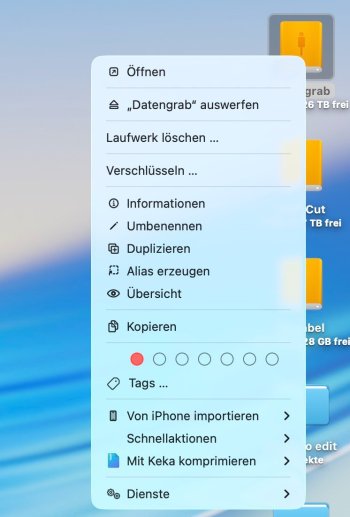
Another issue in 26.3. External drives cannot be ejected anymore. No matter if Thunderbolt or USB. The eject option is missing on the desktop icons:
Bildschirmfoto 2026-02-13 um 12.27.27.JPG
In Finder sidebar, eject icons are displayed, but they do not do anything. I can click them a hundred times, nothing happens. Now I have to shut down, unplug or turn off the drive. Then boot again. WHAT THE F***?!
 
Another issue in 26.3. External drives cannot be ejected anymore. No matter if Thunderbolt or USB. The eject option is missing on the desktop icons:
View attachment 2604396
In Finder sidebar, eject icons are displayed, but they do not do anything. I can click them a hundred times, nothing happens. Now I have to shut down, unplug or turn off the drive. Then boot again. WHAT THE F***?!
Everything seems to be working fine here...
Immagine 13.02.26 - 13.36.png
 
  • Like
Reactions: polyphenol
Version 15 of Numbers / Pages / Keynote are separate apps on the App Store now. You have to go out of your way to download them and then delete the "old" versions. (This happened last week when they did the creator studio thing.) Can you install those? Numbers is called something like "Numbers: Make Spreadsheets" instead of "Numbers 14.5". https://apps.apple.com/us/app/numbers-make-spreadsheets/id361304891
If it means unknowingly jumping on the subscription bandwagon and having Ads in there, I think I will stick on version 14.
 
When the menu bar doesn't load, often it means that the system is unresponsive. So, sometimes it loads, but most of the time it only loads partially. Partial loading means that control center is unavailable and other important monitoring systems cannot be used. Restarting Finder just means the system hangs and my only option is do a hard reset (turn the computer off).
 
Another issue in 26.3. External drives cannot be ejected anymore. No matter if Thunderbolt or USB. The eject option is missing on the desktop icons:
View attachment 2604396
In Finder sidebar, eject icons are displayed, but they do not do anything. I can click them a hundred times, nothing happens. Now I have to shut down, unplug or turn off the drive. Then boot again. WHAT THE F***?!

I have six external SSDs connected permanently. 4x Thunderbolt, 2x USB. In addition two USB-HDDs that only connect when I power them on manually.

No problems with ejecting any of those anywhere.

Your menu looks really short compared to mine. What file system do you use for those drives?

But I have connection problems. Most of the time one or two drives are missing after waking up from sleep or complete logout when longer sleeping and they don't show up in Disk Utility to mount them.
Then I have to reconnect the affected drives or reboot. It is affecting Thunderbolt and USB, no matter if directly connected to my Mac or the TB4 and TB5 Dock from different brands. Seems completely random, which drive is missing.
Not sure if it came with 26.3, because installing Beta 1 is that long ago and I think not all drives had been connected already at once by that time.
 
When the menu bar doesn't load, often it means that the system is unresponsive. So, sometimes it loads, but most of the time it only loads partially. Partial loading means that control center is unavailable and other important monitoring systems cannot be used. Restarting Finder just means the system hangs and my only option is do a hard reset (turn the computer off).

You can restart the menu bar with

Code:
killall SystemUIServer

in Terminal.
 
I have six external SSDs connected permanently. 4x Thunderbolt, 2x USB. In addition two USB-HDDs that only connect when I power them on manually.

No problems with ejecting any of those anywhere.

Your menu looks really short compared to mine. What file system do you use for those drives?

But I have connection problems. Most of the time one or two drives are missing after waking up from sleep or complete logout when longer sleeping and they don't show up in Disk Utility to mount them.
Then I have to reconnect the affected drives or reboot. It is affecting Thunderbolt and USB, no matter if directly connected to my Mac or the TB4 and TB5 Dock from different brands. Seems completely random, which drive is missing.
Not sure if it came with 26.3, because installing Beta 1 is that long ago and I think not all drives had been connected already at once by that time.
I've had similar problems in the past with Sandisk drives (their internal standby seemed too aggressive and the firmware couldn't be upgraded). I switched to using only Samsung T7 and a Samsung 990Pro in a Zike case.
 
  • Like
Reactions: Adora
I've had similar problems in the past with Sandisk drives (their internal standby seemed too aggressive and the firmware couldn't be upgraded). I switched to using only Samsung T7 and a Samsung 990Pro in a Zike case.

The USB SSDs are both Crucial CT4000X10PROSSD9 from Micron. The Thunderbolt SSDs are TB4 enclosures from ANYOYO (EC-6902 and EC-6902PRO), the M.2 NVME drives in there are from some cheap brand with good ratings.

I never had any problems with those Thunderbolt drives before.

I was even able to use them as main boot drive on my M3 iMac without any issue. Now all drives are connected to an M4 Pro Mac mini. But I never connected that much drives all together permanently before.

I often had auto-eject issues with the USB drives before, those seem to be gone since a while at least for the Crucial ones. Not sure if for the HDDs too. I only use them to backup and turn them off when it's finnished. But when they auto-ejected they were still mountable again in Disk Utility. No complete disconnect.

I also have an old WD Blue M.2 SATA drive in a cheap USB enclosure, that is still permanently ejecting automatically. I removed it, because it was really annoying.
 
Interesting. Not that I'm some serious user (I'm using any Office-alike suite mostly for opening files I receive), but I had it shipped with a new Mac. Pages and iMovie are regularly updated, but after trying to update Keynote and Numbers I get this


View attachment 2604278

Try this in Terminal:

Code:
defaults write com.apple.iWork.Pages   TSADisableUpdateNotifications -bool yes
defaults write com.apple.iWork.Keynote TSADisableUpdateNotifications -bool yes
defaults write com.apple.iWork.Numbers TSADisableUpdateNotifications -bool yes

You can run all three commands at once. Just copy and paste and press Enter.

I am also still using the 14.5 versions and don't get any notification anymore. Not sure if a reboot is nessesary. I mostly use OnlyOffice and just tried for the first time if it worked.
 
Your menu looks really short compared to mine. What file system do you use for those drives?
APFS. After reboot, it worked again for a while. Then suddenly eject was dead again. Something strange going on there.
Can always revive it with a reboot (which by the way has to be hard triggered, shut down does not work because system cannot eject the drives, but no message is displayed about them being in use). Then after a while eject will be broken again. Have not been able to pin point the cause to a certain app yet.

I've had similar problems in the past with Sandisk drives
For me it's a Fantec RAID case (USB) and two Thunderbolt Cases (one Acasis USB4/TB3 and one Renkforce USB4/TB4).

Edit: This is how the menu looks after reboot. Back to normal.
Bildschirmfoto 2026-02-13 um 16.59.10.JPG
 
  • Like
  • Sad
Reactions: Adora and Wolf1701
I don't know if this is related but I've been having problems with disappearing sound settings for Thunderbolt. I usually have one or other or both of my dual 27" Apple Thunderbolt displays set as the sound output but since 26.3 final although this sound output is enabled and working immediately after a hard restart, it disappears after a few hours and auto-defaults to the Mac mini internal speaker. A hard restart fixes it for a while and then the same thing happens over. I think this is related to Thunderbolt/USB4 and have reported it using Feedback Assistant.
 
I am running audio through a CalDigit TS3+ (optical). No issues there for me so I would say it's not related to my issue. I also don't have any other issues with USB or Thunderbolt. Just the drive eject going crazy since 26.3. Never had this happening before and the update to 26.3 is the only thing that changed on my set-up.
 
Register on MacRumors! This sidebar will go away, and you'll see fewer ads.