
Become a MacRumors Supporter for $50/year with no ads, ability to filter front page stories, and private forums.

MacOG728893

macrumors 68000
Original poster
I keep getting this message every few hours.

- I am fully updated to the latest version of Office 2011
- I have tried deleting the accounts and re-creating them
- Rebuilding my identity
- All ports / passwords / settings are 100% correct

Anyone know what's going on here?

Edit: It keeps happening again... If I hit no, it goes away but comes back soon after. Anyone?
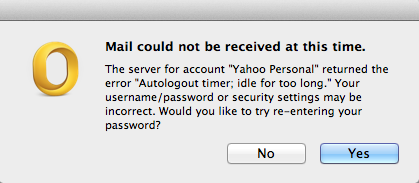
t189.png
 
Last edited:
Common yahoo issue

I keep getting this message every few hours.

- I am fully updated to the latest version of Office 2011
- I have tried deleting the accounts and re-creating them
- Rebuilding my identity
- All ports / passwords / settings are 100% correct

Anyone know what's going on here?

Image


Common yahoo issue
 
Typically a Keychain issue (that’s where the passwords are stored).

- Open /Applications/Utilities/Keychain Access
- In the application, look for the corresponding entry and delete it (to allow Outlook to recreate a fresh new one).
- You can also run the Keychain First Aid command to ensure that everything is OK in your keychain.
 
Weird, you copy and pasted from something, at the very least from this post

answers.microsoft[.]com/en-us/mac/forum/macoffice2011-macoutlook/outlook-2011-mail-could-not-be-received-at-this/70daf7ef-a59b-42bf-8367-f4d590f683ca


Typically a Keychain issue (that’s where the passwords are stored).

- Open /Applications/Utilities/Keychain Access
- In the application, look for the corresponding entry and delete it (to allow Outlook to recreate a fresh new one).
- You can also run the Keychain First Aid command to ensure that everything is OK in your keychain.
 
Weird, you copy and pasted from something, at the very least from this post

answers.microsoft[.]com/en-us/mac/forum/macoffice2011-macoutlook/outlook-2011-mail-could-not-be-received-at-this/70daf7ef-a59b-42bf-8367-f4d590f683ca

Come again?
 
I've ran keychain first aid. Yesterday there was an error, so I repaired it. Today that message popped back up, so I opened First Aid again, no errors.
 
Register on MacRumors! This sidebar will go away, and you'll see fewer ads.