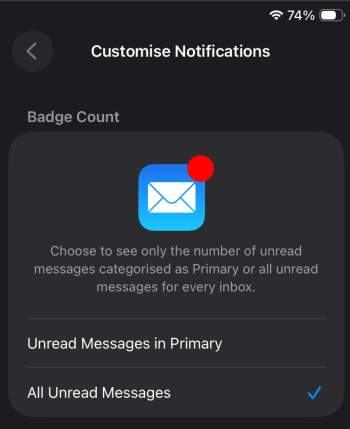
MarkC426 macrumors 601 Original poster Friday at 11:07 AM #1 How can I get the mail icon in the dock to start showing ‘number badge’ when emails arrrive. This was working up until recently. While I’m moaning, the App Store NEVER shows updates until I open the app. This works perfectly on my 1st gen iPad Pro.
How can I get the mail icon in the dock to start showing ‘number badge’ when emails arrrive. This was working up until recently. While I’m moaning, the App Store NEVER shows updates until I open the app. This works perfectly on my 1st gen iPad Pro.
FreakinEurekan macrumors G3 Friday at 11:19 AM #2 Settings > Notifications > Mail. If the settings look right there, toggle notifications off & back on. Reactions: MarkC426
Settings > Notifications > Mail. If the settings look right there, toggle notifications off & back on.
MarkC426 macrumors 601 Original poster Friday at 1:34 PM #3 Ah, nice one. It seemed to be a setting in customise notifications/badge count. Changed it to All unread messages….seems to work. Reactions: FreakinEurekan
Ah, nice one. It seemed to be a setting in customise notifications/badge count. Changed it to All unread messages….seems to work.