Become a MacRumors Supporter for $50/year with no ads, ability to filter front page stories, and private forums.

cleung

macrumors regular
Original poster
Jan 11, 2006
173
0
Hong Kong
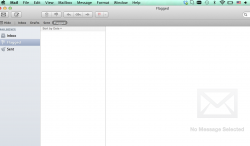
I got my new 13" rMBP last week. I used migration assistant to migrate from my old MBA. Everything migrated but I can't open Mail. I verified that all my mail folders are actually in Library>Mail but Mail can't read anything. Even if I tried to set everything up all over again, Mail won't let me. It is constantly stuck in this screen? Help!

 

Attachments

  • Screen Shot 2013-11-04 at 12.06.51 AM.png
    Screen Shot 2013-11-04 at 12.06.51 AM.png
    407.6 KB · Views: 118
So make another google account. You can have as many gmail as you like nobody cares. I have 7 my self. And then click google and set it up. Then the window will disappear. Then in preferences delete the account and you're good. Don't keep it so next time you can do the same thing and don't have to register another gmail account.
 
I've tried that. As I mentioned, if I tried to set up everything again, it won't let me. I can't create any account. Creating a new account will just lead to a blank mail screen like this.

Plus, I can't just create accounts. I need access to my old mail and my existing accounts. I am the owner of a small business and all my work email was there which I can no longer access (except through web mail) or my other computers.
 

Attachments

  • Screen Shot 2013-11-04 at 1.00.06 AM.png
    Screen Shot 2013-11-04 at 1.00.06 AM.png
    295.1 KB · Views: 118
Register on MacRumors! This sidebar will go away, and you'll see fewer ads.