
Become a MacRumors Supporter for $50/year with no ads, ability to filter front page stories, and private forums.

Kerry91

macrumors newbie
Original poster
Hello everyone,

Is there a way in iOS 26 to make folder behavior work like in iOS 18?

I dislike Liquid Glass as I find it really harsh on my eyes, and I plan to keep iOS 18 on my personal iPhone for as long as possible. Unfortunately, I have to deal with iOS 26 on my work phone and the thing that bothers me the most is how folders behave.

In iOS 18, when we open an app folder, the folder background itself is tinted, which naturally draws your eyes to the app icons and their names. At the same time, the Home Screen background is blurred, so your focus stays on the open folder. Simple, readable, efficient. Honestly just perfect.
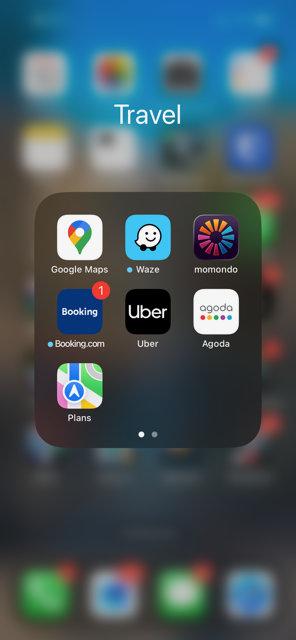
1.png


In iOS 26, with Liquid Glass, whenever I open a folder my eyes need at least a full second to adjust before I can even start looking for the app I need. Because the folder background is transparent, the Home Screen app icons are still visible behind it. This two-layer visual mess caused by Liquid Glass transparency is a nightmare for visibility. By the end of the day I sometimes even feel dizzy because of it.
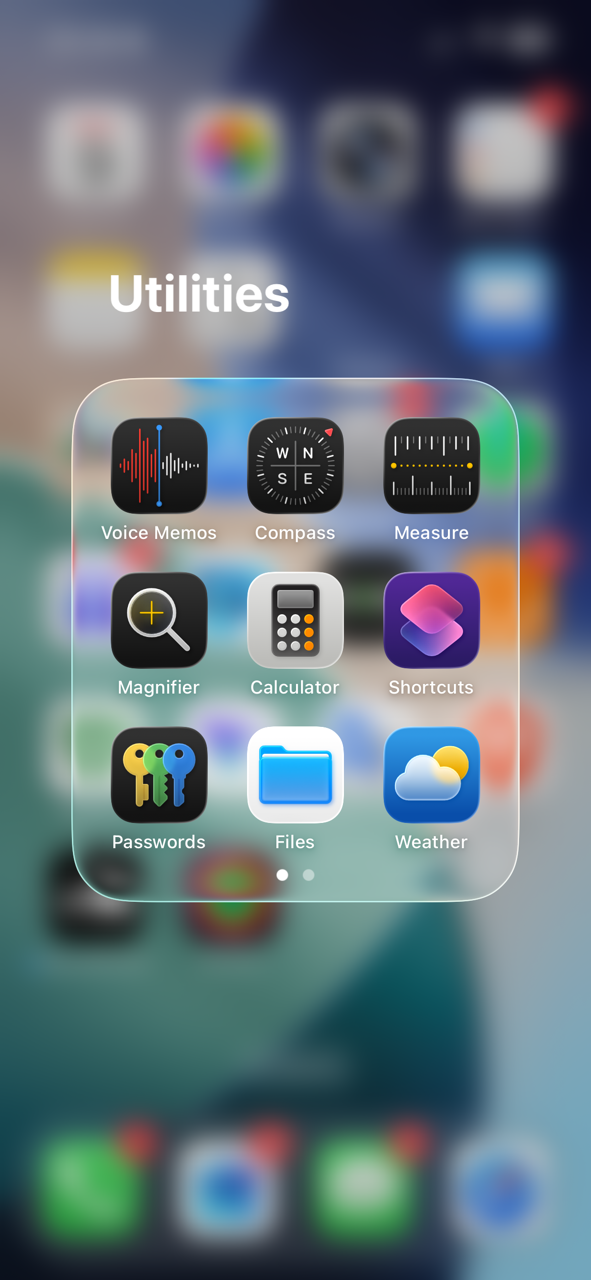
2.png


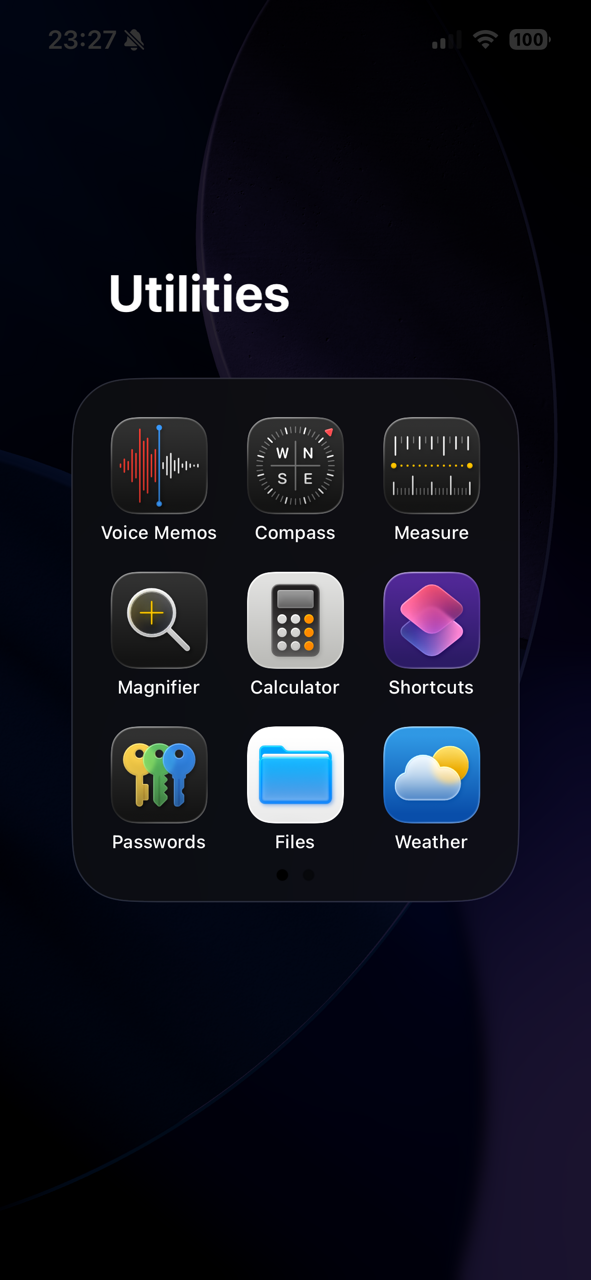
Turning Liquid Glass off somehow makes things even worse. The folder background becomes tinted, which is fine and actually helps with focus, but the Home Screen background turns completely dark. I then have to crank the brightness up to maximum just to clearly see the folder, especially when dark mode is enabled. As soon as I open the app and leave the folder, that increased brightness burns my eyes, so I have to lower it again. And I have to repeat this process every single time I open and close a folder.
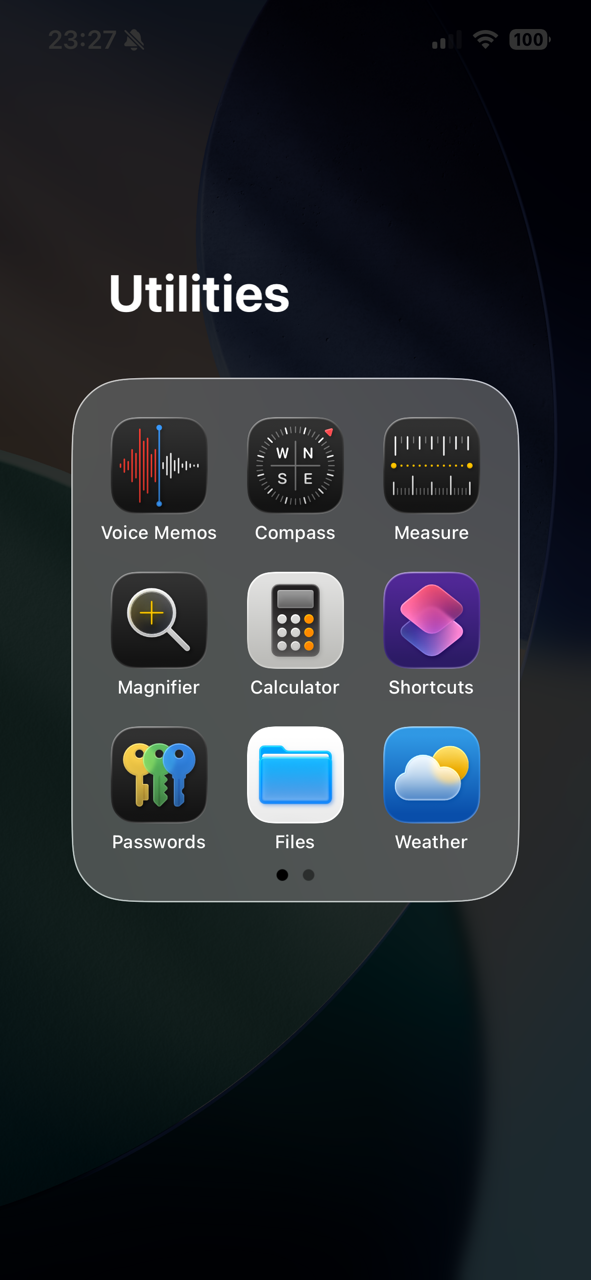
3.png
4.png


This is unbelievably dumb. So dumb it reminds me of the early Samsung TouchWiz dark UI days. I genuinely don’t understand how Apple approved this thing.

Anyway, I would really appreciate some help if there’s any way to fix or improve this behavior.

Thank you in advance.
 
Last edited:
Is there a way in iOS 26 to make folder behavior work like in iOS 18?
No. That's just how they designed it. No hidden settings unfortunately. You can hope in iOS 27 they walk some of this back. But for now all you can do is avoid iOS 26 on the personal phone. On the work phone, maybe you can change your routine to work around the issue. Try using App Library instead of folders. Or try out some of the widget "launchers" in the App Store and see if one of those is a good alternative to the folder setup.
 
  • Like
Reactions: tranceking26
No. That's just how they designed it. No hidden settings unfortunately. You can hope in iOS 27 they walk some of this back. But for now all you can do is avoid iOS 26 on the personal phone. On the work phone, maybe you can change your routine to work around the issue. Try using App Library instead of folders. Or try out some of the widget "launchers" in the App Store and see if one of those is a good alternative to the folder setup.

Thank you for your quick answer. This is very unfortunate but as you've mentioned it I really hope that iOS 27 will fix this nonsense with the folders.

I didn't even know that launchers were a thing on iOS, I will try to find something that suits my needs. Thanks a lot !
 
Hello everyone,

Is there a way in iOS 26 to make folder behavior work like in iOS 18?

I dislike Liquid Glass as I find it really harsh on my eyes, and I plan to keep iOS 18 on my personal iPhone for as long as possible. Unfortunately, I have to deal with iOS 26 on my work phone and the thing that bothers me the most is how folders behave.

In iOS 18, when we open an app folder, the folder background itself is tinted, which naturally draws your eyes to the app icons and their names. At the same time, the Home Screen background is blurred, so your focus stays on the open folder. Simple, readable, efficient. Honestly just perfect.

View attachment 2603417


In iOS 26, with Liquid Glass, whenever I open a folder my eyes need at least a full second to adjust before I can even start looking for the app I need. Because the folder background is transparent, the Home Screen app icons are still visible behind it. This two-layer visual mess caused by Liquid Glass transparency is a nightmare for visibility. By the end of the day I sometimes even feel dizzy because of it.

View attachment 2603409


Turning Liquid Glass off somehow makes things even worse. The folder background becomes tinted, which is fine and actually helps with focus, but the Home Screen background turns completely dark. I then have to crank the brightness up to maximum just to clearly see the folder, especially when dark mode is enabled. As soon as I open the app and leave the folder, that increased brightness burns my eyes, so I have to lower it again. And I have to repeat this process every single time I open and close a folder.

View attachment 2603410 View attachment 2603411

This is unbelievably dumb. So dumb it reminds me of the early Samsung TouchWiz dark UI days. I genuinely don’t understand how Apple approved this thing.

Anyway, I would really appreciate some help if there’s any way to fix or improve this behavior.

Thank you in advance.
FWIW, the top screenshot makes my eyes water, I like screenshot number 4. It’s much easier on the eyes.
 
Sorry, I can’t help, sadly it’s just not possible.

I don’t have iOS 26, but wow do those screenshots look appallingly disgusting.

I have no clue how Apple’s design team ever approved this garbage. Hopefully they walk it back before I have to upgrade for compatibility reasons, that is awful.
 
  • Like
Reactions: ifxf
What about the "Increase Contrast" accessibility setting? I think that makes it look the closest to iOS 18 compared to the screenshots above.

If you don't want to have this setting applied system-wide, then do it as a per-app setting so that it only applies to the Home Screen (Settings > Accessibility > Per-App Settings > Add App > Home Screen & App Library).

IMG_2760.PNG
 
  • Like
Reactions: I7guy
This is a good tip and one I never seem to remember. I wish in the option was there for app dark mode/light mode. Because the Maps functionality in dark mode during the day while driving and wearing sunglasses sucks.
 
FWIW, the top screenshot makes my eyes water, I like screenshot number 4. It’s much easier on the eyes.

On contrary... Screenshot number 4 is unreadable unless you increase the brightness to the maximum, and then your eyes get burned when you leave the folder and switch to another app that isn’t in dark mode.

Sorry, I can’t help, sadly it’s just not possible.

I don’t have iOS 26, but wow do those screenshots look appallingly disgusting.

I have no clue how Apple’s design team ever approved this garbage. Hopefully they walk it back before I have to upgrade for compatibility reasons, that is awful.

I totally agree with you. The more I use iOS 26 on my work phone, the more I hate it. It's just awful.

My personal iPhone is still on iOS 18.7.3, but now that iOS 26.3 has fixed some critical zero-day vulnerabilities that are present in 18.7.3, I feel trapped and forced to update.

I think I’ll stick with iOS 18 until June, when the first beta of iOS 27 is released, hoping it fixes the overall visibility issues. If not, then I’ll get an S26 or a Pixel. I dislike Android, but it still features a flat design, and I’d rather use that than continue with this stupid Liquid Glass.

What about the "Increase Contrast" accessibility setting? I think that makes it look the closest to iOS 18 compared to the screenshots above.

If you don't want to have this setting applied system-wide, then do it as a per-app setting so that it only applies to the Home Screen (Settings > Accessibility > Per-App Settings > Add App > Home Screen & App Library).

View attachment 2603448

Thank you very much for the tip, it does help a little bit but unfortunately the difference in visual comfort is slight 🙁
 
On contrary... Screenshot number 4 is unreadable unless you increase the brightness to the maximum, and then your eyes get burned when you leave the folder and switch to another app that isn’t in dark mode.


[…]
I disagree but we all have our opinions.
 
Register on MacRumors! This sidebar will go away, and you'll see fewer ads.