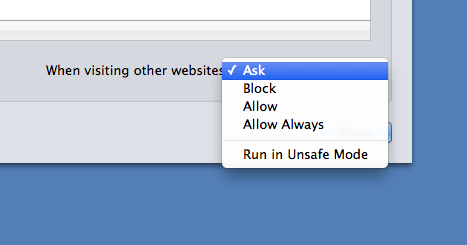
Installed Mavericks and all is fine. I use Safari and the question I have is that previous versions allowed me to disable Java. Now it just shows java script. What happened to this option? How can I check for Java on my machine?
Go to the Safari pref panel and look in the Security tab. Next to Internet plug-ins click the Manage Website Settings... button. You should see Java listed there as a plugin. If you select Java you can use the drop down at the bottom (When visiting other websites) to control what Java does on web pages. You can tell it to ask permission to run Java or just block Java entirely.
Safari Preferences --> Security, then click the button next to Internet Plug-Ins that says "Manage Website Settings". The Java option is there. It will show you the version installed and list the websites (if any) that are allowed to run Java.