
Got a tip for us?
Let us know
Become a MacRumors Supporter for $50/year with no ads, ability to filter front page stories, and private forums.
Mavericks using all my ram - 8GB
- Thread starter Quackers
- Start date
- Sort by reaction score
You are using an out of date browser. It may not display this or other websites correctly.
You should upgrade or use an alternative browser.
You should upgrade or use an alternative browser.
pencilcheck
macrumors member
Mavericks has employed a drastic different memory management, as you might have heard during the keynote also on their official website.
Basically Mavericks tries to use all memory as much as possible all the time by preloading app cache data to the RAM to speed up app speed and compress data on the RAM to accommodate for new apps you just opened for example.
That's why in activity monitor you get pressure instead of paging because now it is a question of how much more room of compression can they get before actually using the swap.
Basically Mavericks tries to use all memory as much as possible all the time by preloading app cache data to the RAM to speed up app speed and compress data on the RAM to accommodate for new apps you just opened for example.
That's why in activity monitor you get pressure instead of paging because now it is a question of how much more room of compression can they get before actually using the swap.

S.B.G
Moderator emeritus
Mavericks has employed a drastic different memory management, as you might have heard during the keynote also on their official website.
Basically Mavericks tries to use all memory as much as possible all the time by preloading app cache data to the RAM to speed up app speed and compress data on the RAM to accommodate for new apps you just opened for example.
That's why in activity monitor you get pressure instead of paging because now it is a question of how much more room of compression can they get before actually using the swap.
Fascinating. I didn't know any of that, details I mean. I just opened Activity Monitor and saw a whole new layout.
Thanks.

Thanks, yes I realise that (and heard about it in the keynote speeches).Mavericks has employed a drastic different memory management, as you might have heard during the keynote also on their official website.
Basically Mavericks tries to use all memory as much as possible all the time by preloading app cache data to the RAM to speed up app speed and compress data on the RAM to accommodate for new apps you just opened for example.
That's why in activity monitor you get pressure instead of paging because now it is a question of how much more room of compression can they get before actually using the swap.
However, it's having the opposite effect in slowing things down if activity monitor can't find enough ram to populate its processes tab, surely?
pencilcheck
macrumors member
Thanks, yes I realise that (and heard about it in the keynote speeches).
However, it's having the opposite effect in slowing things down if activity monitor can't find enough ram to populate its processes tab, surely?
Yes, if you are overloading the RAM with so many apps or tabs opening and actively using them all the time, then you will overpressure your RAM very quickly.
But this memory management assumes that you open a lot of apps but only uses a few at a time for a long time.
I've got 2 Safari tabs open and am downloading the Mavericks installer from the App Store. That's it! Nothing else.
Is that all Mavericks can handle before it slows down the opening of other apps?
I sincerely hope not or I'll be going back to 10.8.5 in a hurry 😀
Is that all Mavericks can handle before it slows down the opening of other apps?
I sincerely hope not or I'll be going back to 10.8.5 in a hurry 😀

pencilcheck
macrumors member
NewbieCanada
macrumors 68030
Never mind. Read more carefully and answered my own question.
However, I'm on an 8GB Macbook Air and have never had a memory problem since DP1
However, I'm on an 8GB Macbook Air and have never had a memory problem since DP1

Not an interesting sight exactly.
[URL=http://imageshack.us/photo/my-images/41/5uf4.png/][url=http://img41.imageshack.us/img41/6132/5uf4.png]Image[/url][/URL]
Uploaded with [URL=http://imageshack.us]ImageShack.us[/URL]
I haven't had this problem and I only have 4gb ram. Mavericks is almost always using almost all of it, and performance is always very snappy, and I haven't had issues with the activity monitor populating. I don't think your issue is due to memory management problems.
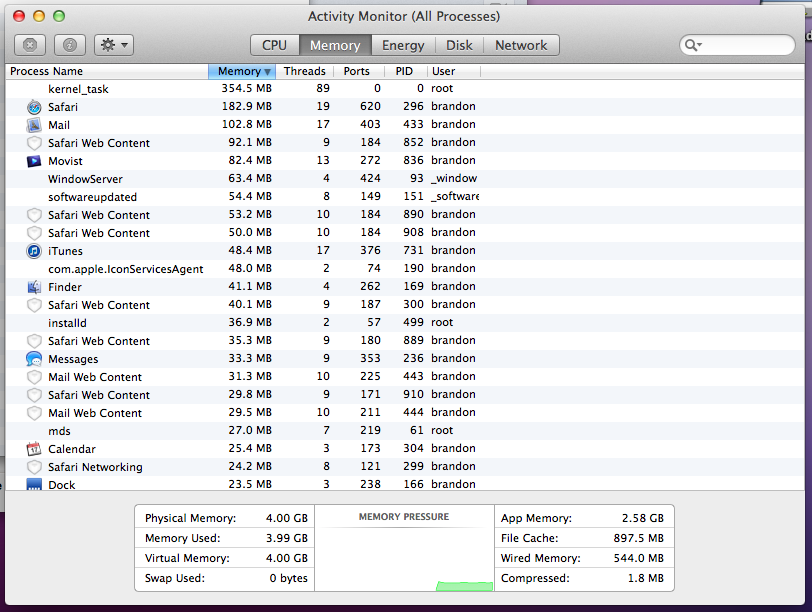
Here's mine right now:

whoknows87
macrumors 6502a
Mine has been downloading for about 2hrs now lol, and says 1hr to go.... is it supposed to take this long via App store , I don't remember it being that long for ML
Last edited:
That is what I would expect. In fact that is what was happening on my system until I rebooted.I haven't had this problem and I only have 4gb ram. Mavericks is almost always using almost all of it, and performance is always very snappy, and I haven't had issues with the activity monitor populating. I don't think your issue is due to memory management problems.
Here's mine right now: Image
As I say I will reboot again after the Mavericks installer download has completed and I have made a bootable USB from it.
I'll be back 😀
Of course, any other ideas in the meantime would be gratefully received 🙂

mfram
Contributor
Not an interesting sight exactly.
Most of your used memory is in the file cache. There's nothing wrong there. Don't worry about it. There's nothing to "fix". Notice how the "memory pressure" graph is low.
Remember: Free memory is wasted memory.
With all due respect, there is something to fix.Most of your used memory is in the file cache. There's nothing wrong there. Don't worry about it. There's nothing to "fix". Notice how the "memory pressure" graph is low.
Remember: Free memory is wasted memory.
If I open anything the coloured wheel appears for a second or so and the app doesn't open immediately.
I don't think that's how it's supposed to be. There was no delay in 10.8.5 when opening a new app with only 2 safari tabs open.
Edit my memory pressure graph is not even populated! (post 7)
I'm having the exact same issue.
When I loaded Mountain Lion previously I had over 6.5 of my 8 gigs ram free.
Now with Maverick I only have .5 of a gig free ram and no applications running at all except Chrome to post this?
Where has all my ram gone?
Read the posts in this thread. There's no problems. This is how the memory management is *supposed* to work. It uses all available ram for cache at all times, and frees and/or compresses memory as necessary. With the new memory compression, it almost never has to page out to swap so performance stays snappy.
The mavericks task manager tells you exactly what the memory is being used for on the memory tab. As you can see in my screenshot, almost all of it is being used for the file and app caches.
I have no problem with all the ram being used.
My problem is that nothing will open immediately. There's either a coloured wheel or a blue wheel before anything else will open.
For instance, when I click on the notifications link near the top right (when somebody has quoted a post of mine) the little box that drops down to show which message is there takes about 5 seconds just to show. It appears one line at a time. Actually it's half a line at a time.
This is not normal.
My problem is that nothing will open immediately. There's either a coloured wheel or a blue wheel before anything else will open.
For instance, when I click on the notifications link near the top right (when somebody has quoted a post of mine) the little box that drops down to show which message is there takes about 5 seconds just to show. It appears one line at a time. Actually it's half a line at a time.
This is not normal.
I have no problem with all the ram being used.
My problem is that nothing will open immediately. There's either a coloured wheel or a blue wheel before anything else will open.
For instance, when I click on the notifications link near the top right (when somebody has quoted a post of mine) the little box that drops down to show which message is there takes about 5 seconds just to show. It appears one line at a time.
This is not normal.
The speed issue you are experiencing doesn't necessarily have anything to do with the memory usage though... Correlation does not equal causation. From your screenshot your memory usage looks totally normal. I have a weaker machine with much less ram than yours and have experienced no such delays.
I haven't used safari's push notifications yet, but I get notifications from messages a lot when people IM me and they pop up instantly showing the message, and clicking it instantly brings up messages etc...
I don't get beachballs opening apps either (and I don't think I've ever seen the blue beachball). I've occasionally got a colored beachball (seemingly at random times), but only for a split second with no visible delays.
Last edited:
venturajep
macrumors newbie
I'm having a similar problem, but instead Kernal_data is hogging up to 500mb-1gb.
Any idea how to get rid of that. I have far less ram than in ML.
Any idea how to get rid of that. I have far less ram than in ML.
venturajep
macrumors newbie
kernel task is using about 539MB of ram on mine but I have no idea whether that is the norm for that item.
My download is finished and I've made a bootable USB of Mavericks so I'll reboot now and see if there is any improvement in my system.
Mine is also hovering around that same 500-600MB Ram usage.
I have never seen Kenel_data use so much ram. So there is defiantly a problem
I've now rebooted again and opened one or two apps and a couple of tabs in Safari.
Currently about 3GB of ram is in use and memory pressure is (obviously) low.
As a result opening and closing apps is snappy and lag-free. Much better now.
Maybe the download was causing my issues.
I'll keep an eye on ram use and lagginess over the next few hours/days.
Thanks for all the input people 🙂
Currently about 3GB of ram is in use and memory pressure is (obviously) low.
As a result opening and closing apps is snappy and lag-free. Much better now.
Maybe the download was causing my issues.
I'll keep an eye on ram use and lagginess over the next few hours/days.
Thanks for all the input people 🙂