Become a MacRumors Supporter for $50/year with no ads, ability to filter front page stories, and private forums.
What you are talking about is something that is still a rumor, and even if true, will happen in future CPUs. NOT NOW. Currently all i7s and i9s inside the new 2018 MBP have HT. We do not care what future CPUs will have because that is not what we are discussing here.

Cool but I made it clear that I was projecting ahead and that the real world tests we should be posting on this forum should offer users a clear picture of any benefits they can get from each tier upgrade offered today.
 
You are right, WE are not comparing anything. What *you* seem to be doing is having a hard time dealing with the fact that some of us are well justified in maxing out our hardware from a business standpoint. You are not going to win this no matter what you do so how about moving along to another point of contention?
Ok...I think we all get that you made a good choice going 2017 to 2018 but why do you keep insisting on derailing the thread with irrelevant data? Go make your own thread for 2017 to 2018 gains because this one isn't it.
 
I just went ahead and ordered the i9 despite how close it is to the i7 in some benchmarks.

My reasoning was the following:

- I’m going (almost) all in and ordered a machine with 32GB RAM, 2TB SSD and the i9 upgrade. I‘ve worked with external drives for years and simply can‘t stand them anymore for day-to-day work. When I‘m out shooting, I usually produce up to 200GB of RAW photos on a 3-4 days long trip and I want to make sure that I have enough space in future (photos and videos of upcoming cameras will very likely be bigger). I want to be able to post-process images and later on videos from various shootings internally and only copy them to an external drive for long-time storage / backups when I'm completely done. At the moment, I have to process all images from an external drive and this is often simply not convenient for me. My startup disk and data disk currently have 750GB of data, so I'm already close to 1TB. I'm regularly copying stuff to backup drives but I think that if I struggle already, 1TB wouldn't do me any good sooner or later.

- The price difference between this configuration and the same configuration without the CPU upgrade was ‘just’ 6.5%. One could rightfully argue that you have to look at the price for the CPU upgrade only but I’m planning to keep the machine for 4-5 years to come. With nothing being upgradable, the considerably small price difference at the time of purchase and me planning to use it for several years, was not a complete dealbreaker for me.

- The i9 is basically always at least as fast as the i7 (on software that isn’t perfectly optimised for the new processors yet) and sometimes up to 20% faster in the countless comparisons I’ve read / watched (post patch). So while it could be even faster overall compared to the i7, it's definitely not worse than the i7 but most of the time ahead of it.

- I’m into heavy photo editing like mentioned above (PSD files often being 5-10GB with 40-50 layers) and have started to do some 4k video editing. On my current machine (a 2013 model) it’s basically impossible to work with 4k files but once I have the new laptop, I guess I can finally dive deeper into video editing (will stick to FCPX). I’m also doing web development, InDesign work, etc. and have very often reached the limit of my current machine (my hate for the spinning beachball has never been bigger ;)). The i9 should reach higher short bursts compared to the i7 and will hopefully give me an even smoother experience when doing stuff that doesn't put the CPU under load for a long time.

- Apple will probably further optimise OSX (Mojave) and other software, maybe the gap between the i7 and i9 will widen a bit further. If not, the i9 will always be as fast or faster, imo (and based on the benchmarks that have been released so far).

- I like things to be as snappy as possible and with software getting more bloated and needing more resources in future, the i9 should make the machine feel faster than the i7 in a few years down the road. For me, it seems to be slightly more future-proof than the i7.

- Apparently, Intel will not integrate hyperthreading into i5 and i7 models anymore, only the i9 processors will still have this functionality. I wonder whether in a few years, people will prefer buying a used i9 over a used i7, simply because i9s have become the new standard. This thought is a bit far-fetched, of course, and hasn't influenced my decision at all, especially since I usually don't sell my machines but give them to family members when buying a new one for myself.

- I’m getting Apple Care at the end of the first year wherefore I don’t worry about the i9 running hotter than the i7 under load, for example. If it turns out that heat is a serious problem for this CPU in the current chassis, my gut feeling is that the machine will fail way before the three years of warranty are over.

- I also never do serious work with the laptop on my lap since I always work with a graphic tablet (even for non-photo stuff I use it as a mouse replacement). So again, the laptop running a bit hotter is not an issue for me.

- Last but not least, I‘ve already spent way too much time on forums, YouTube, etc. trying to find out which machine to get ;) The time I’ve spent on research has cost me a lot of time and money I could've saved by simply pulling the trigger two weeks ago and be done with it. Don‘t get me wrong, I‘m totally for saving some money / getting the best bang for the buck and the pre-purchase phase of doing research is definitely fun and enjoyable for me. The only big issue that held me back was throttlegate, I would not have bought a 2018 machine that is slower than the 2017 laptops. With this being resolved now, it's become a non-issue for me anymore. The chassis and cooling system have their limits thanks to Apple keeping the design sleek, thin and quiet, but I don't want a thicker, heavier or louder laptop and am OK with the compromise. Getting back to Windows is completely out of the question for me, I can't stand it at all and don't want to bother with antivirus stuff, etc. (I said good-bye to Windows over 15 years ago and have never looked back).

I can't wait getting my new toy in a few weeks and am happy to contribute to this thread with some tests (if it's still alive, then). Hopefully, Apple will have resolved the T2 issues (crashes, crackling sound) with a software / firmware update by then so that we can all fully enjoy our new machines (be it 13 inch or 15 inch).
 
Cool but I made it clear that I was projecting ahead and that the real world tests we should be posting on this forum should offer users a clear picture of any benefits they can get from each tier upgrade offered today.

You are still not making any sense. Even if it holds true and the Hyperthreading is removed from future i5 and i7's, jumping to an i9 does still not add any value TODAY. My i7 with hyper threading today will not lose its hyper threading when its removed from future models. Therefore my i7 with HT will continue to be on par as your i9 regardless of what they do in the future.
 
- The i9 is basically always at least as fast as the i7 (on software that isn’t perfectly optimised for the new processors yet) and sometimes up to 20% faster in the countless comparisons I’ve read / watched (post patch). So while it could be even faster overall compared to the i7, it's definitely not worse than the i7 but most of the time ahead of it.

- I’m into heavy photo editing like mentioned above (PSD files often being 5-10GB with 40-50 layers) and have started to do some 4k video editing. On my current machine (a 2013 model) it’s basically impossible to work with 4k files but once I have the new laptop, I guess I can finally dive deeper into video editing (will stick to FCPX). I’m also doing web development, InDesign work, etc. and have very often reached the limit of my current machine (my hate for the spinning beachball has never been bigger ;)). The i9 should reach higher short bursts compared to the i7 and will hopefully give me an even smoother experience when doing stuff that doesn't put the CPU under load for a long time.

- Apple will probably further optimise OSX (Mojave) and other software, maybe the gap between the i7 and i9 will widen a bit further. If not, the i9 will always be as fast or faster, imo (and based on the benchmarks that have been released so far).

- I like things to be as snappy as possible and with software getting more bloated and needing more resources in future, the i9 should make the machine feel faster than the i7 in a few years down the road. For me, it seems to be slightly more future-proof than the i7.

I hope you will like your new Macbook i9 and I'm sure you will do, but I'm afraid you're missing the point of this whole thread and those videos by Max. The laptop doesn't have an ability to take advantage of i9 in the first place because how Macbook is designed and basically, you will get almost the same experience whether you use i7 or i9.
 
  • Like
Reactions: Eason85 and Csayno
You are still not making any sense. Even if it holds true and the Hyperthreading is removed from future i5 and i7's, jumping to an i9 does still not add any value TODAY. My i7 with hyper threading today will not lose its hyper threading when its removed from future models. Therefore my i7 with HT will continue to be on par as your i9 regardless of what they do in the future.

Damn. So many words because you didn’t understand what I wrote.

You keep talking about how the i9 isn’t worth the money even if it saves a user a few minutes a day in productivity, but then you don’t mind wasting many minutes each day flaming on the internets.

My bet is that a few hundred bucks to upgrade to an i9 makes users more money than getting into internet fights.
 
I hope you will like your new Macbook i9 and I'm sure you will do, but I'm afraid you're missing the point of this whole thread and those videos by Max. The laptop doesn't have an ability to take advantage of i9 in the first place because how Macbook is designed and basically, you will get almost the same experience whether you use i7 or i9.

I totally get this thread ( :) )and basically the 10-20% of speed increase of the i9 over the i7 in some of the tasks I do, have made the overall price increase of 6.5% look OK to me. The problem with Max‘ video is that he is looking at the machines from a pure video editing point of view, that‘s not everyone‘s sole use case and doesn‘t give a complete picture.
 
It really depends on whether or not the task is memory-bound, i.e. whether or not 16GB RAM is a performance-limiter (bottleneck).

I can't imagine a Lightroom import would be memory-bound. Three (primary) things are occurring; copying files from one place to another, updating metadata, and generating previews. These tasks would be primarily I/O and processor-bound (unsure if GPU is used for previews/raw-processing).

Do we have some proof that lightroom is using more than 16GB RAM when importing/exporting pictures? When I'm working with my Canon 5D MK3 files I hardly get anything more than 11GB RAM usage.
 
Do we have some proof that lightroom is using more than 16GB RAM when importing/exporting pictures? When I'm working with my Canon 5D MK3 files I hardly get anything more than 11GB RAM usage.
I don't.

LR works fine importing photos on my 8GB RMB12. I don't recall the activity monitor info specifics but memory pressure remains green throughout.
 
I don't.

LR works fine importing photos on my 8GB RMB12. I don't recall the activity monitor info specifics but memory pressure remains green throughout.

The one thing that struck me as odd is that he attributes the significant gain of the i9 in Lightroom Export speed to having more memory. I don't think LR comes close to maxing out memory pressure during export, converting RAWs to JPEGs is essentially an intensive CPU task akin to encoding video. I export RAWs a lot so that increase is worth the upgrade.
 
The one thing that struck me as odd is that he attributes the significant gain of the i9 in Lightroom Export speed to having more memory. I don't think LR comes close to maxing out memory pressure during export, converting RAWs to JPEGs is essentially an intensive CPU task akin to encoding video. I export RAWs a lot so that increase is worth the upgrade.
So you went with the 16GB version?
 
The one thing that struck me as odd is that he attributes the significant gain of the i9 in Lightroom Export speed to having more memory. I don't think LR comes close to maxing out memory pressure during export, converting RAWs to JPEGs is essentially an intensive CPU task akin to encoding video. I export RAWs a lot so that increase is worth the upgrade.

The question then, since RAW conversions (whether as exports or generating previews) seems to remain largely a CPU intensive task, would not the TDP become the limiting factor and thereby tend to even out the i7 & i9 performance for long batches?
 
So you went with the 16GB version?

I got the 32GB i9 (it was in stock with a big discount), probably won't hit the memory limit in Lightroom, but will definitely hit it when layering a dozen 50MP images in Photoshop.

30 50MP cr2 files with the same set of adjustments exports in 1:12 (un-adjusted in 0:24) , CPU at 3 to 3.3 GHZ, 18GB RAM overhead the whole time (before, during, and after the export).

RE: deeddawg: I rarely export more than 150 images at a time, it might even out after 10 minutes of exporting, but the extra quick turbo boost on the i9 IMO is more beneficial to general Lightroom work like the Auto Mask brush and slider tweaking (cpu there goes up to 4.4-4.5 ghz when hitting the adjustments)
 
Last edited:
  • Like
Reactions: deeddawg
30 50MP cr2 files with the same set of adjustments exports in 1:12 (un-adjusted in 0:24) , CPU at 3 to 3.3 GHZ, 18GB RAM overhead the whole time (before, during, and after the export).

Any chance that you could send me over some of these files. I'd love to test out my system if the RAM is going to be exceeded.
 
I'd love to test out my system if the RAM is going to be exceeded.
Just realize that if the system feels it actually needs more ram than is physically installed it will first begin compressing lesser used portions, as well as swapping out the least-recently-used stuff to SSD.

Outside of an extreme example, Lightroom isn't going to do anything other than perhaps do the export a little slower. It's not going to "run into a wall" in terms of RAM.

If you really want to have fun, go grab the 60 Hasselblad X1D sample images in 100MB RAW format from DPreview. https://www.dpreview.com/sample-galleries/4234210046/hasselblad-x1d-sample-gallery/7117150997
[doublepost=1533729184][/doublepost]
30 50MP cr2 files with the same set of adjustments exports in 1:12 (un-adjusted in 0:24) , CPU at 3 to 3.3 GHZ, 18GB RAM overhead the whole time (before, during, and after the export).

RE: deeddawg: I rarely export more than 150 images at a time, it might even out after 10 minutes of exporting, but the extra quick turbo boost on the i9 IMO is more beneficial to general Lightroom work like the Auto Mask brush and slider tweaking (cpu there goes up to 4.4-4.5 ghz when hitting the adjustments)

Interesting that it bursts only to 3-3.3GHz during the 1:12 export yet bursts to 4.4-4.5GHz for the on-the-fly adjustments. Spec for the 2.9 i9 is up-to-4.8GHz and spec for the 2.6 i7 is up-to-4.3GHz. Would love to see direct comparison of the two cpus on the same set of RAWs. Is the CPU limiting itself to a percentage-of-max or is it an absolute figure. If a %-of-max, then the i7 ought to hit 4-4.2GHz in those operations, meaning the i9 would have a 7-9% speed advantage. How much value that represents to the user of course is entirely dependent on their workflow and how much time they're spending waiting on the system.
 
Last edited:
Just realize that if the system feels it actually needs more ram than is physically installed it will first begin compressing lesser used portions, as well as swapping out the least-recently-used stuff to SSD.

Outside of an extreme example, Lightroom isn't going to do anything other than perhaps do the export a little slower. It's not going to "run into a wall" in terms of RAM.

If you really want to have fun, go grab the 60 Hasselblad X1D sample images in 100MB RAW format from DPreview. https://www.dpreview.com/sample-galleries/4234210046/hasselblad-x1d-sample-gallery/7117150997
[doublepost=1533729184][/doublepost]

Interesting that it bursts only to 3-3.3GHz during the 1:12 export yet bursts to 4.4-4.5GHz for the on-the-fly adjustments. Spec for the 2.9 i9 is up-to-4.8GHz and spec for the 2.6 i7 is up-to-4.3GHz. Would love to see direct comparison of the two cpus on the same set of RAWs. Is the CPU limiting itself to a percentage-of-max or is it an absolute figure. If a %-of-max, then the i7 ought to hit 4-4.2GHz in those operations, meaning the i9 would have a 7-9% speed advantage. How much value that represents to the user of course is entirely dependent on their workflow and how much time they're spending waiting on the system.

The 3-3.3Ghz boost is when the system is getting heat-soaked from running export processes constantly, it does burst above 4 but just at the the moment you hit the export button.

When doing developing in Lightroom, you are not hitting it 100% of the time like in exports, and the CPU has time to cool down between intensive tasks, and when it's cooler it will burst to higher frequencies when asked, henceforth feeling pretty snappy when brushing and adjusting.... unfortunately it has never hit the 4.8 that Apple advertised, 4.5 is the highest I have seen. Going to be hard to 'benchmark' that workflow on i7 vs i9, but it's actually how you spend most of your time in LR.

Either way, compared to my 2012 i7 2.6Ghz, I am actually spending almost no time waiting in Lightroom on my i9, it was a misery of loading and beachballs on my 2012, I would say I've gained at least 30% productivity just in develop, not counting export times being ~50% of the 2012!

Was just messing around with Lightroom keeping an eye on the memory, with nothing running other than iStat menus and Little Snitch, it uses just a bit under 10GB memory, and does not ask for more then exporting/importing/developing. This amount of memory I also believe is based on your catalog size, it used 9-10Gb when my 47,000 image catalog was open, and 3.5Gb with my smaller 1000 image catalog was open. I'm pretty positive more memory is NOT going to make Lightroom exports faster as Max claims as it never asks for much more once your catalog is loaded. However if you work on giant catalogs having 32gb would definitely help reduce the need for swapping and compressing.

My raws are all client images, so can't really share them, but those Hasselblads are a good sample set, I downloaded a few and don't notice any difference in speed working in Lightroom vs 50mp Canon files. Anyone want to have an i7 vs i9 export race off? (my studio in Brooklyn is in a heat wave right now, with only 1 ton of cooling for 1000 square feet so I might be at a bit of a disadvantage there!)

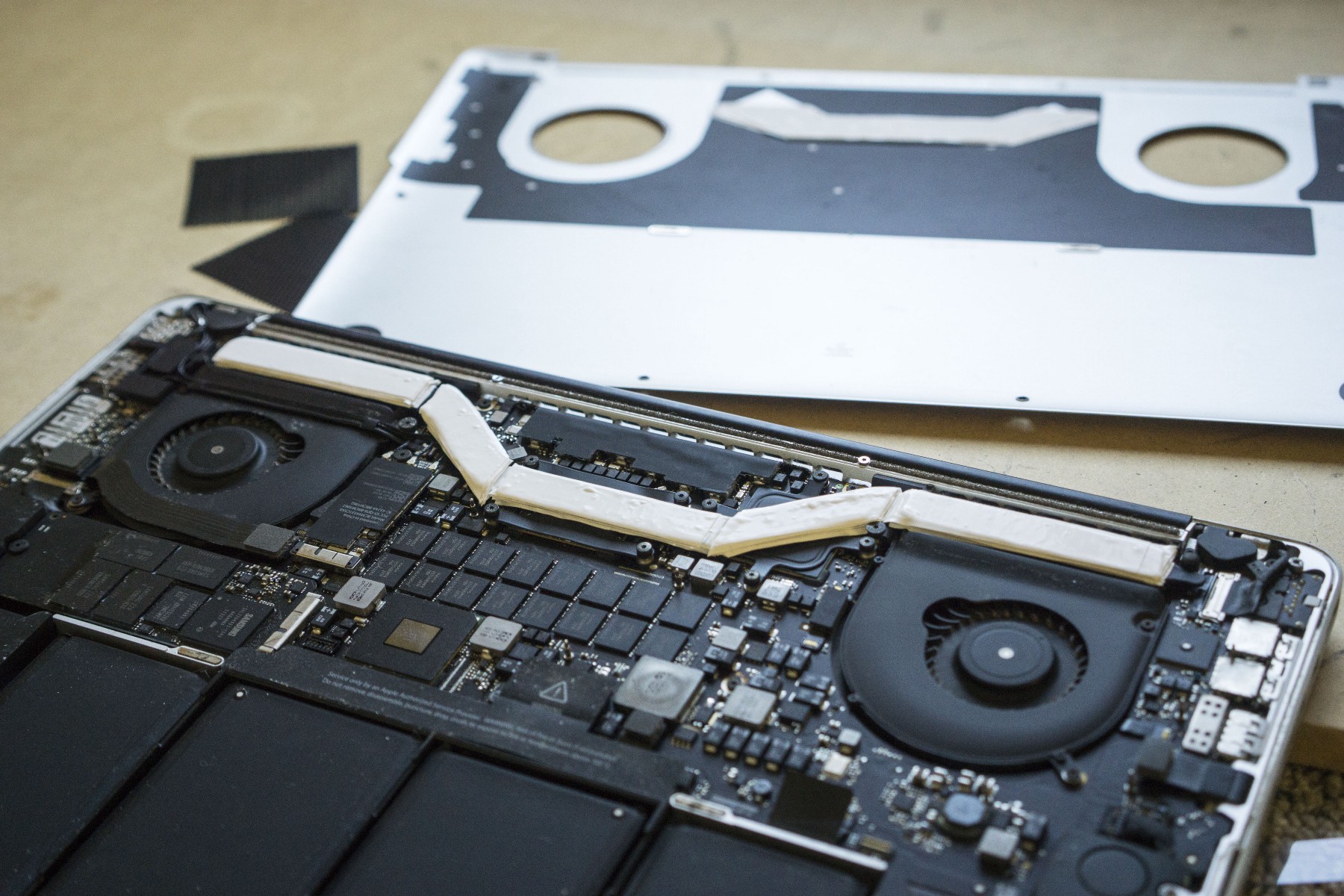
On another note, since my 2012 is now a spare computer well out of warranty, I'm going to try some thermal pads on the heat pipe like this guy (not going to drill holes though!), and see if it makes a significant difference on CPU temp.

1*ecP3FO4m8oSGOPD5IwsQrQ.jpeg
 
When doing developing in Lightroom, you are not hitting it 100% of the time like in exports, and the CPU has time to cool down between intensive tasks, and when it's cooler it will burst to higher frequencies when asked, henceforth feeling pretty snappy when brushing and adjusting.... unfortunately it has never hit the 4.8 that Apple advertised, 4.5 is the highest I have seen. Going to be hard to 'benchmark' that workflow on i7 vs i9, but it's actually how you spend most of your time in LR.

Good illustration on LR operations -- FWIW, I've had LR since Adobe bought Pixmantec and issued all Rawshooter licensees a LR v1.0 license. I'm a hobbiest though so my work volume isn't substantial.

Just for grins I may give a try sometime with those Hasselblad images on my 2012 quad-i7 mac mini and 2015 rMB12.
 
Good illustration on LR operations -- FWIW, I've had LR since Adobe bought Pixmantec and issued all Rawshooter licensees a LR v1.0 license. I'm a hobbiest though so my work volume isn't substantial.

Just for grins I may give a try sometime with those Hasselblad images on my 2012 quad-i7 mac mini and 2015 rMB12.

That's Lightroom from the OG!, I started using it around v4, and have noticed it get slower and slower every version. I do wish Adobe would put some effort into making LR run better instead of just tacking on new features (and bugs). Auto-import now beachballs for 30 seconds when importing an image in the latest version, but worked flawlessly since v4!
 
So I got thermal pads and Kryonaut in from Amazon today and used my 2012 2.6 Retina MBP as a guinea pig for throttle testing. Only had 3 strips of thermal pad, and 1mm was too thin to touch the cover. I concentrated on the CPU, GPU, and radiators; doubled up thermal pads and used up all I had, covering about 60% of the heat pipe. Did not put anything on the VRMs (if I knew where they were).

Also re-pasted with Kryonaut from the previous Arctic Silver 5. Wish I could have tested with factory paste, but I replaced that years ago!

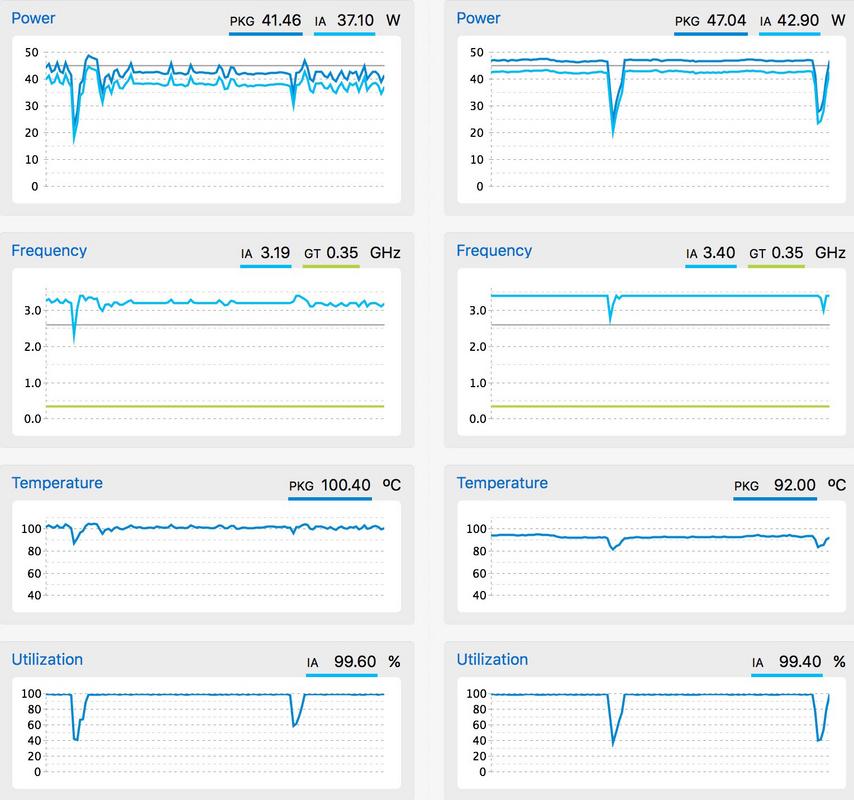
Here's the before and after Cinebench consecutive test results:

No pads with arctic silver 5: avg CB 544
Thermal pads and Kryonaut: avg CB 578

CPU frequency went from bouncing around 3.2 to rock solid full boost of 3.4.
CPU temps went from +/- 100C to around 92C (sitting on a wood desk)

Caviat: the bottom gets pretty hot, not burning hot, but hot.... however this makes cooling pads actually effective! I ran it sitting on a box fan and it ran solid 3.4 GHz and the temp dropped to a consistent 86C!

I ran all the test with fans full blast to eliminate the fan curve variable, but with auto fans it actually maintained 3.4 GHz at around 3000 RPM.

End lesson, if you're willing to take apart your MBP and deal with hot legs, you can get at least 10C temp drop (possibly 15-20+ C with full VRM and heat pipe coverage and a cooling pad) ... on my 2012 this translated to a 200 MHZ boost to max, but on a 6 core i9 capable of 4.8 it could in theory be huge!


Screen_Shot2018-08-10.jpg
 
Register on MacRumors! This sidebar will go away, and you'll see fewer ads.