Become a MacRumors Supporter for $50/year with no ads, ability to filter front page stories, and private forums.

brizna

macrumors newbie
Original poster
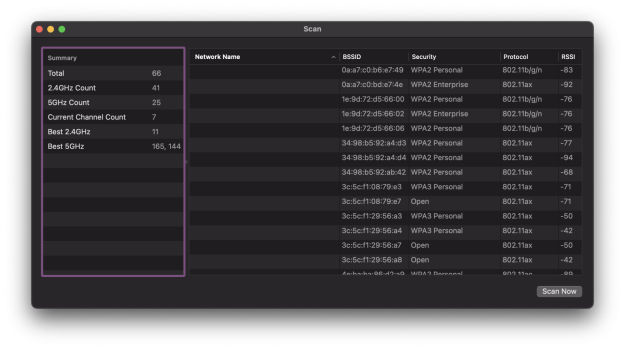
Can anyone with the 2023 MBP M2 Pro, please show the wifi scan window on the left side? I want to know if it reports best 6E channels (even if you do not have a 6E modem / wifi)

You can do the following: Option click the wifi menu icon > Open wireless diagnostics > [don't run the diagnostics] (menu bar item) Window - Scan > (wait for scan to complete)

Screenshot with cmd+shift+4 - spacebar

Thanks!

Mine doesn't display any despite me having a 6E wifi.
 

Attachments

  • Screenshot 2023-01-26 at 9.13.02 AM.png
    Screenshot 2023-01-26 at 9.13.02 AM.png
    377.9 KB · Views: 417
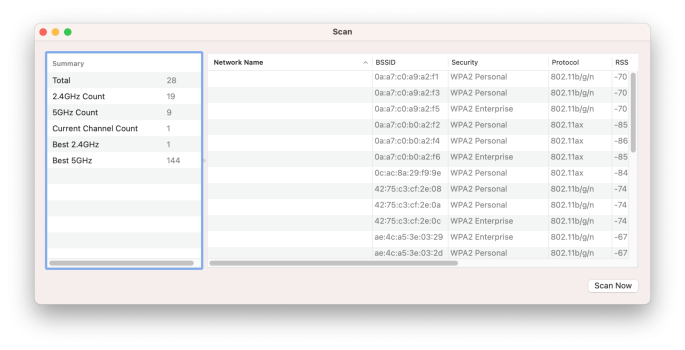
I don't have 6E yet - bit if it helps you diagnose, here's what I see on the Scan window with my 2023 16". (full specs are in my sig)
 

Attachments

  • Screenshot 2023-01-27 at 8.25.41 AM.png
    Screenshot 2023-01-27 at 8.25.41 AM.png
    556.9 KB · Views: 332
I don't have 6E yet - bit if it helps you diagnose, here's what I see on the Scan window with my 2023 16". (full specs are in my sig)
Thank you this helps a tiny bit

In the sense now I am more confident that MacBooks are not showing the count of 6 GHz band if it is zero

In my case I have 6E but it doesn’t show anything in SSIDs or scans
 
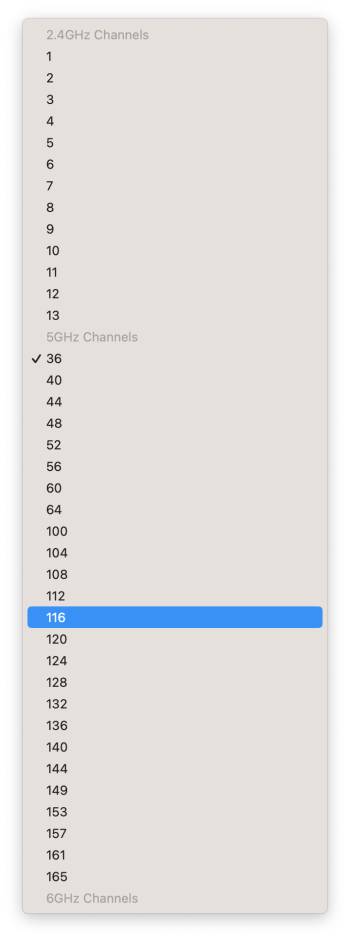
If anyone has successfully connected to a a 6Ghz can you please share the sniffer options (screenshot)

You can do the following: Option click the wifi menu icon > Open wireless diagnostics > [don't run the diagnostics] (menu bar item) Window - Sniffer > Channel

Screenshot with cmd+shift+4 - spacebar

Mine does not show any 6Ghz channels when I try to scroll further down!
 

Attachments

  • Screenshot 2023-01-29 at 10.28.21 AM.png
    Screenshot 2023-01-29 at 10.28.21 AM.png
    276.4 KB · Views: 172
Register on MacRumors! This sidebar will go away, and you'll see fewer ads.