

Become a MacRumors Supporter for $50/year with no ads, ability to filter front page stories, and private forums.

frosse

macrumors 6502a
Original poster
Sep 23, 2007
843
165
Sweden
I've been thinking about why MBPs SD card slot make the SD card visible. From a design perspective it's really ugly and doesn't at all go with Apple's sense of design. From a practical view it really isn't that good either since exposing the card may cause damage to it.

My guess is that Apple wants the SD card slot to be used for temporary things, such as transferring photos from a camera and not an permanent extra storage. A 32 GB SD memory costs about 70-90$ which to me is quite cheap to extend your internal storage space.

I think it's petty of Apple to do this, but as with a lot of their products they just want to make more money. Hopefully they will come to their senses and make a card slot that doesnt reveal the card, it's annoying.

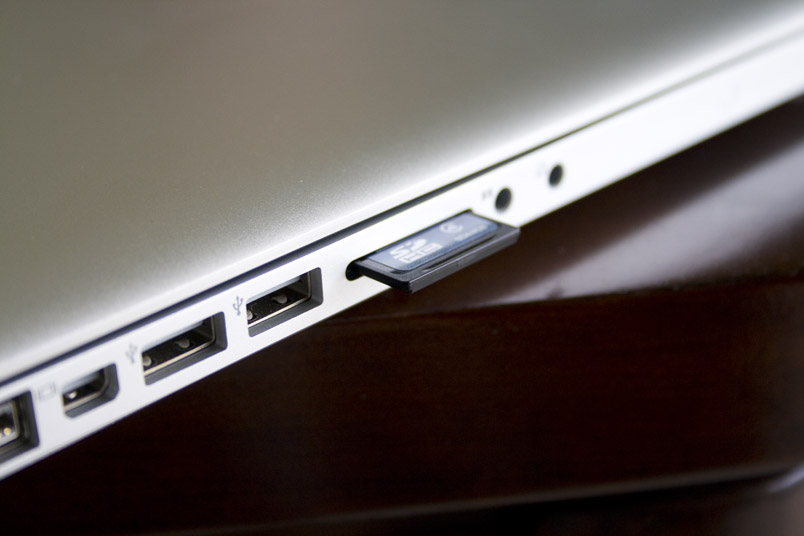
sd-card.jpg

sdcard.jpg
 
What's "petty" about it? If they really didn't want people using SD cards, they could've just as easily not put in an SD card slot at all. Then we would have had to resort to... well, what we were all doing before the card slot existed: using an external USB card reader.

I use the card slot quite a bit for my photography workflow. For me, having the card go in flush would actually be a bit of a hindrance: I'd have to dig into it all the time to eject and insert cards coming from my camera. I could eventually see the mechanism breaking if I weren't exceedingly careful. And as someone who's had to endure a few card failures, I really don't see it as a viable primary or permanent storage medium.

And that's with someone who knows how to spot the rampant fakes that flood the market. I can only imagine the complaints coming from people trying to use SD cards as a poor man's SSD, only to get burned by a knockoff, not realizing this, and blaming the MBP for it being unreliable.
 
My sisters VAIO has a perfect mechanism that hides the SD Card slot. Being a girl that takes a lot of photos she's never had a card fail or anything.

If not for a practical perspective they could atleast do it out of a design perspective. But that's only my opinion.
 
Why is it a 'petty' design? Its perfectly adequate. Many desktop computers allow them to stick out too - the main reasons being;

- So you know that one is inserted
- So its easer to remove
- Reduces mechanical parts that would normally make it 'spring' in/out
:)
 
My guess is that Apple wants the SD card slot to be used for temporary things, such as transferring photos from a camera and not an permanent extra storage. A 32 GB SD memory costs about 70-90$ which to me is quite cheap to extend your internal storage space.

70-90 dollars for 32 gigs? You can get a 500 gig hard drive for around 70-80 dollars at Newegg or even a 640 gig hard drive.

Unless you already have a huge hard drive in your laptop and can't go bigger cause it's not offered, that's a rip just to extend your internal storage space.
 
Why is it a 'petty' design? Its perfectly adequate. Many desktop computers allow them to stick out too - the main reasons being;

- So you know that one is inserted
- So its easer to remove
- Reduces mechanical parts that would normally make it 'spring' in/out
:)
I agree with this.

As I clicked on this thread there was actually an SD card in my MBP because I was temporarily transferring pictures I took yesterday.
 
when u plug in a flashdrive it doesnt get hidden. when u plug in the power cord it doesnt get hidden. when you plug in head phones they dont get hidden.

apple doesnt care what the computer looks like when things are plugged in. i have yet to see an ad where they show accessories like this plugged in. you're just complaining to complain.
 
I agree with the OP...but whatever....I Use one of the sd cards from sandisk that flips over and becomes a usb stick - genious invention btw. I guess now that I have a MBP I'm a bit more safe from breaking it, even it it does stick out somewhat. IMO they should have made the card go in all the way, or atleast more than it does now. But that's typical Apple...drop the cardbus thingy and let us have a sd slot for temporary use. Then you'll have all the comments like "get a cardreader" "get a usb hub" get a mini display port to dvi/vga/hdmi adapter, "get a FW hub" etc. etc....anyway I've already said too much - these "shortcomings" are things that I tend to try and ignore, otherwise I'd walk around being pissed all the time because I didn't get my way in every way. :)
 
It makes it easier to remove.

When they are all the way hidden into the machine using a sprint loaded slot sometimes it can be harder to get out.
 
Why is it a 'petty' design? Its perfectly adequate. Many desktop computers allow them to stick out too - the main reasons being;

- So you know that one is inserted
- So its easer to remove
- Reduces mechanical parts that would normally make it 'spring' in/out
:)
Well, you don't carry around your desktop computer, do you?


I does seem like I'm the only one having these complaints and sure, I can agree that a spring mechanism increase the risk of failure, but my sisters VAIO's card slot has been used A LOT and she's never had any issues. But what ever, just wanted to share my thoughts :)
 
I prefer my SD Cards sticking out, my previous HP made me have to grow out my nails just to get the card out, and even then it was pretty hard. Now I can just pinch the SD card and take it out.
 
If you want to use the slot for semi-permanent storage, you might be able to trim the SD card. A lot of SD cards have empty space in them, as this clear one illustrates.
http://www.amazon.com/dp/B000NLBVYK/
 
As an Amazon Associate, MacRumors earns a commission from qualifying purchases made through links in this post.
I could see them avoiding the spring loaded version for space reasons. Everything else that plugs in goes in around the same amount, but I could see having the SD card go in all the way will push that wall inside the MacBook back that much more, getting in the way of other things and perhaps changing the size of the MacBook.

I'd say compare how small the MacBook is compared to other laptops thathave a springloaded loader, and you'll see why Apple decided to do it that way. Of course, don't forget to factor in specs in the comparisons..
 
Perhaps....might happen to 1 out of a million users...What about all the camera that have spring loaded sd slots? They should convert to the Apple way shouldn't they..

1 out of a million? heh ya right. Maybe 1 out of 300 in the first 2 years at least. The springs would have to be small enough, they could easily become separated and become lost in the machine, and depending on how much you use them they'll eventually just snap. Think of bending a paperclip over and over, pretty soon it'll become brittle at a point and snap.
 
I could see them avoiding the spring loaded version for space reasons. Everything else that plugs in goes in around the same amount, but I could see having the SD card go in all the way will push that wall inside the MacBook back that much more, getting in the way of other things and perhaps changing the size of the MacBook.

I'd say compare how small the MacBook is compared to other laptops thathave a springloaded loader, and you'll see why Apple decided to do it that way. Of course, don't forget to factor in specs in the comparisons..

+1. Spot on explanation. Design of small/portable stuff is all about space. Every millimeter is important. Allowing the SD card to recess more into the MBP would have consumed precious space on the logic board and elsewhere. Simple design choice. Same basic reason you've got the C2D in the 13" MBP; no room for the discrete graphics, basically.
 
I prefer the Springloaded a lot more and a flush design would be nicer perhaps ... but at the end of the day, when you're usually sticking something into your laptop; if it were a USB (drive), or a Firewire drive, or a headphone, or an external monitor or to power it, it's gonna be sticking out, so does it really matter if this is as well.

If you hit it with force and ruined it, thats just carelessness on your part, you could ruin a usb drive the same way, but you likely would blame yourself if that happened.

Its something thats completely negligible in my opinion. If making space for it to be flush and adding that whole spring-mechanism, meant shifting things around or having less space for a battery or w/e ... i would be (unknowingly) annoyed.
 
I could see them avoiding the spring loaded version for space reasons. Everything else that plugs in goes in around the same amount, but I could see having the SD card go in all the way will push that wall inside the MacBook back that much more, getting in the way of other things and perhaps changing the size of the MacBook.

I'd say compare how small the MacBook is compared to other laptops thathave a springloaded loader, and you'll see why Apple decided to do it that way. Of course, don't forget to factor in specs in the comparisons..

This. I can't find a link right now, but someone did a teardown back when Apple first added the SD card slot, and there just physically isn't any more space for a slot that would allow the card to sit flush with the body of the laptop. Anyone else know what I'm talking about and where to find it?
 
Meanwhile, in Bizarro World:

"I just put an SD card in my MBP and now the spring's broken and I can't get it out, why didn't they just make it stick out a little? Petty, Apple. Real petty."

I don't mean this as a sleight on the OP but this is, hands down, the worst board I've ever been on in terms of complaints that are totally and utterly meaningless.
 
I could see them avoiding the spring loaded version for space reasons. Everything else that plugs in goes in around the same amount, but I could see having the SD card go in all the way will push that wall inside the MacBook back that much more, getting in the way of other things and perhaps changing the size of the MacBook.

I'd say compare how small the MacBook is compared to other laptops thathave a springloaded loader, and you'll see why Apple decided to do it that way. Of course, don't forget to factor in specs in the comparisons..

....just about every netbook has a recessed SD card slot... its all about the internal design...
 
Personally, I like the card slot as I use them (8 and 16gig cards) quite often as a way to swap files quickly and of course as many here have stated, to move pictures from my Canon camera to my MBP without having to connect any cords/wires (I hate wires!!)...
My Acer NetBook has two card slots and one is the kind with the spring action that takes the card all the way in...I have had a heck of a time trying to get cards out of that thing..I prefer having it stick out a bit so I can just grab it an pull it out...
btw, I also have the SD Card that flips to a USB adapter and I like it but they are expensive and very very flimsy...I prefer the card slot...:D
 
Register on MacRumors! This sidebar will go away, and you'll see fewer ads.