
Become a MacRumors Supporter for $50/year with no ads, ability to filter front page stories, and private forums.

MarkC426

macrumors 601
Original poster
I have an external backup drive which previously had multiple HFS+ partitions (cMP 10.14).
I need to make the drive one large partition for my iTunes backup which is now larger than 2TB.
I have deleted all other partitions, but can’t delete the (erased) OSX one, which is first in the pie…. 🤔

Is there any way to combine this without erasing all, maybe in terminal.
I wanted to do a smart update with SuperDuper, which won’t take long.

To do a full clone again, I estimate 36 hours….. 🫣
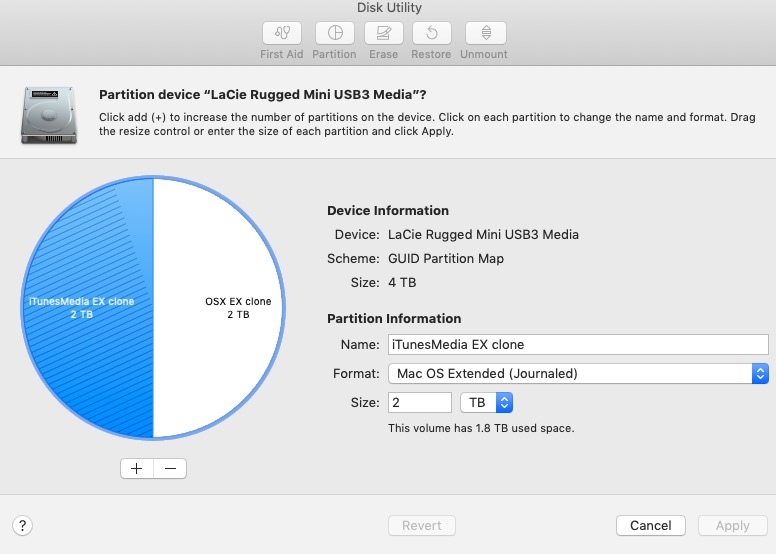

DiskUtility.jpeg
 
If OSX clone bootable, is there a small EFI partition? You may have to delete the EFI partition before the OSX clone partition can be deleted. What does diskutil have to say about your disk? Otherwise, it's erase, reformat, and restore data.
 
  • Like
Reactions: MarkC426
Partitions can only be deleted from the end of the drive, not the beginning. So if your OS X partition is before the one you want to keep -no, you can’t do it.

Copy the data you want to keep to another drive, erase, put data back.
 
  • Like
Reactions: MarkC426
If it was converted to APFS would it allow me to gain the extra space?
And is cloning from HFS+ to APFS advisable (I have done APFS to HFS+ without issue).
 
If both partitions are HFS+, you might give "iPartition" a try.
I've used it before and IT WORKS on HFS+ drives.

iPartition was developed by Coriolis, but with the advent of APFS, the market for it dried up.
Coriolis very generously put two of its products into an "online free museum" where it can be freely downloaded and used.

You can find it here:

Other than that, as has been previously suggested, the best way may be to get ANOTHER 2tb drive. Either another platter-based HDD or perhaps a 2tb SSD. Then, manually copy what you need from each partition to the new drive.
(these days, I'd recommend an SSD, even for backups. Cheapest ones are probably in the 2.5" SATA form factor, buy a bare drive and put it into a USB3.1 gen2 enclosure).

When done, erase the old drive into one partition (or whatever), use it for a backup drive or file storage, etc.

One last comment:
DO NOT use APFS on a platter-based HDD unless you have no other choice (such as using it for a time machine backup or for CarbonCopyCloner or SuperDuper). APFS can BADLY fragment platter-based HDD's.
 
  • Like
Reactions: !!! and MarkC426
Thanks all…. 👍
Tried erasing in Terminal, got rid of EFI and Unwanted partition, but then the free space was not visible in DU….🫣

So bit the bullet and wiped it…..😉
This is my ‘offsite copy’, I have it backed up to a drive at home already.

My largest data is TV shows, so have started ‘drag n drop’ copying a folder at a time.
Once I have a good chunk done, I will run SD with a smart update to fill in the holes.
 
Well finished getting everything onto my new drive.
20 hours total….. 😂
As stated above I ‘drag n dropped’ a good chunk while doing other stuff on my Mac over a number of days, then finished with a smart update from SD.
At least future updates will be quicker….didn’t help that my cMP only has USB 2.0….. 😬
 
Register on MacRumors! This sidebar will go away, and you'll see fewer ads.