Become a MacRumors Supporter for $50/year with no ads, ability to filter front page stories, and private forums.
Libreoffice is fine and I would go with it, unless you need it for the things Office does really well, like collaboration, edit tracking, Excel macros, etc. I would love to use a free open-source alternative, but they just don't cut it...

The standalone home version does some of that.
 
I have Microsoft Office Home & Student 2021 (now called Microsoft Home) and I have zero issues. I get frequent updates. In my view Microsoft 365 is and has always been legalized extortion like so many subscription based products.
 
Last edited:
  • Like
Reactions: Avril2108
Hi, MacRumors Users!

I have been using Microsoft 365 for the last two years, but having to pay for a yearly subscription is becoming really too expensive. Just received a reminder for next year's subscription.

I see there is an alternative, Microsoft Office Home, with lifetime validity, and am wondering if buying it would turn out to be less expensive in the end. The 365 is an annual subscription for MS, and it's extremely annoying to feel like a cash-cow being milked every 12 months by MS.

Has anyone in this forum bought/using the Microsoft Office Home version (for Mac) with lifetime validity and what has your experience been like? I am a translator (though I do not use the MS built-in translating feature which uses Google Translate, not very precise), and sometimes have to translate spreadsheets and text in Powerpoint. My translation work is not regular. Sometimes, none at all.

If anyone has had experience with the MOH, I would greatly appreciate hearing from you.

Thanks in advance!

"Lifetime validity" really is a misleading metric. Yes, you own the software and it will not require you to pay extra to use it indefinitely. However, as is the case with any given version of macOS or Mac, eventually, that version of Office won't get security updates (yes, perpetual license versions of Microsoft Office still get and need regular security patches).

It sounds like the kind of concern that should only impact IT departments, but it's really something that any user should care about.

Microsoft will typically support a version of non-subscription Office for Mac for 3-5 years. If you calculate the MSRP for a given version of Office over that same period of time and a Microsoft 365 Personal subscription, you actually save money on a Microsoft 365 Personal subscription (especially since you can activate it on up to 5 Macs or PCs and not just the 1).

You can do, as others have suggested, and go with a non-Microsoft alternative; though, considering many of the security vulnerabilities lie in the Office formats themselves and the kinds of media that can be embedded therein, you'll want to keep those apps up to date as well, lest you put yourself at risk
 
I’m being forced to use MS Office at work after years of GSuite. MSO is clunky and poorly aligned with Mac idioms in comparison. Granted, my word processing and spreadsheeting needs are only moderate. But I’m finding MSO high-friction.

LibreOffice, which I first downloaded years ago for a replacement at home, is far worse, though. It looks and feels and operates like a windows 2000 app. It might have been a decent substitute 15 years ago, but it’s not enjoyable to use now. Every time I open it I regret it.

YMMV if you’re not a heavy keyboard navigator or are already a heavy user of MSO’s keyboard shortcuts on Mac.

The iWork suite, by comparison, is merely inscrutable. It just doesn’t quite work like any other office suite, isn’t particularly discoverable, and repeatedly leaves me mystified.
 
My main complaint about LibreOffice is that the user interface and menu structure have some strange design choices. For example, in the spreadsheet, there's a single key combination to fill down (command-D, same as MS), but to fill right you have to manually select from two menus deep (with MS, you just do command-R).
True, command-r defaults to right justify. You can change it though using the Tool/Customize menu. I do that on a new install.
 
  • Like
Reactions: mdcmdcmdc
Thank you for taking the time to reply!
A reply I sent to maflynn: I would have liked to move to LibreOffice or OnlyOffice, but most of my clients send me documents in MS, so have to remain in the Microsoft sphere. Just a question: What happens when you receive MS documents? Are you able to open them using OnlyOffice and work on them (eventually saving them as MS documents for those who do not have OnlyOffice)? I am curious. Would appreciate knowing about your experience.

I haven't had any issues with opening and exchanging Word and Excel documents in and from LibreOffice with others. Even MS Office opens LibreOffice native documents nowadays - that should tell you something about its popularity.

LibreOffice Calc offers some formatting options that Excel seems to miss, on the other hand, and it results in slightly ugly looking Excel versions.

As far as OnlyOffice is concerned: personally I will not use it. There are some potential issues in regards to it being a Russian project and is developed by a Russian company that has allegedly attempted to obscure its Russian ties through shell companies.

For me that is reason enough to avoid it.
 
LibreOffice, which I first downloaded years ago for a replacement at home, is far worse, though. It looks and feels and operates like a windows 2000 app. It might have been a decent substitute 15 years ago, but it’s not enjoyable to use now. Every time I open it I regret it.

Very much disagree. As the expression goes: don't judge a book by its cover. I like LibreOffice, and love working in Calc.

Everyone can decide for themselves - it is open source and free. No strings attached 😎
 
  • Like
Reactions: Kayak49
Very much disagree. As the expression goes: don't judge a book by its cover. I like LibreOffice, and love working in Calc.

Everyone can decide for themselves - it is open source and free. No strings attached 😎

Not by its cover. Don’t get me wrong, I’m a big fan of FOSS in general. But with LibreOffice I find the UX clunky and unidiomatic on Mac, especially as a keyboard-oriented user. And there are just enough functions/bits of syntax that don’t translate well from Sheets/Excel to make switching between them or importing/exporting files painful.

But I absolutely agree that everyone can try it and decide for themselves!
 
Microsoft Office is missing a bunch of features on the Mac compared to the Windows versions of the apps. Over years of using Microsoft 365, there have been few meaningful additions in functionality, so the one-time purchase may be fine for a casual user.

LibreOffice and Apple iWork (Pages, Numbers, Keynote) do a fairly good job of covering basic office document functions and they can save to Microsoft Office file formats.

The other thing to consider is surveillance and AI training. By default, you can assume that Office will send all your work to its servers and it runs CoPilot to "assist" you in your work.
 
  • Like
Reactions: Avril2108
Thank you for taking the time to reply!
I would have liked to move to LibreOffice or OnlyOffice, but most of my clients send me documents in MS, so have to remain in the Microsoft sphere. Just a question: What happens when you receive MS documents? Are you able to open them using OnlyOffice and work on them (eventually saving them as MS documents for those who do not have OnlyOffice)? I am curious. Would appreciate knowing about your experience.

OnlyOffice's native format is the same .docx/.xlsx/etc, and I have found it to have the best compatibility among Office clones. I use my resume as my 1st benchmark for testing such clones and it is the only one that gets everything right.

Not sure the implications of OnlyOffice being Russian backed as others have mentioned. Right now I am not depending on it and rather just keeping it around to see if it will be an alternative if for whatever reason I can't use MS Office.

Right now I have on one Mac an older version MS OFfice Home Use I bought years ago and Office 365 on another Mac. I think the latter costs me $100/year which I more or less accept as a reasonable cost of doing business to know I am bug-for-bug compatible with the software most likely being used by my clients. On the flip side no real issues with the Home Use edition other than it doesn't get updates anymore. I got it for like $20 some years ago and keep it around because why not. On the other hand I believe I have the option to install Office 365 on any 5 computers, which is nice.
 
  • Like
Reactions: Avril2108
If you only use it on Mac, LibreOffice is more than sufficient for most needs.

If you also use mobile.... personally I ended up going with Numbers (I mostly need spreadsheets). Using Excel format with LibreOffice on Mac and some 3rd party office on mobile would work too, but most of them are subscriptions now (I do own a paid version of MobiOffice that still works fine).

Numbers is good because it offers a near full feature parity between laptop and mobile, and has an entry form functionality on the phone which I use a lot.
 
I see there is an alternative, Microsoft Office Home, with lifetime validity, and am wondering if buying it would turn out to be less expensive in the end. The 365 is an annual subscription for MS, and it's extremely annoying to feel like a cash-cow being milked every 12 months by MS.

Try SoftMaker Office. It's great and you still get it as a one-time purchase.
And its DOCX/XLSX support is just plain awesome, LibreOffice and its forks are just horrible at it.

(And there is a free iPhone version!)
 
Try SoftMaker Office. It's great and you still get it as a one-time purchase.
And its DOCX/XLSX support is just plain awesome, LibreOffice and its forks are just horrible at it.

(And there is a free iPhone version!)

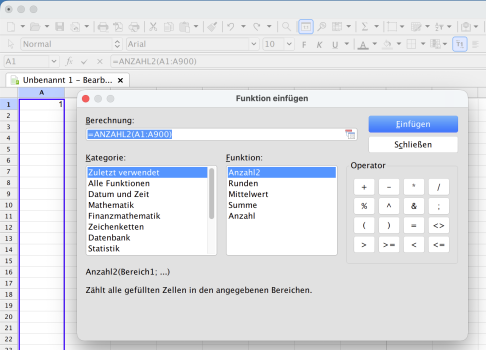
Does PlanMaker's function menu still use that limited one-line display? That is a deal-breaker to me.

1775382094506.png
 
Try SoftMaker Office. It's great and you still get it as a one-time purchase.
So going to the Softmaker's website shows Office NX which seems subscription only. Its a bit buried but you want the Office 2024 application which is a one time purchase.

I'm trying this out on CachyOS, and so far I'm liking how it looks and feels compared to OnlyOffice.
 
  • Like
Reactions: it wasnt me
It does. Here's the latest version on my Mac (German language):

Bildschirmfoto 2026-04-05 um 12.16.49.png

Have you suggested to change that? Because they obviously can't fulfill wishes they don't know about.
 
Register on MacRumors! This sidebar will go away, and you'll see fewer ads.