Just so you know, you can use Option-arrows, Fn-arrows, etc, much the same as on Windows machines.
Tried them. I remember it didn't work in all programs, or worked differently from program to program. Also, I couldn't find equivalents to Ctrl-Home, Ctrl-End, Ctrl-PageUp and Ctrl-PageDown. I found some work arounds, but again, they didn't work in all programs. Drove me nuts trying to remember which commands worked in which programs.
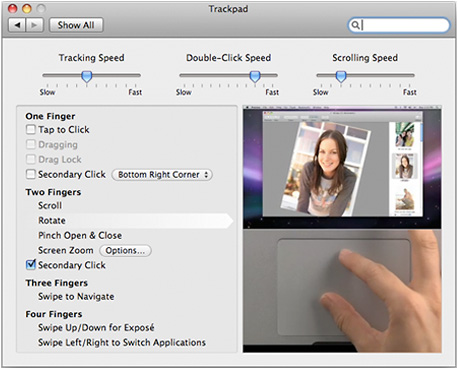
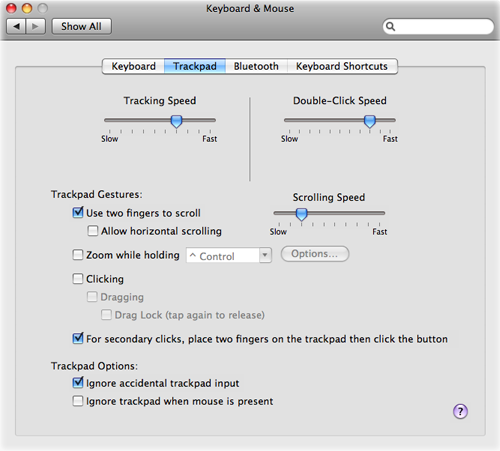
And click-lock (drag-lock Apple calls it,) is in the Trackpad preference panel pane.
Is this a new thing with the trackpads? So far I've only tried OSX with a mouse/trackball.
OS X has excellent system-wide zoom, MUCH better than Windows. But, yes, there is no simple way to resize all fonts system-wide like Windows' "DPI" setting. (Which is sad, since OS X has had the support for resolution independence for a few releases now.) There are a few hacks out there for this, but they're just that - hacks.
Zoom isn't what I want, since that only magnifies a portion of the screen at a time, and also magnifies graphical elements that I don't need magnified.
It's kind of puzzling how they've never done anything about this. And this carries over, for instance, into the Windows version of iTunes, where the fonts for the iTunes store can't be changed. I find myself squinting really hard trying to read the product descriptions and reviews. And I often wonder if everyone who works for Apple software division is under 40? Does everyone there have perfect 20/20 vision????
In the end, I could certainly learn to live with OSX if that were my only option, but since I'm so comfortable with Windows, why bother, especially when Windows 7 runs so perfectly on the iMac, and hopefully it runs well on the Air too, if I do get one.
But in any case, thank you very much for this info, I appreciate it much!