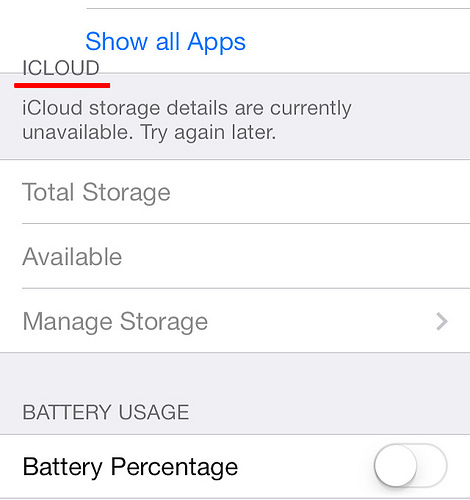
M mclin macrumors newbie Original poster Sep 21, 2013 #1 Set first your iphone 4 to airplane mode or disconnect your network, then go to Settings-General-Usage..Check "ICLOUD" if misalign in your phone... img02 by lutz14, on Flickr Last edited: Sep 28, 2013
Set first your iphone 4 to airplane mode or disconnect your network, then go to Settings-General-Usage..Check "ICLOUD" if misalign in your phone... img02 by lutz14, on Flickr
M mclin macrumors newbie Original poster Sep 23, 2013 #3 dictoresno said: It's perfectly aligned for me. Try rebooting. Click to expand... Did you set your phone to Airplane mode?... I done rebooting it but still the same, and also try thru itunes to restore but the text still misaligned.
dictoresno said: It's perfectly aligned for me. Try rebooting. Click to expand... Did you set your phone to Airplane mode?... I done rebooting it but still the same, and also try thru itunes to restore but the text still misaligned.
dictoresno macrumors 601 Sep 23, 2013 #4 mclin said: Did you set your phone to Airplane mode?... I done rebooting it but still the same, and also try thru itunes to restore but the text still misaligned. Click to expand... yes, i set airplane mode and its still perfectly fine.
mclin said: Did you set your phone to Airplane mode?... I done rebooting it but still the same, and also try thru itunes to restore but the text still misaligned. Click to expand... yes, i set airplane mode and its still perfectly fine.