

Got a tip for us?
Let us know
Become a MacRumors Supporter for $50/year with no ads, ability to filter front page stories, and private forums.
Missing space
- Thread starter qw3rty
- Start date
- Sort by reaction score
You are using an out of date browser. It may not display this or other websites correctly.
You should upgrade or use an alternative browser.
You should upgrade or use an alternative browser.


Try repairing the disk in disk utility by booting from an installation DVD. If the problem is what I think it is, that should fix it.

I'm not sure why you are seeing a difference now that you've confirmed the trash is empty. What does finder say you have free? Disk utility? I would believe the OS before I believe 3rd party shareware.
I downloaded the app you use to give it a try. The web site mentioned something about a new version for Lion. Still, it will only do 20 gig without payment. I finally found a small folder with only 26 gig of stuff and ran it to see what it looked like. I sort of like the display your app gives but I don't want to cough up 12 bucks right now. Instead I use freeware grand perspective to do much the same thing.
Attached is my screen shot from grand perspective. When I hover over the bigger rectangles, it tells me the name of the file that is using so much space.
I downloaded the app you use to give it a try. The web site mentioned something about a new version for Lion. Still, it will only do 20 gig without payment. I finally found a small folder with only 26 gig of stuff and ran it to see what it looked like. I sort of like the display your app gives but I don't want to cough up 12 bucks right now. Instead I use freeware grand perspective to do much the same thing.
Attached is my screen shot from grand perspective. When I hover over the bigger rectangles, it tells me the name of the file that is using so much space.
Attachments
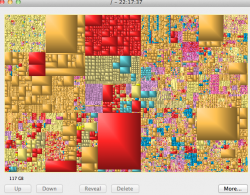

I see you are using logical size measure. Change to physical and re-scan. If that doesn't work...
I found some help over at sourceforge.
I don't particularly like the idea of running an application as root, but it turns out the "misc used space" is made up of stuff you don't have permission to see. Be sure to turn off file deletion in preferences so you aren't running grand perspective as root and accidentally delete a bunch of stuff. But wait. Before you go run it as root, are you running as an an admin account? I don't see nearly as much misc used space as you and I never run gp as root but I am logged in as an admin user.
I found some help over at sourceforge.
"Miscellaneous used space: All used space that is not accounted for by the size of the scanned files. This includes the following:
* Files that were not scanned, either because the scanned folder was not at the root of the volume, or the user did not have permissions to access all subfolders.
* Files that are excluded by the filter (if any).
* Disk space that is not accounted for because the Logical file size measure is used, which underestimates the space that files actually take up.
* Low-level file system data, needed to store amongst others the folder hierarchy."
To reduce the size of the miscellaneous used space, you can do the following:
1) Run GrandPerspective as "root" so you have permission to scan all files (see [1])
2) Use the Physical file size measure
3) Scan in the entire HD, without using a filter
I don't particularly like the idea of running an application as root, but it turns out the "misc used space" is made up of stuff you don't have permission to see. Be sure to turn off file deletion in preferences so you aren't running grand perspective as root and accidentally delete a bunch of stuff. But wait. Before you go run it as root, are you running as an an admin account? I don't see nearly as much misc used space as you and I never run gp as root but I am logged in as an admin user.

Register on MacRumors! This sidebar will go away, and you'll see fewer ads.