

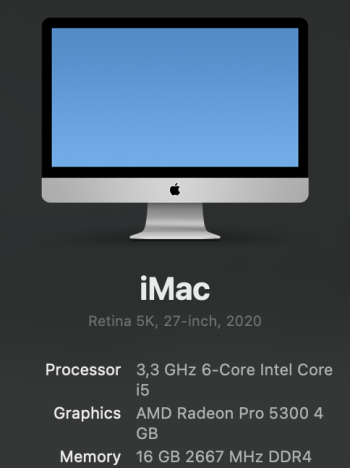
It has been about 5 years since I had a good overview of the different options from Apple. Especially the desktop computers. I'm using an iMac from 2020 daily with the stats shown on the attached picture and the 512GB storage option.
The iMac has started to feel a bit sluggish although it's not major problem since it's just a private computer and not work related. Said in another way I'm pretty confident I don't need any of the current high end stuff for my everyday tasks like web surfing, music, mails, word etc.
I have spent the last two weeks trying to get up to date with the current options that I can choose between and what makes the most sense cost/benefit wise since this is not a money maker machine for me but just the computer I use at home.
Having said that I do like quality and I'm not against spending a bit extra if I feel it will add to the overall satisfaction of the setup for years.
I'm a fan of the 27-inch retina display so the 24-inch iMac is not an option. I made that conclusion pretty quickly which resulted in me acquiring the 27-inch studio display already. I got it for a good price and I'm confident that it's the monitor I want for my setup. With regard to peripherals I have also found the ones I want. I have bought the newest trackpad with USB-C from Apple since I have enjoyed the trackpad option the last 5 years. The regular mouse option hasn't been missed at all. I have always used keyboards from Apple for the last +15 years which has been fine but this time I decided to try something different. I have thought about trying a really nice mechanical keyboard for a few years, but just never got around to it, so now is the time. The Nuphy AIR75 V3 has already been acquired which I'm very excited to use with the new computer soon.
All this to say it's the computer itself that I have had doubts about and I want to find the best option for me. Storage wise I bought the 512GB option for the iMac to be safe with storage headroom and the speed benefits of a bigger SSD. Having said that I can conclude that I haven't been using all that storage at all. Right now about 130GB is being used on my iMac so I feel like 256GB should be sufficient for the new computer since I don't plan on installing any storage demanding programs in the near future. With regard to ram I have attached a picture showing the current situation in 'Activity' Monitor' about memory pressure. Some "swap used" but not a lot and I never see the pressure graph turn into yellow/red so I imagine 16GB for the new system will be just fine?
After reading countless posts on this portal and on 'Reddit' I have made the conclusion that the basic Mac Mini M4 should be a great option for me. Considering my needs it seems like the basic Mac Mini M4 will provide a nice affordable way into the modern M-chip series and give me great up to date performance overall without any negative compromises that will frustrate me. Spending more money on ram, storage or even going all the way up to a Mac Studio model seems like a waste and won't provide any real speed benefits for the way I use my computer on a daily basis.
I have also looked into finding eg. a Mac Mini M2 Pro since I imagine that will be plenty capable too, but it's hard to find one of those at the same low price as a basic Mac Mini M4.
Have I arrived at the correct conclusion or does anybody have a few aspects that I have forgotten to consider before I make the purchase?
Let me hear your thoughts!

The iMac has started to feel a bit sluggish although it's not major problem since it's just a private computer and not work related. Said in another way I'm pretty confident I don't need any of the current high end stuff for my everyday tasks like web surfing, music, mails, word etc.
I have spent the last two weeks trying to get up to date with the current options that I can choose between and what makes the most sense cost/benefit wise since this is not a money maker machine for me but just the computer I use at home.
Having said that I do like quality and I'm not against spending a bit extra if I feel it will add to the overall satisfaction of the setup for years.
I'm a fan of the 27-inch retina display so the 24-inch iMac is not an option. I made that conclusion pretty quickly which resulted in me acquiring the 27-inch studio display already. I got it for a good price and I'm confident that it's the monitor I want for my setup. With regard to peripherals I have also found the ones I want. I have bought the newest trackpad with USB-C from Apple since I have enjoyed the trackpad option the last 5 years. The regular mouse option hasn't been missed at all. I have always used keyboards from Apple for the last +15 years which has been fine but this time I decided to try something different. I have thought about trying a really nice mechanical keyboard for a few years, but just never got around to it, so now is the time. The Nuphy AIR75 V3 has already been acquired which I'm very excited to use with the new computer soon.
All this to say it's the computer itself that I have had doubts about and I want to find the best option for me. Storage wise I bought the 512GB option for the iMac to be safe with storage headroom and the speed benefits of a bigger SSD. Having said that I can conclude that I haven't been using all that storage at all. Right now about 130GB is being used on my iMac so I feel like 256GB should be sufficient for the new computer since I don't plan on installing any storage demanding programs in the near future. With regard to ram I have attached a picture showing the current situation in 'Activity' Monitor' about memory pressure. Some "swap used" but not a lot and I never see the pressure graph turn into yellow/red so I imagine 16GB for the new system will be just fine?
After reading countless posts on this portal and on 'Reddit' I have made the conclusion that the basic Mac Mini M4 should be a great option for me. Considering my needs it seems like the basic Mac Mini M4 will provide a nice affordable way into the modern M-chip series and give me great up to date performance overall without any negative compromises that will frustrate me. Spending more money on ram, storage or even going all the way up to a Mac Studio model seems like a waste and won't provide any real speed benefits for the way I use my computer on a daily basis.
I have also looked into finding eg. a Mac Mini M2 Pro since I imagine that will be plenty capable too, but it's hard to find one of those at the same low price as a basic Mac Mini M4.
Have I arrived at the correct conclusion or does anybody have a few aspects that I have forgotten to consider before I make the purchase?
Let me hear your thoughts!
Last edited:


