
Become a MacRumors Supporter for $50/year with no ads, ability to filter front page stories, and private forums.

MikkelAD

macrumors regular
Original poster
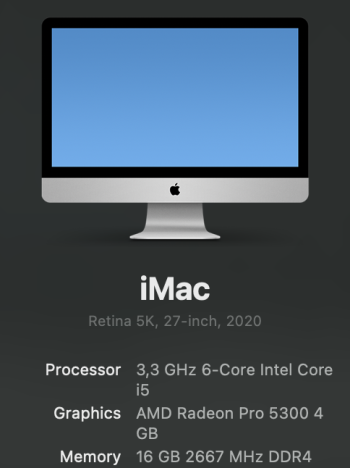
It has been about 5 years since I had a good overview of the different options from Apple. Especially the desktop computers. I'm using an iMac from 2020 daily with the stats shown on the attached picture and the 512GB storage option.

The iMac has started to feel a bit sluggish although it's not major problem since it's just a private computer and not work related. Said in another way I'm pretty confident I don't need any of the current high end stuff for my everyday tasks like web surfing, music, mails, word etc.

I have spent the last two weeks trying to get up to date with the current options that I can choose between and what makes the most sense cost/benefit wise since this is not a money maker machine for me but just the computer I use at home.

Having said that I do like quality and I'm not against spending a bit extra if I feel it will add to the overall satisfaction of the setup for years.

I'm a fan of the 27-inch retina display so the 24-inch iMac is not an option. I made that conclusion pretty quickly which resulted in me acquiring the 27-inch studio display already. I got it for a good price and I'm confident that it's the monitor I want for my setup. With regard to peripherals I have also found the ones I want. I have bought the newest trackpad with USB-C from Apple since I have enjoyed the trackpad option the last 5 years. The regular mouse option hasn't been missed at all. I have always used keyboards from Apple for the last +15 years which has been fine but this time I decided to try something different. I have thought about trying a really nice mechanical keyboard for a few years, but just never got around to it, so now is the time. The Nuphy AIR75 V3 has already been acquired which I'm very excited to use with the new computer soon.

All this to say it's the computer itself that I have had doubts about and I want to find the best option for me. Storage wise I bought the 512GB option for the iMac to be safe with storage headroom and the speed benefits of a bigger SSD. Having said that I can conclude that I haven't been using all that storage at all. Right now about 130GB is being used on my iMac so I feel like 256GB should be sufficient for the new computer since I don't plan on installing any storage demanding programs in the near future. With regard to ram I have attached a picture showing the current situation in 'Activity' Monitor' about memory pressure. Some "swap used" but not a lot and I never see the pressure graph turn into yellow/red so I imagine 16GB for the new system will be just fine?

After reading countless posts on this portal and on 'Reddit' I have made the conclusion that the basic Mac Mini M4 should be a great option for me. Considering my needs it seems like the basic Mac Mini M4 will provide a nice affordable way into the modern M-chip series and give me great up to date performance overall without any negative compromises that will frustrate me. Spending more money on ram, storage or even going all the way up to a Mac Studio model seems like a waste and won't provide any real speed benefits for the way I use my computer on a daily basis.

I have also looked into finding eg. a Mac Mini M2 Pro since I imagine that will be plenty capable too, but it's hard to find one of those at the same low price as a basic Mac Mini M4.

Have I arrived at the correct conclusion or does anybody have a few aspects that I have forgotten to consider before I make the purchase?

Let me hear your thoughts!

Screenshot 2026-01-23 at 18.12.14.pngScreenshot 2026-01-23 at 18.45.09.png
 
Last edited:
Yeah, seems like it would be sufficient.

I recently had my 'PC' die on me. A Mac really but PC as in desktop computer for everything that isn't strictly work and requiring a particular kind of high performance (as well as modularity - in case some component fails and I need to be back up and running same-day).

So the Mac that died on me was the 2013 Trashcan Mac Pro Xeon 6-Core, D500 GPUs with maximum RAM and 3rd party storage. I had no complaints about the performance for the tasks it was doing.

The M4 Mini 10-core I got to replace it: even in Rosetta-"Emulation" it has proven to be much faster (several times, or feels like it anyway) so I'm rather satisfied with the speeeeeeeeeeeed. I opted for maximum RAM (32 GB) and reasonable level of storage (2TB).
Not sure how the M4 Pro stacks up but I got the impression it wouldn't run quite as cool to the touch and I'm kinda all-burned out on hot-running computers requiring cooling utilities to keep the fan noise down and fans from ramping up and down all the time.

The downside of upgrading now of course is that you'll come in at the raw end of Tahoe. I hope you like being a paying beta tester. 🙂
 
I agree. I recently had to replace a computer and made the decision to get the M2Pro Mini (if you can find one) to avoid being sucked into the Tahoe maestrom. More than enough to meet needs.
 
The base M4 mini will suite your needs for years to come.

Of note, after telling myself I didn't need it, I bought a M4 mini a couple of days ago when they were at $399. If you have a MicroCenter nearby and they have any in stock that's going to be your lowest price anywhere.

I haven't seen anyone post that their M4 mini came with Tahoe. Mine is 2 days old so they're still shipping/selling them with Sequoia 15.6.1 installed. The MacBook Pro M4 series was released with Sequoia and I imagine if you bought one new today from Apple it'll come with Sequoia as well, not Tahoe.
 
Last edited:
It has been about 5 years since I had a good overview of the different options from Apple. Especially the desktop computers. I'm using an iMac from 2020 daily with the stats shown on the attached picture and the 512GB storage option.

The iMac has started to feel a bit sluggish although it's not major problem since it's just a private computer and not work related. Said in another way I'm pretty confident I don't need any of the current high end stuff for my everyday tasks like web surfing, music, mails, word etc.

I have spent the last two weeks trying to get up to date with the current options that I can choose between and what makes the most sense cost/benefit wise since this is not a money maker machine for me but just the computer I use at home.

Having said that I do like quality and I'm not against spending a bit extra if I feel it will add to the overall satisfaction of the setup for years.

I'm a fan of the 27-inch retina display so the 24-inch iMac is not an option. I made that conclusion pretty quickly which resulted in me acquiring the 27-inch studio display already. I got it for a good price and I'm confident that it's the monitor I want for my setup. With regard to peripherals I have also found the ones I want. I have bought the newest trackpad with USB-C from Apple since I have enjoyed the trackpad option the last 5 years. The regular mouse option hasn't been missed at all. I have always used keyboards from Apple for the last +15 years which has been fine but this time I decided to try something different. I have thought about trying a really nice mechanical keyboard for a few years, but just never got around to it, so now is the time. The Nuphy AIR75 V3 has already been acquired which I'm very excited to use with the new computer soon.

All this to say it's the computer itself that I have had doubts about and I want to find the best option for me. Storage wise I bought the 512GB option for the iMac to be safe with storage headroom and the speed benefits of a bigger SSD. Having said that I can conclude that I haven't been using all that storage at all. Right now about 130GB is being used on my iMac so I feel like 256GB should be sufficient for the new computer since I don't plan on installing any storage demanding programs in the near future. With regard to ram I have attached a picture showing the current situation in 'Activity' Monitor' about memory pressure. Some "swap used" but not a lot and I never see the pressure graph turn into yellow/red so I imagine 16GB for the new system will be just fine?

After reading countless posts on this portal and on 'Reddit' I have made the conclusion that the basic Mac Mini M4 should be a great option for me. Considering my needs it seems like the basic Mac Mini M4 will provide a nice affordable way into the modern M-chip series and give me great up to date performance overall without any negative compromises that will frustrate me. Spending more money on ram, storage or even going all the way up to a Mac Studio model seems like a waste and won't provide any real speed benefits for the way I use my computer on a daily basis.

I have also looked into finding eg. a Mac Mini M2 Pro since I imagine that will be plenty capable too, but it's hard to find one of those at the same low price as a basic Mac Mini M4.

Have I arrived at the correct conclusion or does anybody have a few aspects that I have forgotten to consider before I make the purchase?

Let me hear your thoughts!


View attachment 2598481View attachment 2598494

For your needs, I recommend the following:


Mac mini M4 (basic)
16GB RAM
512GB SSD storage (internal)


Good luck on your purchasing decision.


richmlow
 
Have you backed up your system, re-formated the HD and reinstall the OS? This may refresh you system and allow you to keep it longer. If you do decide to replace it, think about a refurbished M4, a lot cheaper and comes with a warranty. You could still use your display with the new system. As others have said the M4 with 16 GB Ram and 512GB SSD is GREAT.
 
The M4 mini is the right choice. And at $499 shipped or $450 refurbished from BestBuy or $399 at Microcenter (if you can pick it up) it’s a phenomenal deal. The machine is so much faster in day to day use than what you’re using right now and it’ll last quite a lot longer.

I’ve paired mine with a 24” 1440p 300Hz monitor and scrolling is sublime. I wish I had retina just a tad but at the distance it sits I can’t tell that much and it literally doesn’t make a difference for any video. I find the 24” screen paired with 1440p plenty of room for windows while presenting slightly better PPI.

Anyway, you will not regret going with the M4 mini. It’s a truly one of the best machines Apple has ever made.
 
For your needs, I recommend the following:


Mac mini M4 (basic)
16GB RAM
512GB SSD storage (internal)


Good luck on your purchasing decision.


richmlow
Hi, I agree 100% with your recommendation, that spec is exactly what I went for on my Mac mini M4 choice.
This thing is a powerhouse, I have to confess I have now removed the 512 GB Drive (which was more than adequate to begin with) and replaced it with a third party 2TB Drive after watching 'How To' videos, (piece of cake).
 
I used to get the best Mac I could afford and use it for as long as possible. Now I get what I need for now and for the near future. The smaller investment means I can upgrade more often. I get a bigger percentage of the investment back when selling the old machine, upgrades don’t make enough difference, but newer hardware does. I spend more time on newer equipment than if I future proof when buying, and have something faster on average for less overall cost.

My M4 Pro Mini has an external 2TB SSD permanently attached, sitting behind a monitor. Speed critical files are on the internal drive, but most is fine on the external. This isn’t the first Mac the drive has been attached to. If I had a lot of speed critical files, I would get an external Thunderbolt device. Much more flexible and economical to have storage that can move to new machines.

I think you are right to get the base Mac Mini with no upgrades.
 
Thanks for the answers so far everybody. I live in Denmark so sadly I don't have the same opportunities as those of you from USA. I can't acquire the basic Mac Mini M4 dirt cheap 🙂

Because of VAT the basic Mac Mini M4 is about $840 from Apple in Denmark. Crazy expensive and unfortunately they don't have a "refurbished"-section either. If I use the education store or get it home from Germany I can get it down to $680-$700.

With regard to upgrading the storage I guess the same logic as back in 2020 still applies. Bigger capacity results in better overall speed. That being said I'm still wondering though if I will be able to detect that in the way I use it. I understand that the 512GB option will have better read/write speeds reducing bottlenecks in heavy workflows like for large file transfers and video editing because of the extra NAND-chips. That's just so far away from how the computer will be used.

As mentioned earlier I like quality and spending a bit extra for a nicer overall experience is definitely something I'm willing to do. Especially because I plan on keeping this setup for at least 3 years and most likely 5+.

I'm also a sucker for a good deal, so when I recently came by an opportunity of buying the basic Mac Mini M4 Pro at a 20% discount I felt the temptation to just go for it and be done with searching for the absolute most logical solution 😅
 
Last edited:
Hi, I agree 100% with your recommendation, that spec is exactly what I went for on my Mac mini M4 choice.
This thing is a powerhouse, I have to confess I have now removed the 512 GB Drive (which was more than adequate to begin with) and replaced it with a third party 2TB Drive after watching 'How To' videos, (piece of cake).
Why did you not choose the 256gb version which is cheaper ?
 
Thanks for the answers so far everybody. I live in Denmark so sadly I don't have the same opportunities as those of you from USA. I can't acquire the basic Mac Mini M4 dirt cheap 🙂

Because of VAT the basic Mac Mini M4 is about $840 from Apple in Denmark. Crazy expensive and unfortunately they don't have a "refurbished"-section either. If I use the education store or get it home from Germany I can get it down to $680-$700.

With regard to upgrading the storage I guess the same logic as back in 2020 still applies. Bigger capacity results in better overall speed. That being said I'm still wondering though if I will be able to detect that in the way I use it. I understand that the 512GB option will have better read/write speeds reducing bottlenecks in heavy workflows like for large file transfers and video editing because of the extra NAND-chips. That's just so far away from how the computer will be used.

As mentioned earlier I like quality and spending a bit extra for a nicer overall experience is definitely something I'm willing to do. Especially because I plan on keeping this setup for at least 3 years and most likely 5+.

I'm also a sucker for a good deal, so when I recently came by an opportunity of buying the basic Mac Mini M4 Pro at a 20% discount I felt the temptation to just go for it and be done with searching for the absolute most logical solution 😅
Can you not just get it from Amazon de?
 
Can you not just get it from Amazon de?
Yes I can order in Germany, but right now via the cheapest retailer I'll have to pay $700. That being said I have seen that sometimes refurbished models get listed by some of these retailers, so hopefully I'll find a decent deal within a couple of weeks 🤞🏼
 
The base model Mini "will not be enough".

It may seem like enough for now, but as time passes, you will quickly discover the shortcomings.

16gb of RAM will be the greatest problem, because the RAM isn't expandable.
24gb is better, if available.
However, I consider 32gb to be "the new baseline" for anyone buying a Mac who will be expecting the same performance 5-7 years down the line that they see when new today.

The SSD *IS* "replaceable", but it's a do-it-yourself job that will likely void the warranty.
There are several threads here about those who have done it, replacing the 256gb SSD with a 2tb 3rd-party SSD bought from China.

I got my own m4 Mini with 32gb of RAM and a 1tb SSD out-of-the-box from Apple.
I bought through their "online, refurbished" store, though they probably don't have that where you are.

But again... if you buy the base version, I predict that you will regret it sooner or later.
Probably... sooner.
 
I have to agree with getting 24GB of RAM at minimum. I don't mess with video editing, software development or anything else like that. I do run three monitors with Safari open on two of them, one for surfing websites and the other for watching Youtube. I usually have Solitare open on the third monitor and also open up Finder or documents on that monitor. I am using an average of 17 GB of RAM.

Some websites use quite a bit of memory compared to other websites. Gmail and Facebook are two websites that use more memory.

From past experiences with a 2010 and 2018 Mac mini, having more RAM keeps them from slowing down after a few years of OS upgrades.
 
Yes I can order in Germany, but right now via the cheapest retailer I'll have to pay $700. That being said I have seen that sometimes refurbished models get listed by some of these retailers, so hopefully I'll find a decent deal within a couple of weeks 🤞🏼
Not sure what your point is? $700 or €618 or £520 is the standard price, it's not crazy expensive - it is what it is.

You might shave £80 or €92 or $108 off it on a sale price, but it's hardly a huge saving, at this point just wait for the M5 & pay the 'crazy expensive' price for that.

Remember the folks in the US sometimes have sales tax on the rrp (not shown), whereas in the EU & UK it's included.

It'll drive you mad constantly comparing EU & US pricing, especially with apple.
 
The base model Mini "will not be enough".

It may seem like enough for now, but as time passes, you will quickly discover the shortcomings.

16gb of RAM will be the greatest problem, because the RAM isn't expandable.
24gb is better, if available.
However, I consider 32gb to be "the new baseline" for anyone buying a Mac who will be expecting the same performance 5-7 years down the line that they see when new today.

The SSD *IS* "replaceable", but it's a do-it-yourself job that will likely void the warranty.
There are several threads here about those who have done it, replacing the 256gb SSD with a 2tb 3rd-party SSD bought from China.

I got my own m4 Mini with 32gb of RAM and a 1tb SSD out-of-the-box from Apple.
I bought through their "online, refurbished" store, though they probably don't have that where you are.

But again... if you buy the base version, I predict that you will regret it sooner or later.
Probably... sooner.

I have to agree with getting 24GB of RAM at minimum. I don't mess with video editing, software development or anything else like that. I do run three monitors with Safari open on two of them, one for surfing websites and the other for watching Youtube. I usually have Solitare open on the third monitor and also open up Finder or documents on that monitor. I am using an average of 17 GB of RAM.

Some websites use quite a bit of memory compared to other websites. Gmail and Facebook are two websites that use more memory.

From past experiences with a 2010 and 2018 Mac mini, having more RAM keeps them from slowing down after a few years of OS upgrades.
Thanks for the inputs. Upgrading to 24GB ram definitely seems like a potential useful upgrade. If I were to upgrade anything on the base Mac Mini M4 I think it would be that option. At least compared to upgrading the storage which just doesn't make much sense in my situation when I'm quite far off even utilising 256GB on the iMac.
If I for some odd reason end up needing a good chuck of storage in 2 years(I can't imagine for what) then a Samsung T7 seems like a simple and affordable solution.
 
Not sure what your point is? $700 or €618 or £520 is the standard price, it's not crazy expensive - it is what it is.

You might shave £80 or €92 or $108 off it on a sale price, but it's hardly a huge saving, at this point just wait for the M5 & pay the 'crazy expensive' price for that.

Remember the folks in the US sometimes have sales tax on the rrp (not shown), whereas in the EU & UK it's included.

It'll drive you mad constantly comparing EU & US pricing, especially with apple.
I never said $700 was crazy expensive. I said the $840 directly from Apple is and especially compared to the $399 from Microcenter. I know why they have cheaper prices and I don't have sleepless nights over it. I'm just looking to find the optimal solution for me and if I can find a eg. refurbished base Mac Mini M4 for $625 or below then I think that's nice.

Don't you worry I'll find the best solution for me shortly 👍🏼
 
  • Love
Reactions: _Mitchan1999
Good day folks, just wondering if any of you running the M4 Mini has come across this glitch. I am running Tahoe and updated to the latest version that came out yesterday 26.3 (25D122) and it all went well.

As a routine at the end of the day, opposed to powering off in the drop down Menu, I tend to let it auto sleep.
This morning I noticed the LED light flashing and the machine would not boot (which normally would Wake with a keyboard or mouse gesture) giving the impression the machine is in deep sleep mode and would not wake no matter what I tried.

Eventually the only solution that worked was the Restored method by hooking it up in DFU mode to another machine.
As I am very new to actual Mac machines, I find this method a bit convoluted to say the least and wondered if there is another easier way to get it back to normal.

Now I am a bit reluctant to let it auto sleep overnight just incase the same happens again.
I came across an article that states 'Extended Sleep duration on the Mac mini M4 can lead to Wake failures.
You may have to disable Automatic Sleep in Energy Saver options and enable 'Prevent Auto Sleep when display is off'.

Feeling somewhat jaded at the moment.
Cheers.
 
Last edited:
!!! Update !!!

I thought I would report back with an update. Not that I expect anyone to particularly care, but maybe someone in the future will have an easier time finding the optimal solution for them after reading about my experience.

As described earlier I got offered a Mac Mini M4 Pro at a 20% discount which I actually ended up buying knowing that it would be overkill for my use case. I didn't unpack it just like I hadn't setup the already acquired Studio Display. Nevertheless I had second thoughts and kind of regretted my purchase of the Mac Mini M4 Pro and actually sold it again shortly after. Just too much money to spend for no logical reason when I could be fine with another model at 1/2 or less of the price.

I started to look for a secondhand basic Mac Mini M4 which should be enough for my everyday tasks as discussed in this thread. I found a good offer, but ended up getting scammed by a private seller. Quite a bummer, yet my own fault in the end even though I took precautions. Back to the drawing board and then it suddenly hit me. Maybe the 24" iMac could be a solution although it would be a smaller display compared to the 27" I was already using. After reading about numerous people who found going down in display size a good experience I began to look for a 24" iMac M4 and then luck suddenly stroke me.

I was able to purchase an opened but never used iMac M4 with 10/10 CPU/GPU, 24GB ram and 1TB storage at a 50% discount. One of three identical machines that an electronics store had taken back within a returning period. Of course I couldn't pass on the awesome deal and went for it. While waiting for the new iMac I managed to sell my unopened Studio Display and luckily ended up not loosing any money by having bought the Studio Display and Mac Mini M4 Pro in the first place.

There is a bit more to the story, but all this just to say that earlier this week I received the new 24" iMac and I have spend the last two days setting it up while transferring files from the old 27". So here is my current setup and I have never been happier about my overall computer setup at home.

IMG_5761.JPG


The new 24" iMac is absolutely fantastic and I don't regret the smaller screen at all. After having used it just for a few days I have actually thought about that I should have made this switch years ago. Likewise with the mechanical keyboard which has been a great experience so far. I have been missing out on that front for a few years as well, but better late than never.

It has been quite the journey to get here, but I'm sure I will enjoy this setup for many years so all worth it in the end!
 
Register on MacRumors! This sidebar will go away, and you'll see fewer ads.