

I feel that this may have started since I activated iCloud Drive. I am not sure if I can actually reverse this on my doc or desktop folders.
Text Recovery Converter? I searched and I do not think I have a file like that. I have the 365 office account and it is up to date.
Thoughts? I obviously cannot easily rewrite some files that were ~50 pages long.
Thanks
edit:
I have figured out how to open photos or docx files by doing this:
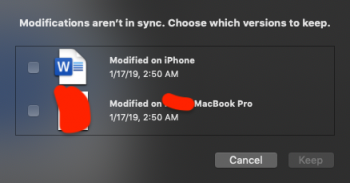
Docx files I open the files through Preview and I check the bottom option using "modified" on the macbook than my iphone. After I do this option, I close preview and then the docx normally opens in Word again. This should not be required.
Keep in mind, I NEVER modified any of these files on my iphone, there seems to be an issue from iCloud always downloading and uploading all the time.
.jpg files: I open them in Safari and I receive this similar error. I click the bottom modified on macbook and press keep... then the photo opens normally in preview again.
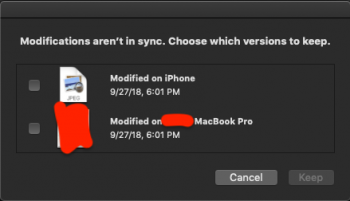
Has anyone had this issue before? It's clearly an iCloud / Drive issue. No idea how to resolve this myself, Apple support could not resolve it besides that I figured out how to make the files open.
Word experienced an error trying to open the file.
Try these suggestions.
* Check the file permissions for the document or drive.
* Make sure there is sufficient free memory and disk space.
* Open the file with the Text Recovery converter.
(temporaryfile.docx)
Text Recovery Converter? I searched and I do not think I have a file like that. I have the 365 office account and it is up to date.
Thoughts? I obviously cannot easily rewrite some files that were ~50 pages long.
Thanks
edit:
I have figured out how to open photos or docx files by doing this:
Docx files I open the files through Preview and I check the bottom option using "modified" on the macbook than my iphone. After I do this option, I close preview and then the docx normally opens in Word again. This should not be required.
Keep in mind, I NEVER modified any of these files on my iphone, there seems to be an issue from iCloud always downloading and uploading all the time.
.jpg files: I open them in Safari and I receive this similar error. I click the bottom modified on macbook and press keep... then the photo opens normally in preview again.
Has anyone had this issue before? It's clearly an iCloud / Drive issue. No idea how to resolve this myself, Apple support could not resolve it besides that I figured out how to make the files open.
Last edited: