Become a MacRumors Supporter for $50/year with no ads, ability to filter front page stories, and private forums.

esteban2526

macrumors newbie
Original poster
Hi,
my girlfriend has an iMac (last generation) with Leopard and has created many users (5)(for all familiy)
she has created : password while installation (=PW1 => master-PW?))
after -> for any user
user1->PW2
user2-> PW3 etc
She is user2 and now she must give the "session"-PW (= the same as master-PW) every time when she open any Internet-connection (mail.app + Safari) (after every newstart)

Now we have changed the master-PW with the installation-CD of Leopard.
May - the problem is the same!
How we can stop this situation. She don't want give every time the Passwort.
Anyone an idea ??
Thanks advance
Esteban
 
You have all these type of passwords in macosx:
Administrator account
Master Password - if you setup the File Vault
every user password
Key Chain password
Maybe you have something running that requires the administrator or master password to authenticate.
I'll first check all the system preferences and the accounts, security settings, and the firewall.

What type of account she has?
Administrator, standard, guest, shared?
________
herbal vaporizers
 
Last edited:
You have all these type of passwords in macosx:
Administrator account
Master Password - if you setup the File Vault
every user password
Key Chain password
Maybe you have something running that requires the administrator or master password to authenticate.
I'll first check all the system preferences and the accounts, security settings, and the firewall.

What type of account she has?
Administrator, standard, guest, shared?

I don't know .. while installation she has created the Password from his son as administrator-password (?) (the Mac was byed for his son!) .. after she has created accounts for every member of family !

Now she gives your password at startup ... and every time when she is starting any internet-connection - she must give the Password, which was created at first while installation (the password from his son)

I have tried to change the Admin-Password (?) with the installation-CD of Leopard ... the password was changed successfully !
But the problem is always the same ... every time she must give the "session-password" to open any internet-connection. (I think - in english is the keychain-password ) (she works with a french version !)
How she can register this password for all the time for her sessions ???

Thanks for your help !
Esteban
 
Check in your System Preferences

It seems like you have your Network connection set to ask for your admin password.

Check in your Network preferences then click on the "Advanced..." button and see if you can disable in the 802.1X tab the Login setting by cicking on the "disable Login 802.1X" button.

To be able to change any Preferences you need to enter the Admin password first click on the lock icon located in the left bottom section of the Preferences Window.

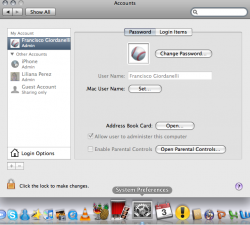
You can check how every account was setup in the System Preferences: Accounts.

English tip: the past for buy is bought.
________
uhwh warehouse
 

Attachments

  • Picture 7.png
    Picture 7.png
    136.8 KB · Views: 97
  • Picture 5.png
    Picture 5.png
    108.2 KB · Views: 92
  • Picture 6.png
    Picture 6.png
    89.3 KB · Views: 92
Last edited:
(thank you for the english-course) (I'am german ... )

I have posted your answer to here .. she lives a lot of kilometres from me ... I can't change/verify by myself now.
But - was is strange .. it's only her account with this problem. No other user at this Mac has this problem!
She is making a lot of thing as this Mac ... and very often .. she told me ... I don't know, what I was doing ... know I have a lot of problems ...
so .. I don't know, what she has changing ..
Thanks for your help !
Esteban (in the great Alpes from France !)
 
I haven't ANY answer from her ... :-(((((
all the time it was very urgent ...
and now ... no news from her !! :-(
keep you posted when I have news !
 
Register on MacRumors! This sidebar will go away, and you'll see fewer ads.