Become a MacRumors Supporter for $50/year with no ads, ability to filter front page stories, and private forums.

Dave Felix

macrumors 6502a
Original poster
January 2013 will make 2 years with my Mac.. I know people who've had Mac's for years.. I only have about 14 GB of music and I mainly use it for web browsing and email so I dont beat on it..What are things I can do to speed up my mac?

Thanks in advance.,😱
 
If you don't see anything that fixes your problem in the link the other poster provided, more info would be helpful. What are the specs of your computer? What exactly seems slow to you?

My first inclination is to suggest a RAM upgrade and a SSD, but that may be a waste of money depending on your usage.
 
I will try that link out.. and I tend to let my Mac run for a week or two before actually shutting it off or restarting it.. I was told that isnt the best either. Last night it just seemed like the animations when you minimize a browser seemed slow and iPhoto seem to lag.. could just happen that one time who knows. But I want to know how to clean it up because I've had it for almost two years and havent done anything for it. Rather safe than sorry, I dont have another 1600 at the moment haha

15-inch Mind 2010
2.66 GHz i7, 4 GB DDR3, im running 10.7.4

"MacBookPro6,2" for all the specs
 
I will try that link out.. and I tend to let my Mac run for a week or two before actually shutting it off or restarting it.. I was told that isnt the best either.
There's nothing wrong with running for weeks or months at a time without shutting down or restarting.
 
I will try that link out.. and I tend to let my Mac run for a week or two before actually shutting it off or restarting it.. I was told that isnt the best either. Last night it just seemed like the animations when you minimize a browser seemed slow and iPhoto seem to lag.. could just happen that one time who knows. But I want to know how to clean it up because I've had it for almost two years and havent done anything for it. Rather safe than sorry, I dont have another 1600 at the moment haha

15-inch Mind 2010
2.66 GHz i7, 4 GB DDR3, im running 10.7.4

"MacBookPro6,2" for all the specs

when is "slow" take not of whats going on in activity monitor, see what processes are using alot of CPU usage and how much RAM is in use during those "slow" periods
 
There's nothing wrong with running for weeks or months at a time without shutting down or restarting.

According to the apple store genius he said I should kill it every week or two. Also he said something about me moving the Mac while it sleeps can also cause problems..I never heard that before.


when is "slow" take not of whats going on in activity monitor, see what processes are using alot of CPU usage and how much RAM is in use during those "slow" periods

I made an appointment with the genius bar today...I turned my Mac on and before ten minutes of IDLE time I only had 9.0MB of free ram. What the ****? It takes 15 minutes for safari and mail application to maximize... THEY ARE ALREADY RUNNING IN THE BACKGROUND. I'm still warranty so I'll see what they say Monday. I hardly even use my Mac...I'm mainly on my iPad.

Thanks for all the replies.
 
According to the apple store genius he said I should kill it every week or two. Also he said something about me moving the Mac while it sleeps can also cause problems..I never heard that before.
Both are false. It's important to remember than "Genius" is only their job title, and not necessarily an indication of their knowledge, experience or expertise.
 
I turned on my computer and after a few minutes im down to 9.0MB of free memory.. that cant be normal.. any suggestions?
 
I turned on my computer and after a few minutes im down to 9.0MB of free memory.. that cant be normal.. any suggestions?
Mac OS X manages your memory automatically, and can use all memory that you have available. Also, there's more to the picture than free memory, as inactive memory is also free for apps to use. You don't need to worry about memory unless you have page outs.

To determine if you can benefit from more RAM, launch Activity Monitor and click the System Memory tab at the bottom to check your page outs. Page outs are cumulative since your last restart, so the best way to check is to restart your computer and track page outs under your normal workload (the apps, browser pages and documents you normally would have open). If your page outs are significant (say 1GB or more) under normal use, you may benefit from more RAM. If your page outs are zero or very low during normal use, you probably won't see any performance improvement from adding RAM.

Mac OS X: Reading system memory usage in Activity Monitor

 
Mac OS X manages your memory automatically, and can use all memory that you have available. Also, there's more to the picture than free memory, as inactive memory is also free for apps to use. You don't need to worry about memory unless you have page outs.

To determine if you can benefit from more RAM, launch Activity Monitor and click the System Memory tab at the bottom to check your page outs. Page outs are cumulative since your last restart, so the best way to check is to restart your computer and track page outs under your normal workload (the apps, browser pages and documents you normally would have open). If your page outs are significant (say 1GB or more) under normal use, you may benefit from more RAM. If your page outs are zero or very low during normal use, you probably won't see any performance improvement from adding RAM.

Mac OS X: Reading system memory usage in Activity Monitor


I've checked and its at 1.5mil. In the apple store my computer ran fine (go figure) but I may downgrade back to snow leopard. I think I like it a little better anyhow. Thanks studios.
 
Last edited:
Since it is clear I can benefit from more ram from minimum usage.. what websites are good sites to purchase from ram? I was thinking crucial.

2ynorqg.png
 
Last edited by a moderator:
Could you repost an Activity Monitor screenshot with the tab set to All Processes instead of My processes please? Your active memory count and page-outs are awfully high for someone with just a few apps open. More ram will speed things up but there seems to be something else going on.🙄
 
Could you repost an Activity Monitor screenshot with the tab set to All Processes instead of My processes please? Your active memory count and page-outs are awfully high for someone with just a few apps open. More ram will speed things up but there seems to be something else going on.🙄
If you read the post before yours, you'll see the OP already upgraded to 8GB of RAM.
 
Yup but if something else is eating up all his RAM then the problem might come back later no?
Viewing all the processes won't necessarily help, since the page outs could have occurred at any time since the last restart, but the high memory utilization may not be occurring at the time of the screen shot. That's why it's better to restart, which resets page outs to zero, then track page outs under normal workload. Certainly, it's possible that a particular app is a memory hog, but catching that in a screen shot isn't assured. Still, I usually recommend using "All Processes" instead of "My Processes" for any Activity Monitor usage.
 
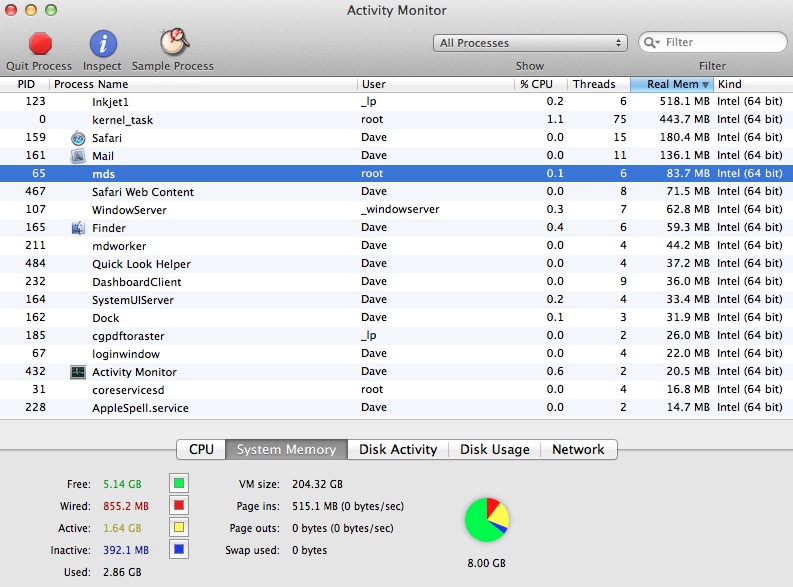
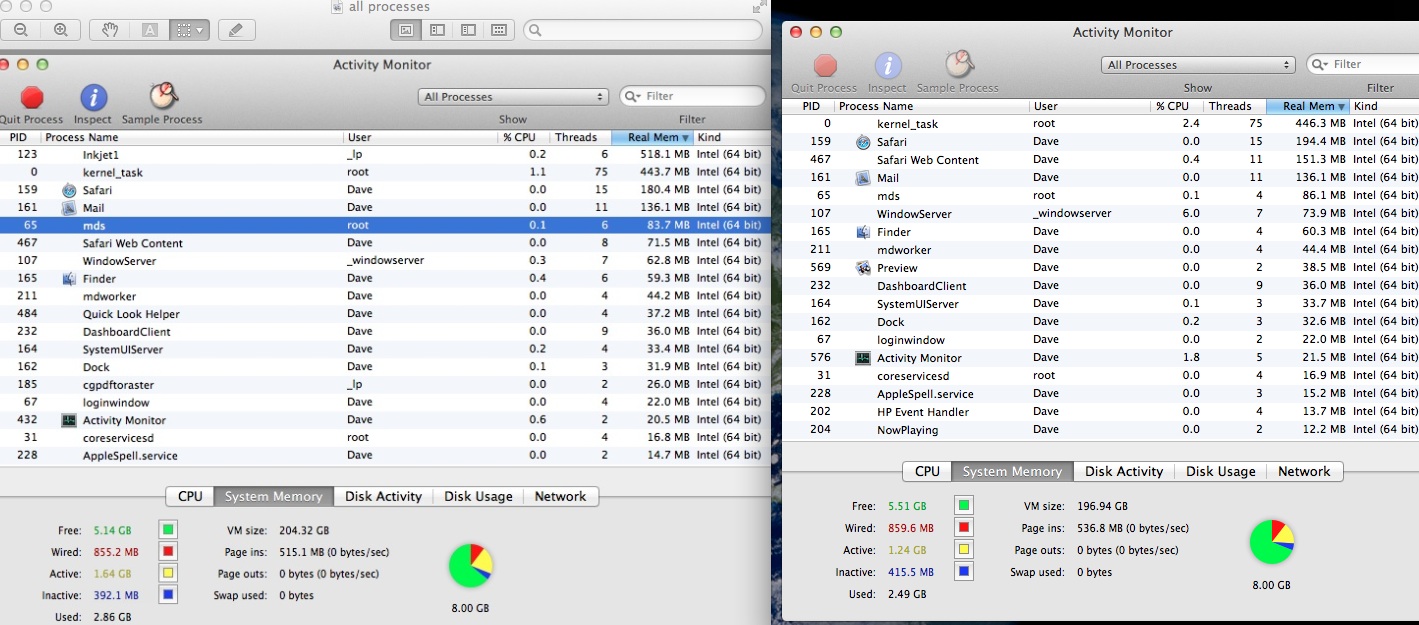
Now that you said to look at all processes.. It seems InkJet could be my printer 😡thats a lot of usage!! What the ****!?

zodjq9.jpg
 
Should I uninstall it so I dont have a reoccurring problem until they update that software?
You may not need to uninstall it. Just delete any occurrences of it from any of the following locations:
  • System Preferences > Accounts > yourusername > Login Items
    (Lion and ML users: System Preferences > Users & Groups > yourusername > Login Items)

  • /Library/LaunchAgents/
    (Lion and ML users: In Finder, click Go > Go to Folder > then enter the path above)

  • ~/Library/LaunchAgents/
    (Lion and ML users: In Finder, click Go > Go to Folder > then enter the path above)

  • /Library/StartupItems/
    (Lion and ML users: In Finder, click Go > Go to Folder > then enter the path above)
That way it won't launch on start-up.
 
I thought that looked like high ram usage with so few apps open. 😱 Let me guess HP printer?


Yeah.. and its wireless and works when it feels like it. 🙄


You may not need to uninstall it. Just delete any occurrences of it from any of the following locations:
  • System Preferences > Accounts > yourusername > Login Items
    (Lion and ML users: System Preferences > Users & Groups > yourusername > Login Items)

  • /Library/LaunchAgents/
    (Lion and ML users: In Finder, click Go > Go to Folder > then enter the path above)

  • ~/Library/LaunchAgents/
    (Lion and ML users: In Finder, click Go > Go to Folder > then enter the path above)

  • /Library/StartupItems/
    (Lion and ML users: In Finder, click Go > Go to Folder > then enter the path above)
That way it won't launch on start-up.

Its not in the startup items
 
Its not in the startup items
It may launch only when you print something. Keep an eye on it and see if it consumes RAM again. If it does, you may have to manually quit it every time you print, or you might be able to uninstall it without negative effects. I'm not sure what that particular process does, or whether it's critical to printing.
 
Register on MacRumors! This sidebar will go away, and you'll see fewer ads.