After taking a nap today, I come back to my 2010 Mac Mini, and everything is damn slow! Apps aren't launching at their normal (instantly) speed, file management is barely responsive, simple things like clicking buttons in apps are even crappy (I click a button, and it'll be dark like I'm holding it down for a while, the beach ball will run for however long it wants, then it does what it's supposed to)!
I ran Disk Utility to verify and repair permissions, verified the volume, and even erased free space. Rebooted, and it's still slow! The Finder has been especially slow, moving a File from one folder to another, or moving a file to the Trash is taking a ridiculously long amount of time. 5-10 seconds before any indication of activity on the activity bar, then another 5-10 to actually perform the task. I quit the Finder via Terminal, and restarted it, but there's no improvement.
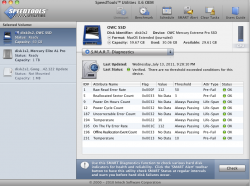
I've ran Speed Tools Utilities tests on the drive, and it passed just fine. I ran:
-Scan and Repair for bad sectors (there were none)
-Scanned for fragmented files (very few, defragged in about 30 seconds)
-Tested Data Transfer Integrity (same results as usual steady speeds)
-Tested SMART Diagnostics (passed)
-Inspected Preference Files (no damaged files)
Passed all tests as usual.
I've ran MacKeeper scans on the drive. I ran:
-System Scan (Security Tools had 0 issues, Junk Files removed [maybe 20 cache files], Optimization had 0 issues)
-Fast Cleanup (deleted more Junk Files)
-Antivirus (wouldn't run)
The issue I'm experiencing with MacKeeper is that the Virus protection software won't scan my drive! Does this mean I have a virus?
I've ran every single test I can think of, and things are still sluggish.
What's going on?
EDIT: I managed to get MacKeeper's virus scan to work by disabling real-time protection, quitting MacKeeper, then restarting it. It's scanning now.
EDIT 2: Scanned fine, it didn't mention any issues. I'll turn my machine off, and see if things are better after work today.
-Alex

Last edited: