Become a MacRumors Supporter for $50/year with no ads, ability to filter front page stories, and private forums.
Despite your advice against it, I still went ahead and bought myself a Touch Bar model of the 2018 MacBook Pro. It has an i7 2.2GHz 6-core processor, AMD 555X with 4GB, and 256GB of storage. If it turns out to be fine, then I'll sell my 2015 model.

The device is still on its way to me, but it should be without issues, everything works, and the keyboard is clean. The only problem is the sticker marks, which is a bit of a challenge since they've been exposed to sunlight. I might try placing it under direct sunlight to see if it helps.

IMG_5771.jpg
you could get a cover to hide those stickers but that will hide the apple logo tho
 
I managed to quickly find another lot and bought it, now I own a 2018 MacBook Pro 15. It came without an operating system, which turned out to be quite a hassle. The Internet restore feature only downloads the factory operating system, which is High Sierra. However, I encountered an error when trying to install it.

I researched the issue online and discovered that you need to fix the date via terminal to proceed with the installation. “Nice” and “friendly” work, Apple.

Anyway my goal was to install macOS Sonoma on the MacBook. Unfortunately, you can't create an installer officially on an older MacBook. To do this, I would need the macOS Sonoma app file, which can be converted into a bootable USB flash drive using terminal commands. However, I couldn't find the macOS Sonoma app file anywhere on the Internet—only in pkg format. My MacBook, being unsupported, wouldn’t allow me to unpack Sonoma pkg 🥴

To work around this, I created a Monterey installer since that's the latest operating system I can install on my 2015 MacBook. Now, I'm going to use this installer to set up the operating system on the 2018 MacBook.
 
Installing a clean macOS was even harder than I thought! The previous owner had deleted everything from the SSD, and I couldn't use an external drive to install Monterey since I needed to authorize the drive. However, there was no admin account available, which is required for this authorization. Although I found some advice online, it was ultimately easier to install the base OS (High Sierra), which recreated everything I needed. But I couldn't install High Sierra because it requested some HTTPS files. To solve this, I altered the NVRAM data to use a non-HTTPS link. With that, I was able to install High Sierra, enable the external boot device, and then install Monterey on my machine.
 
  • Like
Reactions: MBAir2010
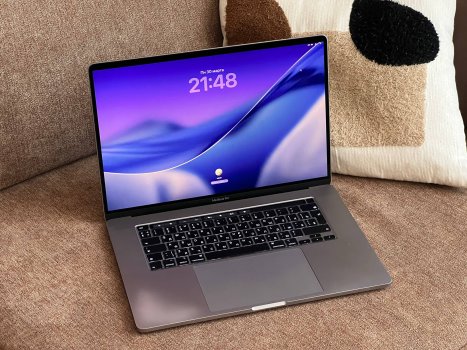
Friends, did you think my saga with MacBooks as the ultimate retro-gaming device was over? Not a chance 🙂

Quick recap: I collect retro laptops, I’ve covered different niches from the early ’90s, and I wanted a device for games from the DX10 generation and newer. At one point I decided a MacBook would be the perfect solution because they’re compact, good-looking, with a reliably great screen and sound.

I tried a 2012 Pro, a 2015, and a 2018—and every time it was the same problem: even without any obvious overheating of the CPU or GPU, the laptop drops clocks and the game starts stuttering horribly. I sold all of those machines, but then I got the urge again and jumped on a 16-inch 2019 Pro. Config: i9 2.3 / 5500M 4GB / 16GB RAM / 1TB SSD.

I’ve already installed Windows, already tested games, and already confirmed the same issue as with all the previous models: performance gets worse over time during use. Not as bad as on previous machines, but still.

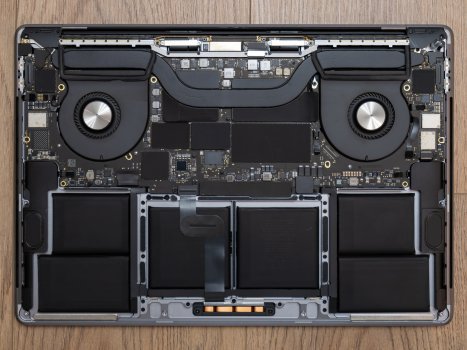
However, unlike the earlier models, this one has guides for a VRM mod that supposedly should solve the problem, so I’m going to work on that.

Overall, I’m really happy with the laptop for my purposes. The screen is gorgeous and big. The sound is awesome. It’s not bulky. Playing through older games is a blast.

photo_2026-03-31_10-03-44.jpg photo_2026-04-01_21-51-54.jpg
 
Using the laptop for a while in my daily routine (Google Sheets, YouTube, Twitch, Telegram), it’s been mostly fine with the dGPU forced on—but Telegram still lags, and it’s noticeably worse than on my M3 Air. That’s pretty strange; it feels like Apple is doing something weird under the hood. Also, resizing a Safari window with YouTube playing is horribly laggy. I can’t really explain it. I’ll try updating to something newer, maybe Sonoma, and see if it helps.

I also did a VRM mod, and the laptop holds its clocks better in games now. Still, it’s not as perfect as people claim online—maybe the pad height isn’t enough and some of them aren’t making proper contact with the bottom case.

Either way, it fits my goal: a great retro gaming machine with an awesome screen and sound.
 
  • Like
Reactions: mike.coulter
Register on MacRumors! This sidebar will go away, and you'll see fewer ads.