Become a MacRumors Supporter for $50/year with no ads, ability to filter front page stories, and private forums.

reedi

macrumors newbie
Original poster
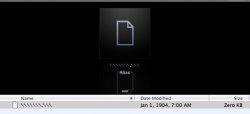
for many days this file (Alias) wont disappear, and i dont know how it ended up in the Trash anyway.. i have attached a pic for it.. hope i can find the answer here,, thank you guys
 

Attachments

  • screen-capture.jpg
    screen-capture.jpg
    23 KB · Views: 112
try copy and pasting these commands into Terminal. when it asks you for your password it doesnt show typing input so just type it and press enter.

Code:
rm -rf .Trash

Code:
killall Finder

ONLY type THESE commands and be sure you typed them correctly.
 
ya i have tried but still there...🙁

hmm - okay, it sounds like you've got some file corruption in there.

Richthomas has the right approach, so I won't say it again - just make sure that you're in your home directory before you enter those commands (which should be fine as that's terminal's default directory when it starts up unless you've changed something).
 
tersono & richthomas thanks for ur help, i tried everything i know, including disk Utilities - repair disk but still never worked,, nvm i'll go to the place wer i bought my macbook from.. thnx again
 
Register on MacRumors! This sidebar will go away, and you'll see fewer ads.