Become a MacRumors Supporter for $50/year with no ads, ability to filter front page stories, and private forums.

heretiq

Suspended
Original poster
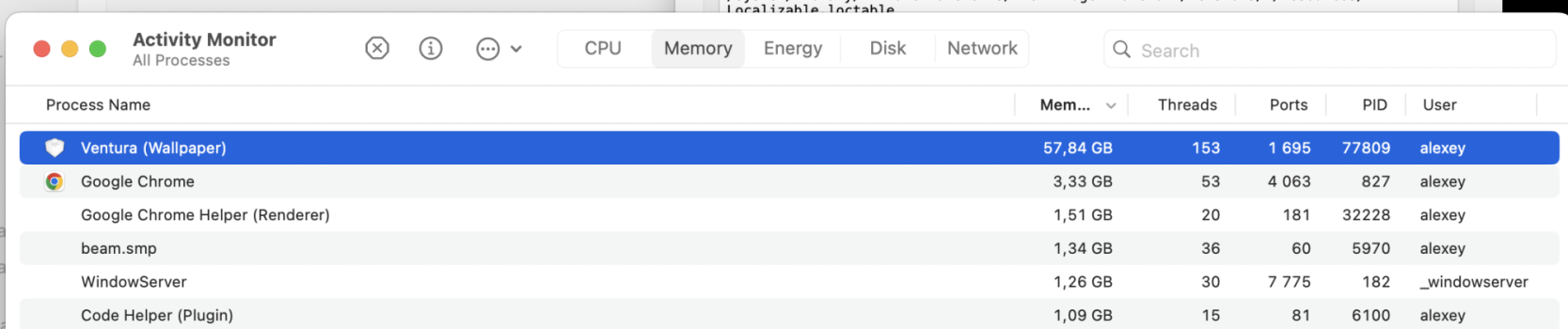
Hello, I'm running the latest MacOS Sonoma beta and notice a persistent "Ventura (Wallpaper)" process in Activity Monitor. See screenshot:

Ventura (Wallpaper) Task.jpg


This process consumes a lot of memory and appears to be a system process, but I cannot find any mention of it in the MacRumors Forums, Apple Support Forums, Stack Overflow or general web search. Anyone have any idea what this Process is and whether it is safe to terminate it and if so, how to permanently terminate it?

Thanks!
 
  • Like
Reactions: wnorris
Try clicking on that process to select it (such as you show in your screen shot)
Then, click on the circled I in the menu (Inspect selected process) and then click the tab (Open Files and Ports)
That will show you some information about the process and its file location. The item at the top of the list might be a good choice to look at.
 
Try clicking on that process to select it (such as you show in your screen shot)
Then, click on the circled I in the menu (Inspect selected process) and then click the tab (Open Files and Ports)
That will show you some information about the process and its file location. The item at the top of the list might be a good choice to look at.
Thanks @DeltaMac. The item at the top of the list is "/Users/username/Library/Containers/com.apple.ScreenSaver.Ventura/Data". At the time it was consuming 4GB of memory according to Activity Monitor.

This is perplexing as the selected wallpaper was Sonoma and the Screensaver was Drift. I also don't recall previously seeing wallpapers take up so much RAM. The only thing I did differently with this beta was to briefly try out the new Sonoma Aerial Wallpaper, then almost immediately reverted and selected the standard Sonoma wallpaper.

I decided to try closing all apps, re-selecting Sonoma Wallpaper and Drift Screensaver, then restarting the Mac and that seems to have resolved the issue as that "Ventura (Wallpaper)" process is no longer visible. This is also odd because I had previously tried restarting and the "Ventura (Wallpaper)" process reappeared. I'll chalk this one up to beta mysteries. 🤔

ActivityMonitorResults.jpg
Weird, but seemingly resolved. Thanks again for the assist. 🙏🏽
 
  • Like
Reactions: DeltaMac
Thanks @DeltaMac. The item at the top of the list is "/Users/username/Library/Containers/com.apple.ScreenSaver.Ventura/Data". At the time it was consuming 4GB of memory according to Activity Monitor.

This is perplexing as the selected wallpaper was Sonoma and the Screensaver was Drift. I also don't recall previously seeing wallpapers take up so much RAM. The only thing I did differently with this beta was to briefly try out the new Sonoma Aerial Wallpaper, then almost immediately reverted and selected the standard Sonoma wallpaper.

I decided to try closing all apps, re-selecting Sonoma Wallpaper and Drift Screensaver, then restarting the Mac and that seems to have resolved the issue as that "Ventura (Wallpaper)" process is no longer visible. This is also odd because I had previously tried restarting and the "Ventura (Wallpaper)" process reappeared. I'll chalk this one up to beta mysteries. 🤔

View attachment 2223168 Weird, but seemingly resolved. Thanks again for the assist. 🙏🏽
I get this after the screensaver kicks in. Seems to have starting happening after Beta 2. It appears to be a bug as it will consume vast amounts of memory until you Force Quit the process.
 
  • Like
Reactions: gank41
I get this after the screensaver kicks in. Seems to have starting happening after Beta 2. It appears to be a bug as it will consume vast amounts of memory until you Force Quit the process.
Yes, I definitely detected this after Beta 2. However, the problem has not recurred after killing the process, resetting the wallpaper to the Sonoma wallpaper and setting the screensaver to non-Arial option.
 
I’m seeing this and also a “Legacy” screensaver listing in Activity Monitor taking up a lot of memory. Force quitting “fixes” the problem. For now. Definitely a bug with the screensavers on B2 as I have a few “Legacy” screensavers that worked fine on B1 and now just display a black screen on B2.
 
I do have a Wallpaper.app taking 1.40GB of memory at the moment and I use one of the new video wallpapers.
Eh, it's still beta, can't complain.
 
Wallpaper.app is new to Sonoma (/System/Library/core services) and appears to be the new application Apple is using to control all screensavers now.
The old application that did it, ScreenSaverEngine.app, is still there, but it’s basically broken.
If you click it, it will launch a Legacy screensaver, but then you won’t be able to get back into your computer without logging out and logging back in. It just stays stuck on the screensaver, at least from what I’ve found.
However, using a hot corner to start screensaver appears to launch this new wallpaper.app to display it.
I assume this is because of the redesigned lock screen, and the new aerial wallpapers that are also screensavers.
Someone let me know if I’m wrong and if the ScreenSaverEngine.app still works for them.
 
  • Like
  • Wow
Reactions: twanj and gank41
Wallpaper.app is new to Sonoma (/System/Library/core services) and appears to be the new application Apple is using to control all screensavers now.
The old application that did it, ScreenSaverEngine.app, is still there, but it’s basically broken.
If you click it, it will launch a Legacy screensaver, but then you won’t be able to get back into your computer without logging out and logging back in. It just stays stuck on the screensaver, at least from what I’ve found.
However, using a hot corner to start screensaver appears to launch this new wallpaper.app to display it.
I assume this is because of the redesigned lock screen, and the new aerial wallpapers that are also screensavers.
Someone let me know if I’m wrong and if the ScreenSaverEngine.app still works for them.
I've found this, too, and it's so annoying! And same results for me using a hot corner to start the Screensaver, although that hasn't been 100% for me. For now, I've just switched to the Aerials Screensaver for now so I won't have to hard reboot.
 
As usual, the best solution is to write your own script to kill apples Crap. eg:

while true; do killall [Process Name] ; sleep 60 ; done

🤬
 
Today I found that my Macbook Pro became a slow calculator, and the reason was a process with 12GB memory consuming by Message (Wallpaper)!

I get the ID of that process:

Code:
> ps ax |grep Wallpaper
  729   ??  S      1:23.77 /System/Library/CoreServices/WallpaperAgent.app/Contents/MacOS/WallpaperAgent
 1083   ??  Ss     0:14.96 /System/Library/ExtensionKit/Extensions/WallpaperVideoExtension.appex/Contents/MacOS/WallpaperVideoExtension
 9438   ??  Ss     0:08.97 /System/Library/ExtensionKit/Extensions/WallpaperImageExtension.appex/Contents/MacOS/WallpaperImageExtension
12821   ??  Ss     0:07.32 /System/Library/ExtensionKit/Extensions/WallpaperDynamicExtension.appex/Contents/MacOS/WallpaperDynamicExtension
73982   ??  Ss     0:03.06 /System/Library/ExtensionKit/Extensions/Wallpaper.appex/Contents/MacOS/Wallpaper

I killed it as:

Code:
sudo kill -9 729
 
  • Like
Reactions: goodniceweb
This is a serious problem. I caught this process consuming over 20GB(!) of my memory today and all my CPU cycles.

One can only wonder how many users have upgraded or sold their "slow" devices over issues like this.

This was already reported well over a year ago and still no fix has been issued.
 
This is a serious problem. I caught this process consuming over 20GB(!) of my memory today and all my CPU cycles.

One can only wonder how many users have upgraded or sold their "slow" devices over issues like this.

This was already reported well over a year ago and still no fix has been issued.
Are you seeing this on a production or beta OS release?
 
This process was eating 6.5/8.0 GB on my M1 Mac running the release macOS build 15.3.1 (24D70). Pretty amazing problem to have. I totally thought it was a malicious process, but now am thinking it's just a brutal bug.
 
Yeah, same here. It has been a random issue for me as well if I use any default new kind of wallpaper that moves on lock screen. It take up to 2-3GB plus much of core activity. I dunno wy they don't fix it, it is a pretty obvious bug for a long time now.

I am thinking to upgrade to macOS 16 just for that reason tbh.
 
This just fixed a massive burden on my main system.
I do allot of different long running tasks, so my system restarts are a rare alignment of processes completed.
My system goes in and out screensaver several times a day, from 30 minutes to hours, as I work and let things process.

This last week, I've been rummaging around trying to find why my youtube is running at 2 to 5 FPS (smooth sound, video is secondary on third screen).

I Force Quit "Message (Wallpaper)" and the following happened:
- Youtube jumped to stable FPS with minimal or no frame drops.
- System Cursor lag (10FPS) removed.
- My Memory Pressure stopped being thrashed, often on the edge of orange, dropping to a flat 15%
- Memory and Swap dropped by about a combined 10GB.
- Typing no longer has a 15 to 20 second delay, sometimes jumbling or missing key presses.

Memory Pressure would jump into the Red for periods of time, sometimes locking up my system completely for afew seconds.

Some of the Process Stats reported from the Activity Monitor:
30% CPU, 8 Threads, 403 Ports, 20K Page Ins, 45:48:10.94 CPU Time (I did say allot of long running tasks), 600M Context Switches and 4 times as many Faults, 2 Recent hangs.

I'm used to my system being overloaded, so the slowdowns are semi-normal. One time one of my scripts was consuming 98% CPU for 3.5 Days each run, pretty much completely locking me out of the system due to lag, the project ran that script a dozen times easily.
Most project scripts are just long running but low CPU, by being in a single thread so I can have my system too.
 
Register on MacRumors! This sidebar will go away, and you'll see fewer ads.