Become a MacRumors Supporter for $50/year with no ads, ability to filter front page stories, and private forums.
I hated the nano texture standard ASD so much. This thing made the monitor look like 1080p instead of 5K.

Thank God I sold it for the glossy version.

I don't understand why people would not change their environment (space, curtains) instead of going for the NT. But to each their own...

Edit : For those talking about reflections : Don't trust the ones you see in the Apple Store because there is a TON of light. I didn't notice any at home.
I’ve had both the NT and the glossy Studio Display (2022 models). To my mind, there are reflections with the glossy, but there’re not as noticeable in light mode, and very noticeable in dark mode.

If you’re a dark mode user primarily, the nano texture might be preferable because it lessens the ‘rainbow’ effect usually seen when viewing dark text on light backgrounds. In dark mode, the glossy and NT screens are incredibly similar in terms of viewing experience.
 
I’ve had both the NT and the glossy Studio Display (2022 models). To my mind, there are reflections with the glossy, but there’re not as noticeable in light mode, and very noticeable in dark mode.

If you’re a dark mode user primarily, the nano texture might be preferable because it lessens the ‘rainbow’ effect usually seen when viewing dark text on light backgrounds. In dark mode, the glossy and NT screens are incredibly similar in terms of viewing experience.

Yes there are slight reflections in the dark with the glossy version. But I found the image absolutely garbage night and day with the NT. It was really irritating. My 100$ QHD Dell work monitor looked better (with Windows).

If somones wants to get a matte monitor because of the reflections and don't care about how bad that affects sharpness, why not go with a much cheaper one ? Paying 1599$ for a 1080p looking monitor is insane to me.
 
If somones wants to get a matte monitor because of the reflections and don't care about how bad that affects sharpness, why not go with a much cheaper one ? Paying 1599$ for a 1080p looking monitor is insane to me.
The reflections on the glossy for me personally was way worse than the fuzziness nano creates. But each to his own and no it's NOWHERE near looking like a 1080p monitor. And why someone would prefer to to look at themself in the reflection of a glossy is beyond me... 🤣 I get the glossy if you are in a windowless dungeon, I'm not.
 
The reflections on the glossy for me personally was way worse than the fuzziness nano creates. But each to his own and no it's NOWHERE near looking like a 1080p monitor. And why someone would prefer to to look at themself in the reflection of a glossy is beyond me... 🤣 I get the glossy if you are in a windowless dungeon, I'm not.
Yeah, I agree with this personally. Although maybe people's eyes / vision interpret the nanotexture differently.
 
  • Like
Reactions: Mindfighter
The reflections on the glossy for me personally was way worse than the fuzziness nano creates. But each to his own and no it's NOWHERE near looking like a 1080p monitor. And why someone would prefer to to look at themself in the reflection of a glossy is beyond me... 🤣 I get the glossy if you are in a windowless dungeon, I'm not.
Curtains exist. Or change your space. We're talking about a stationary device, not a MBP.

There is no reflection unless you watch black content. Don't trust the Apple Store impression
 
Curtains exist. Or change your space. We're talking about a stationary device, not a MBP.

There is no reflection unless you watch black content. Don't trust the Apple Store impression
I trust the ASD2022 glossy I used daily for two years, curtains doesn’t do much tbh. I don’t have direct sunlight, it’s still a mirror…
 
I've heard really good things about the nano-texture glass, so I went with it. But my Studio Display XDR with nano-texture just got here and it looks sort of like the entire display is covered in fingerprints. I assumed it was residue from Apple's protective sticker sheet thing, but no amount of wiping with their special cleaning cloth is removing it. It's all over the display -- uniform. Looks sort of like there's oil all over it, but in a matte way (if that makes sense). I wasn't expecting the nano-texture to make it look so jarringly wrong.

Is this what it looks like to you guys, too?
This is my experience with the nano-texture M4 MBP I had. It was very frustrating and one of the reasons I traded it in.
 
  • Like
Reactions: collin_
I have a nanotexture iPad Pro and love it. I don't have a nanotexture ASD, but came very very close to buying one (before deciding on buying a different display altogether).
 
  • Like
Reactions: jr5x
I have a nanotexture iPad Pro and love it. I don't have a nanotexture ASD, but came very very close to buying one (before deciding on buying a different display altogether).
After having my nano glass iPad Pro, I’ll only buy nano in the future for iPads. It’s so much nicer to look at (and I only use it indoors). Bonus: I only clean fingerprints off it once a month, whereas with the regular glass I had to clean it almost every day.

But my nano glass ASD XDR seems to sacrifice more clarity than my iPad nano. I think it’s a coarser texture. But with my office lighting that I can’t control, I had no choice but to go nano.
 
  • Like
Reactions: collin_
I've heard really good things about the nano-texture glass, so I went with it. But my Studio Display XDR with nano-texture just got here and it looks sort of like the entire display is covered in fingerprints. I assumed it was residue from Apple's protective sticker sheet thing, but no amount of wiping with their special cleaning cloth is removing it. It's all over the display -- uniform. Looks sort of like there's oil all over it, but in a matte way (if that makes sense).

it makes zero sense, the 'protective sticker sheet thing' is not a sticker, so there's nothing to wipe after removing it, and sure, it doesn't shine like a mirror when it's off, but how does it follow from there that it looks all 'coverd in fingerprints' is beyond me. you seem to have expected that matte finish will look no different to ordinary glossy - uh oh..

have it on my MBP, cleaning is a non-issue, and yet to miss a single detail👌
 
To this day, I still don't understand why you have to pay extra for the Nanotexture finish when it results in lower image quality! But never mind. The main thing is that the best display quality is still available in the glossy coating version!
 
To this day, I still don't understand why you have to pay extra for the Nanotexture finish when it results in lower image quality! But never mind. The main thing is that the best display quality is still available in the glossy coating version!
Because, it doesn't result in lower image quality in most situations. It's an extra step (added cost) that shifts optical imperfections from one area to another.

Whether you want to believe it or not reflections degrade the light from the panel to your eye. The only way to escape them on a glossy screen is to use a dark room, or avoid overhead/parallel lighting (even a white wall to your back can bounce light to the glass); a lot of people don't want to deal with this, and instead opt for the NT which all but negates the reflections issue at the cost of a subtle loss in clarity/sharpness when compared to optimal conditions with the glossy.

I'm never going to be in optimal conditions with a glossy screen, so the benefit of the NT is 100% worth it for me. If I had to use a glossy screen the IQ would be significantly WORSE than my NT display. Your "perfect" scenario theoretical use case means nothing to me.
 
I was a huge nano texture convert. I've got it on my iPad Pro, I've got it on my MacBook Pro, and to be honest I thought I'd have it on every device if I could.

I was running 2 studio displays. One glossy, and one nanotexture, so I was able to directly compare the experiences of using both. I used the nanotexture as my primary display for a year and then when I switched back over to the glossy as my primary display, it just felt like a breath of fresh air In terms of clarity.

The nanotexture on the studio display is not the same as that on the iPad Pros and MacBook Pros. My understanding is that on the MacBook Pro and iPad Pro the nanotexture is chemically etched, but it is not on the studio display.

The screen has just been so pleasant to use on the glossy studio display. But as other people have pointed out, reflections will always be an issue and I personally don't want to be sitting in a dark room all the time, or fighting reflections. In an ideal world, I would love to have the nanotexture display and not have any of that perceptible grain on white backgrounds, or the text sharpness to be diminished. But this is the trade-off with any matte screen. The nanotexture display its perfect if you use the display in Dark Mode all the time. Both glossy and nano texture have their advantages and disadvantages.

I want my iPad as Macbook pro screens to be have the nanotexture screen, due to their portable form. But with a studio display that's in a fixed position, I overall find the advantages of the glossy screen to outweigh the nanotexture.
 
  • Like
Reactions: jr5x
The nanotexture on the studio display is not the same as that on the iPad Pros and MacBook Pros. My understanding is that on the MacBook Pro and iPad Pro the nanotexture is chemically etched, but it is not on the studio display.

is your 'understanding' supported by any evidence? me thinks not.
 
I've heard really good things about the nano-texture glass, so I went with it. But my Studio Display XDR with nano-texture just got here and it looks sort of like the entire display is covered in fingerprints. I assumed it was residue from Apple's protective sticker sheet thing, but no amount of wiping with their special cleaning cloth is removing it. It's all over the display -- uniform. Looks sort of like there's oil all over it, but in a matte way (if that makes sense). I wasn't expecting the nano-texture to make it look so jarringly wrong.

Is this what it looks like to you guys, too?
Only nano texture I have is on my MacBook Pro and doesn't look like that, you sure yours isn't defective?
 
To this day, I still don't understand why you have to pay extra for the Nanotexture finish when it results in lower image quality! But never mind. The main thing is that the best display quality is still available in the glossy coating version!
Because its an antireflective coating on the MacBook pros that won't peel off...
 
From Apple's website:

To remove dust or smudges from the nano-texture display, use the polishing cloth that came with your Studio Display, Pro Display XDR, iMac, MacBook Pro or iPad Pro (M4).

For infrequent cleaning of hard-to-remove smudges, you can moisten the cloth with a 70-percent isopropyl alcohol (IPA) solution.


I use it once in a while on my MBP and it cleans it perfectly.
 
is your 'understanding' supported by any evidence? me thinks not.
Not quite sure why the tone is confrontational. I've seen it reported in various places, - e.g., https://nathansnelgrove.com/2026/03/the-new-studio-displays

"What’s the nano-texture display like on this model? I love nano-texture on my MacBook Pro, and I’d like it on the Studio Display. On the MacBook Pro, the nano-texture is chemically etched. On the first-generation Studio Display, it was physically etched. This meant the first-gen Studio Display’s nano-texture implementation made the display looked much blurrier than the MacBook Pro’s chemically-etched one. I would like to see the new nano-texture implementation on the Studio Display XDR myself before I order it."

But as you suggest, I can't be sure. When I look at my MacBook Pro, iPad Pro and Studio Display (all with nanotexture coating) the Studio Display does seem different.
 
Is this what it looks like to you guys, too?

Of course it does, that is what makes reflections a non-issue, and is the whole point of nano-texture.

full


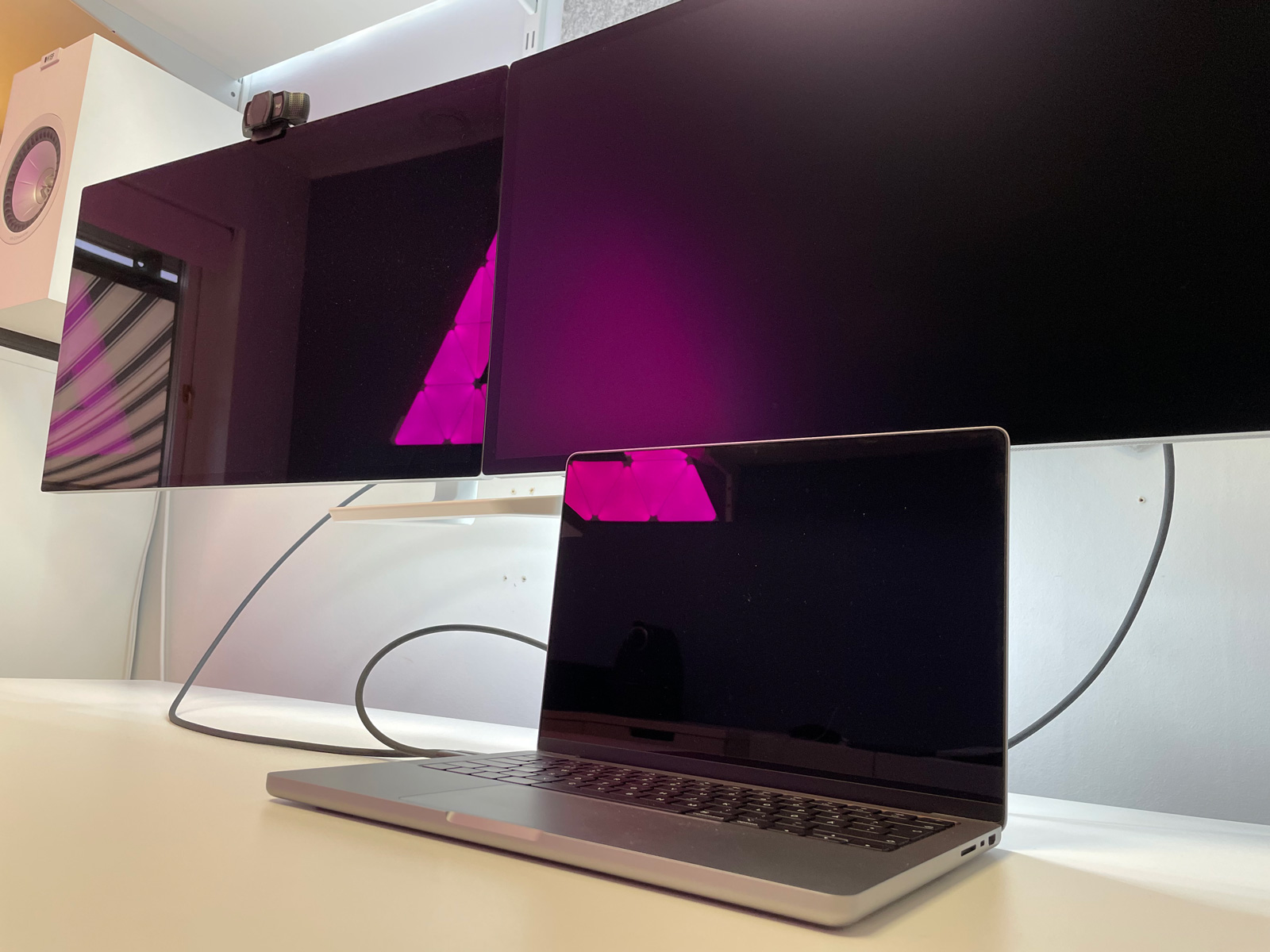
My setup with a window off to the left leaves terrible reflections on the standard screen, but they are entirely gone on the nano-texture.

Is it a little less sharp? Sure. Worth it? Absolutely.
 
Last edited:
But as you suggest, I can't be sure. When I look at my MacBook Pro, iPad Pro and Studio Display (all with nanotexture coating) the Studio Display does seem different.

'coating' implies an extra layer, which it is not, it's a finish, and I very much doubt they use different processes across different product lines, whatever some blog guy thinks without presenting any proof.
 
'coating' implies an extra layer, which it is not, it's a finish, and I very much doubt they use different processes across different product lines, whatever some blog guy thinks without presenting any proof.
Yes, I misspoke using the word coating. Its etched onto the glass, but as I say there a number of reports this is done chemically with the portable devices (MacBook Pro and iPad Pro), but mechanically with the Studio Display (and the Pro Display XDR before that). I
 
Of course it does, that is what makes reflections a non-issue, and is the whole point of nano-texture.

full


My setup with a window off to the left leaves terrible reflections on the standard screen, but they are entirely gone on the nano-texture.

Is it a little less sharp? Sure. Worth it? Absolutely.
The thing is, you convince yourself that reflections on your Nanotexture display have disappeared, but in reality—if you evaluate the right screen completely, completely objectively—the image on the Nanotexture display is just blurry and softened, and once you realize this, you’ll always prefer the glossy screen, because with the matte screen you always (!) have a degradation in image quality that you simply don’t have with the glossy screen! There, you get the best possible display quality!
 
  • Like
Reactions: Snørrbjørg
The thing is, you convince yourself that reflections on your Nanotexture display have disappeared, but in reality—if you evaluate the right screen completely, completely objectively—the image on the Nanotexture display is just blurry and softened, and once you realize this, you’ll always prefer the glossy screen, because with the matte screen you always (!) have a degradation in image quality that you simply don’t have with the glossy screen! There, you get the best possible display quality!

I think your problem is you don't understand that there are aspects to IQ other than contrast, clarity, and sharpness.

Prioritizing one set vs. another doesn't make anyone right, or wrong, and it certainly doesn't mean one set is "objectively" better for anyone other than yourself.
 
If you have a good spot for a glossy monitor, you’ll simply get the best-quality image by far, and there’s no getting around that.

In my opinion, the only such spot is a completely dark room.

The thing is, you convince yourself that reflections on your Nanotexture display have disappeared, but in reality—if you evaluate the right screen completely, completely objectively—the image on the Nanotexture display is just blurry and softened, and once you realize this, you’ll always prefer the glossy screen, because with the matte screen you always (!) have a degradation in image quality that you simply don’t have with the glossy screen! There, you get the best possible display quality!

I have been using both practically since launch day, and I completely and objectively understand exactly how nano-texture works, including all the tradeoffs, thanks!

One of the monitors reflects enough to be constantly annoying and distracting, the other does not. (Also, if you look closer at my photo, you will notice that the only reflection seen on the surface of the nano-texture display is the light source placed directly in front of the displays for illustrative purposes. The window is in fact simply not visible.)

Quality for me is not being annoyed or distracted, while retaining sufficient sharpness.

If I could trade in the standard display for another nano-texture I would, because I constantly find myself moving windows to the nano-texture display.
 
Last edited:
Register on MacRumors! This sidebar will go away, and you'll see fewer ads.