madoka macrumors 6502a Original poster Jun 18, 2014 #1 I outgrew a 6tb NAs and so I copied my entire iTunes library to a 20tb Drobo. I tried deleting and redownloading iTunes, but it immediately went back to the 6tb NAS. How do I get iTunes to only use my new NAS?
I outgrew a 6tb NAs and so I copied my entire iTunes library to a 20tb Drobo. I tried deleting and redownloading iTunes, but it immediately went back to the 6tb NAS. How do I get iTunes to only use my new NAS?
fhall1 macrumors 68040 Jun 19, 2014 #2 You have to go into iTunes preferences and set your new Library location.
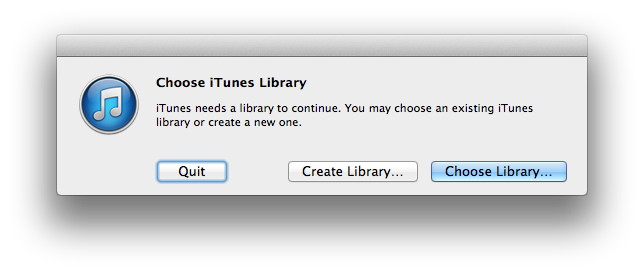
Weaselboy Moderator Staff member Jun 19, 2014 #4 madoka said: I outgrew a 6tb NAs and so I copied my entire iTunes library to a 20tb Drobo. I tried deleting and redownloading iTunes, but it immediately went back to the 6tb NAS. How do I get iTunes to only use my new NAS? Click to expand... Just hold the option key down and launch iTunes and you will get this popup that you can use to select the library location.
madoka said: I outgrew a 6tb NAs and so I copied my entire iTunes library to a 20tb Drobo. I tried deleting and redownloading iTunes, but it immediately went back to the 6tb NAS. How do I get iTunes to only use my new NAS? Click to expand... Just hold the option key down and launch iTunes and you will get this popup that you can use to select the library location.