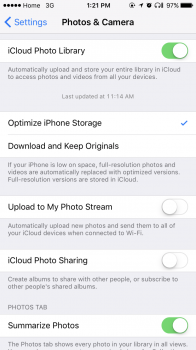
Hi my iCloud photos seems to be a total mess at the moment. I will try my best to explain the situation.
My Mac has all the photos I want organised in albums etc, I would like this to be reflected on other devices.
Visiting iCloud.com I have parts of some albums from my mac uploaded but not many albums are just missing all together.
My iPhone I'm currently backing up photos to one drive.
What I would like to happen.
Scrap everything thats saved in iCloud currently and then back up everything from my mac to allow me to share it to my phone and iPad, hopefully next month to the new apple TV also.
I would also like to back up my iPhone camera to iCloud but I do not wish it to send the photos to my mac or other devices as most of the photos are just rubbish.
I have googled and looked at a few videos but I'm confused as to what settings i need and where. I tried to call apple support and got an Indian which isn't a bad thing but I myself have a very strong northern English accent and neither of us could understand each other.
My Mac has all the photos I want organised in albums etc, I would like this to be reflected on other devices.
Visiting iCloud.com I have parts of some albums from my mac uploaded but not many albums are just missing all together.
My iPhone I'm currently backing up photos to one drive.
What I would like to happen.
Scrap everything thats saved in iCloud currently and then back up everything from my mac to allow me to share it to my phone and iPad, hopefully next month to the new apple TV also.
I would also like to back up my iPhone camera to iCloud but I do not wish it to send the photos to my mac or other devices as most of the photos are just rubbish.
I have googled and looked at a few videos but I'm confused as to what settings i need and where. I tried to call apple support and got an Indian which isn't a bad thing but I myself have a very strong northern English accent and neither of us could understand each other.