First, I have to thank lots of people on this board. I can't tell you how valuable it's been for me to research your posts about so many things I've been learning about my new Mac Pro.
I'm a PC transplant. Just got my first MAC! I couldn't refuse a Mac Pro 1,1 (2.66 GHz, 2 GB RAM, 250GB HD) for $425. It's in tip top shape and I've been starting the process of beefing up the RAM and storage, among other things. I had been planning to go Mac and this seemed like the right time to make the jump...
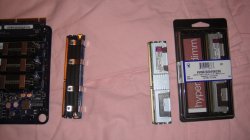
I just added 1 TB drives into bays #2 and #3 and I just odered (2) 4GB sticks of RAM to add (giving me a total of 10 GB of memory - I intend to add 8 more later). I also want to upgrade to Snow Leopard and I want to add a blu-ray reader/writer as my second optical drive. AND I want to upgrade the graphics card. I intend to use my Mac Pro to edit HD films (just shorts for now) and I want to play around with Photoshop some too (I'm a total newbie).
So on to my questions... admitedly these questions sprout other questions but maybe someone can help me. I have two 1TB drives left to install (to max out my 4TB hard drive capacity). One will replace my existing 250GB drive in Bay #1 where all the applications, etc. live. I had success installing new drives into bays #2 and #3 (amazing since I suck at this but I'm learning and Apple makes it easy). But now, in replacing my MAIN drive with a new one, do I need to drag those app folders, etc. into a separate drive first before I replace the drive with the new 1 TB one? Or can I just yank it out, put the new one in, and then install Snow Leopard? I intend to keep all that stuff on my main drive in Bay #1 but do I need to move/save it before the swap out? Let me also point out that I have nothing personal on this machine yet so I don't have to worry about losing any files. Just the basic OS system (Leopard).
And then, once I install the new drive into Bay #1, outside of the typical Utlities pop up to partition, select Journal, etc. is there anything special I need to check off or do when replacing my MAIN drive where my "stuff" lives? So that it continues to be my boot drive?? I don't want to scew that up.
And last, what order would you guys do all these things? I was thinking hard drive and RAM first. Here's the list of things I want to do in the next few weeks:
Add 8GB of RAM to total 10GB (will add 8 more in a few months)
Add another 2 TB of storage to complete all 4 bays at max (4 TB)
Install Snow Leopard
Install video card (I'm gunning for the Radeon 5700)
Install blu ray reader/writer
Add Time Capsule external drive (or use one of my TB HD's for now)
Whew! Got that? Sorry for being so long winded and multi dimensional in my questions. 😕
Any advice would be greatly appreciated!! 🙂
Thanks.
Rick
I'm a PC transplant. Just got my first MAC! I couldn't refuse a Mac Pro 1,1 (2.66 GHz, 2 GB RAM, 250GB HD) for $425. It's in tip top shape and I've been starting the process of beefing up the RAM and storage, among other things. I had been planning to go Mac and this seemed like the right time to make the jump...
I just added 1 TB drives into bays #2 and #3 and I just odered (2) 4GB sticks of RAM to add (giving me a total of 10 GB of memory - I intend to add 8 more later). I also want to upgrade to Snow Leopard and I want to add a blu-ray reader/writer as my second optical drive. AND I want to upgrade the graphics card. I intend to use my Mac Pro to edit HD films (just shorts for now) and I want to play around with Photoshop some too (I'm a total newbie).
So on to my questions... admitedly these questions sprout other questions but maybe someone can help me. I have two 1TB drives left to install (to max out my 4TB hard drive capacity). One will replace my existing 250GB drive in Bay #1 where all the applications, etc. live. I had success installing new drives into bays #2 and #3 (amazing since I suck at this but I'm learning and Apple makes it easy). But now, in replacing my MAIN drive with a new one, do I need to drag those app folders, etc. into a separate drive first before I replace the drive with the new 1 TB one? Or can I just yank it out, put the new one in, and then install Snow Leopard? I intend to keep all that stuff on my main drive in Bay #1 but do I need to move/save it before the swap out? Let me also point out that I have nothing personal on this machine yet so I don't have to worry about losing any files. Just the basic OS system (Leopard).
And then, once I install the new drive into Bay #1, outside of the typical Utlities pop up to partition, select Journal, etc. is there anything special I need to check off or do when replacing my MAIN drive where my "stuff" lives? So that it continues to be my boot drive?? I don't want to scew that up.
And last, what order would you guys do all these things? I was thinking hard drive and RAM first. Here's the list of things I want to do in the next few weeks:
Add 8GB of RAM to total 10GB (will add 8 more in a few months)
Add another 2 TB of storage to complete all 4 bays at max (4 TB)
Install Snow Leopard
Install video card (I'm gunning for the Radeon 5700)
Install blu ray reader/writer
Add Time Capsule external drive (or use one of my TB HD's for now)
Whew! Got that? Sorry for being so long winded and multi dimensional in my questions. 😕
Any advice would be greatly appreciated!! 🙂
Thanks.
Rick