Become a MacRumors Supporter for $50/year with no ads, ability to filter front page stories, and private forums.

fzJNotIBOxgnbqejSeVCvJScL

macrumors regular
Original poster
Trying to re-surrect this MacPro. No Video, no chime.

Recently re-pasted the Northbridge. Thought I did a good job with it.

Removed every Memory stick (8GB) except the one in slot1.
Replaced the CMOS Battery with a C2032
Tried 3 different hard drives I had lying around.
Swapped out the GT640 for the GT-120 Mac Edition (I think).
Tried booting with no HD, no GPU, not hearing a chime.

Solid white power lite on the front panel.
Seeing the green PSU LED and the Amber Stdby 5V LED
Seeing two green diag LEDs. One EFI Ready and the GPU OK LED

What am I missing?
 

Attachments

  • 1772928421071.png
    1772928421071.png
    91.6 KB · Views: 88
Maybe I screwed up the re-paste. I did have to re-paste one of the CPUs. Perhaps I didn't drop it into the slot correctly or bent a pin. Using delidded CPUs. This system worked for years with the delidded CPUs. Didn't delid them myself.
 
Polish the cpus down, cut the black seal down, use the spacers.

Make all 100% matching the original cpus, then you can safely screw down the heatsink.

Most of the fellows do not a decent job with delidding, leaving too much on the cpus, creating a gap or adding thickness and screwing down the heatsinks bent the CPUs socket pins.
 
  • Like
Reactions: owbp
Polish the cpus down, cut the black seal down, use the spacers.

Make all 100% matching the original cpus, then you can safely screw down the heatsink.

Most of the fellows do not a decent job with delidding, leaving too much on the cpus, creating a gap or adding thickness and screwing down the heatsinks bent the CPUs socket pins.
I thought that the spacers weren't needed with the delidded cpus? "Make all 100% matching the original cpus"? Don't understand what you mean.
 
oldskool cheesegrater Mac Pros use BR2032 batteries, not CR, but I would suspect that's not the issue.

Did you do all the work in an anti-static work environment?
I did not. I guess I could've shorted something, but wouldn't I see a problem with the diag cpus? if that were the case?
 
I thought that the spacers weren't needed with the delidded cpus? "Make all 100% matching the original cpus"? Don't understand what you mean.
I mean the square black spacers lying on the pcb of the processors.

What is hard to understand, about to make the replacement cpus look alike the original cpus? They should match exact size.

When you let the black seal on, they get too high. Pressure of the heat sink is too much.
 
So, now I'm getting a chime and it's trying to boot up. I now have video. It starts trying to load the OS and it gets about 1/3 of the way there and then the fans start to spin up at super high-speed. It eventually shut down on its own.

I'm trying to boot with a single processor. Is that OK? I think the clip I used to install the Northbridge was too high, so I cut some plastic off of the retaining clip. The Northbridge might be a little bit loose now.

Is it an issue with the Northbridge or with the CPU?
 
Put a new fastener push pin into the Northbridge. It moves a tiny bit, not that much.

Re-pasted my CPU and still seeing the same problem. The fans are spinning up at high speed after a minute or so. Should I swap my CPU with the other one? To see if I have a bad CPU?
 
Re-pasted the Northbridge again. Swapped CPUs and re-pasted once more. Still, getting a high-fan speed.

How can I tell if it's the Northbridge or the CPU? This is frustrating!
 
I mean the square black spacers lying on the pcb of the processors.

What is hard to understand, about to make the replacement cpus look alike the original cpus? They should match exact size.

When you let the black seal on, they get too high. Pressure of the heat sink is too much.
I don't remember what the original CPUs look like anymore. How can I tell if I have bent pins? Magnifying glass?
 
You're trying to boot Big Sur with a GT640 or GT120? Those are non-Metal cards, only supported through High Sierra. Your copy of Big Sur had better be patched by OCLP for these cards, or boot will fail.

note that OCLP patches for unsupported cards, in part based on the slot they're in. If you switched GPU slots from the last time the system was working OK, then OCLP's patches will not all be in play.

Got a macOS copy from earlier? Snow Leopard through High Sierra? At this point, I'd try booting with an unpatched OS, as a sanity check. If it boots OK, then your Big Sur may need repatching by OCLP (or reinstall).

If you were booting OK with those video cards before, in the same slot, then you can try resetting the SMU. It's a good idea after a hardware change. A confused or crashed SMU can cause many odd symptoms, including boot failure.
 
You're trying to boot Big Sur with a GT640 or GT120? Those are non-Metal cards, only supported through High Sierra. Your copy of Big Sur had better be patched by OCLP for these cards, or boot will fail.

note that OCLP patches for unsupported cards, in part based on the slot they're in. If you switched GPU slots from the last time the system was working OK, then OCLP's patches will not all be in play.

Got a macOS copy from earlier? Snow Leopard through High Sierra? At this point, I'd try booting with an unpatched OS, as a sanity check. If it boots OK, then your Big Sur may need repatching by OCLP (or reinstall).

If you were booting OK with those video cards before, in the same slot, then you can try resetting the SMU. It's a good idea after a hardware change. A confused or crashed SMU can cause many odd symptoms, including boot failure.
Yes, this is an OpenCore patched version of Big Sur. That's not the issue right now. I'm getting a chime and video now, with ONE processor. The fan then speeds up to HIGH. When I try to install the 2nd processor, I get nothing. No chime, no video.
 
When you run just one Xeon with a dual CPU tray, the SMC enters fail-safe mode with all fans at max speed.

No way to overcome this.


So, you confirmed that the socket is damaged, inspect the pins. There are lot of threads about this here.

When you run just one Xeon with a dual CPU tray, the SMC enters fail-safe mode with all fans at max speed.

No way to overcome this.


So, you confirmed that the socket is damaged, inspect the pins. There are lot of threads about this here.
Sorry for the extra empty replies. Don't see a way to delete my posts.
Just to summarize. #1. Fans at max speed with one processor is expected behavior. #2. The socket is damaged in socket#2 CPU-B? #3 Look for a post on inspecting damaged pins in the socket?
 
When you run just one Xeon with a dual CPU tray, the SMC enters fail
When you run just one Xeon with a dual CPU tray, the SMC enters fail-safe mode with all fans at max speed.

No way to overcome this.


So, you confirmed that the socket is damaged, inspect the pins. There are lot of threads about this here.
What about the red LED in the image above? I don't see any reference to that in the Apple Service manual for the 4,1.
-safe mode with all fans at max speed.

No way to overcome this.
When you run just one Xeon with a dual CPU tray, the SMC enters fail-safe mode with all fans at max speed.

No way to overcome this.


So, you confirmed that the socket is damaged, inspect the pins. There are lot of threads about this here.


So, you confirmed that the socket is damaged, inspect the pins. There are lot of threads about this here.
Sorry for the extra empty replies. Don't see a way to delete my posts.
Just to summarize. #1. Fans at max speed with one processor is expected behavior. #2. The socket is damaged in socket#2 CPU-B? #3 Look for a post on inspecting damaged pins in the socket?
 
Just to summarize. #1. Fans at max speed with one processor is expected behavior. #2. The socket is damaged in socket#2 CPU-B? #3 Look for a post on inspecting damaged pins in the socket?
Correct.

You can also test both Xeon processors one at a time with socket A (if you need to use only one Xeon with a dual CPU tray, you are required to install it to socket A) to be sure that the defect is somewhere on the CPU tray and both Xeons work.
 
Correct.

You can also test both Xeon processors one at a time with socket A (if you need to use only one Xeon with a dual CPU tray, you are required to install it to socket A) to be sure that the defect is somewhere on the CPU tray and both Xeons work.
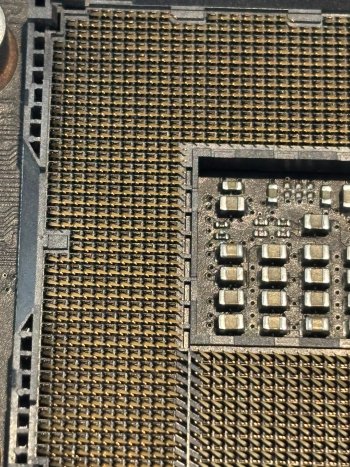
OK, both CPUs work in socket A. Looking for a good guide on inspecting/repairing the socket pins. Couldn't find it in the Search. Do you happen to have a link to a good How-To? I apologize for the poor search skills.
 
Correct.

You can also test both Xeon processors one at a time with socket A (if you need to use only one Xeon with a dual CPU tray, you are required to install it to socket A) to be sure that the defect is somewhere on the CPU tray and both Xeons work.
 

Attachments

  • IMG_1162.JPG
    IMG_1162.JPG
    2.2 MB · Views: 143
  • IMG_1164.JPG
    IMG_1164.JPG
    2.1 MB · Views: 56
  • IMG_1163.JPG
    IMG_1163.JPG
    2.1 MB · Views: 56
OK, both CPUs work in socket A. Looking for a good guide on inspecting/repairing the socket pins. Couldn't find it in the Search. Do you happen to have a link to a good How-To? I apologize for the poor search skills.

 
Register on MacRumors! This sidebar will go away, and you'll see fewer ads.