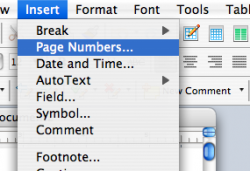
How in the world do you instert page numbers at the top of every page?? I cannot figure it out on the help menu it says to go to the insert page numbers but there is no tab for that??😕 help please

On an unrelated note, how do you guys put up screenshots of your computer screen like that?I assume you're talking about the Word portion. What version? Here's a screenshot from Office 2004 on my machine:
View attachment 69125
Please do show off? Is this how you do it on a PC? I don't have a cmd button.Cmd+Shift+4 To take the selection screenshot, then i uploaded it to a picture sharing website and clicked on the insert image button in the reply box
![]()
Just showing off now.
how can I put a password in order to log onto my computer?
Command button is the key with the Apple logoPlease do show off? Is this how you do it on a PC? I don't have a cmd button.
to the left and right of the space bar. 🙂Please do show off? Is this how you do it on a PC? I don't have a cmd button.
Thanks!you mean with a PC keyboard or with Windows? with Windows on the upper right hand corner, there's a screen print (or something similar) that takes a screen shot, but then you have to crop.
with a PC keyboard on Mac, the cmd key is the Win key