Become a MacRumors Supporter for $50/year with no ads, ability to filter front page stories, and private forums.

playethic

macrumors member
Original poster
I've been downloading mp4's no problem, but suddenly it's no longer working. What happens is that as it's completing the download, my computer elects to use a camera application to open the mp4, which cancels the download. I'm never given an opportunity to change the application I'd like to use to download the file. I'm sure in the past on this computer, somewhere, I selected to use Quicktime to open mp4's. But I can't for the life of me find that location, nor do I understand why it's changed.
Can anyone help?
 
I assume you are using Safari?

Open Safari preferences and and uncheck this box to stop any app from autolaunching the file when downloaded.

t4RcGxY.png


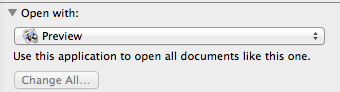
Then DL a mp4 file and select the file and hit command-i to bring up the get info window. Toward the bottom of the get info window change Open With to Quicktime or whatever you want then click change all. That should make mp4 files open by default with Quicktime.

7COEusD.png
 
Thanks

I use both Chrome and Safari.

Thanks for these detailed instructions for Safari. Really helpful.
Loisa
 
Register on MacRumors! This sidebar will go away, and you'll see fewer ads.