lwilliams macrumors 6502 Original poster Jul 25, 2014 #1 After installing Yosemite, i don't see my network drives anymore! Anyone have this happen? Any ideas?
After installing Yosemite, i don't see my network drives anymore! Anyone have this happen? Any ideas?
G Gjwilly macrumors 68040 Jul 26, 2014 #3 Well that right there would stop me from installing. Any one else find the cause or a work around?
P ProphetX macrumors 6502 Jul 26, 2014 #4 lwilliams said: After installing Yosemite, i don't see my network drives anymore! Anyone have this happen? Any ideas? Click to expand... My network drives are still there. They just don't show up on the desktop.
lwilliams said: After installing Yosemite, i don't see my network drives anymore! Anyone have this happen? Any ideas? Click to expand... My network drives are still there. They just don't show up on the desktop.
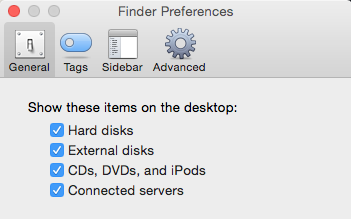
scaredpoet macrumors 604 Jul 26, 2014 #5 Might want to check Finder preferences and make sure that "connected servers" are enabled to show on the desktop.
Might want to check Finder preferences and make sure that "connected servers" are enabled to show on the desktop.
Porsupah macrumors regular Jul 26, 2014 #7 You'll be able to cmd-K to connect to the server(s) explicitly, even if it doesn't admit to seeing them in the Finder sidebar. eg afp://my-airport/ or smb://linuxbox/ This seems an erratic bug - restarting usually fixes it.
You'll be able to cmd-K to connect to the server(s) explicitly, even if it doesn't admit to seeing them in the Finder sidebar. eg afp://my-airport/ or smb://linuxbox/ This seems an erratic bug - restarting usually fixes it.
W willydimes macrumors regular Jul 26, 2014 #8 Ive had this issue with my TC but if I open finder and wait a bit it usually comes back up, however it is a PITA when I try to find a file but the thing never loads
Ive had this issue with my TC but if I open finder and wait a bit it usually comes back up, however it is a PITA when I try to find a file but the thing never loads
lwilliams macrumors 6502 Original poster Jul 27, 2014 #9 Porsupah said: You'll be able to cmd-K to connect to the server(s) explicitly, even if it doesn't admit to seeing them in the Finder sidebar. eg afp://my-airport/ or smb://linuxbox/ This seems an erratic bug - restarting usually fixes it. Click to expand... Thanks!!!! The CMD-K worked. Restarting does not......at least not in the 2 times I tried.
Porsupah said: You'll be able to cmd-K to connect to the server(s) explicitly, even if it doesn't admit to seeing them in the Finder sidebar. eg afp://my-airport/ or smb://linuxbox/ This seems an erratic bug - restarting usually fixes it. Click to expand... Thanks!!!! The CMD-K worked. Restarting does not......at least not in the 2 times I tried.
laurihoefs macrumors 6502a Jul 27, 2014 #10 I've had this happen a couple of times, force quitting Finder has fixed it.
B bobbydaz macrumors regular Jul 27, 2014 #11 Same happend to me. I can see all the macs but all PC servers are not visible.